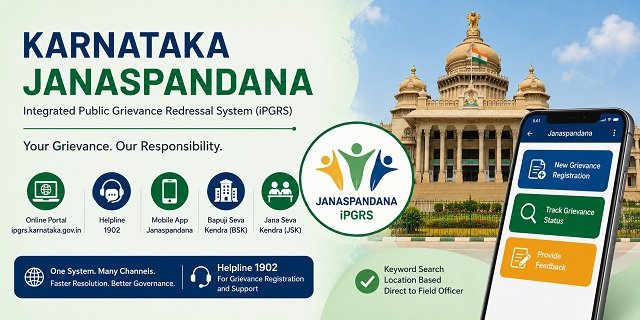
The Government of Karnataka runs its public grievance system through Janaspandana, officially called the Integrated Public Grievance Redressal System (iPGRS). The portal is at ipgrs.karnataka.gov.in, and the helpline number is 1902. The system was launched on 1 November 2021 – Kannada Rajyotsava Day – by the Centre for e-Governance under the Department of Personnel and Administrative Reforms (e-Governance), Government of Karnataka.
Janaspandana is described as a one-stop, multi-model, paperless, and data-driven platform that covers grievances across more than 40 departments with over 3,000 grievance types mapped. It is backed by the Karnataka Guarantee of Services to Citizens Act (SAKALA) 2011, which gives every Karnataka resident a legal right to government services within defined timelines. Citizens can file complaints through the web portal, the mobile app, by calling 1902, by visiting a Bapuji Seva Kendra (BSK), or through a Jana Seva Kendra (JSK).
A feature unique to Janaspandana is the keyword-based grievance search that routes your complaint directly to the Last Mile Functionary (L1) of the relevant department at the location you specify – the field officer closest to your area and issue. No other state CM helpline in this series has this direct routing to field officers based on a keyword and location combination.
Read our CM Helpline India Guide to get complete details about all the States CM Helpline Process. For ration card services in Karnataka, read our Karnataka Ration Card Guide.
The SAKALA Act and Your Rights
The Karnataka Guarantee of Services to Citizens Act (SAKALA) 2011 underpins the iPGRS. Under SAKALA, every Karnataka citizen has a legal right to receive notified government services within a specified period from state departments, Public Authorities, and Local Bodies. If a service is delayed or denied, you have the right to appeal to the Appellate Authority of the concerned department. Janaspandana-iPGRS is the primary mechanism through which SAKALA rights are enforced. SAKALA integrated services are accessible through the Seva Sindhu portal at sevasindhu.karnataka.gov.in.
What You Can Complain About
Janaspandana accepts grievances against any department, scheme, or service of the Government of Karnataka, including local bodies. Common complaint categories include:
- Ration Card issues – Ahara portal application delays, FPS not distributing food grains, Annabhagya DBT not credited, card correction pending
- Revenue department issues – land mutation, RTC (Record of Rights, Tenancy and Crops), land records, encroachment
- Karnataka State Police complaints
- Electricity complaints against BESCOM, HESCOM, MESCOM, GESCOM, or CESC
- Water supply complaints against local bodies
- Municipal corporation, Nagar Panchayat, or Gram Panchayat service failures
- Social security pension schemes not credited
- State government hospital and medicine complaints
- BBMP services in Bengaluru – building plan approval, property tax
- RERA-related project delays or developer complaints
- Karnataka Udyoga Mitra employment scheme issues
- State housing and RGRHCL (Rajiv Gandhi Rural Housing Corporation) complaints
- A government officer is not responding or demanding a bribe
What to Keep Ready Before Filing
- Mobile number for one-time OTP-based registration
- Your complete address, including district, taluk, and village or ward
- Location where the grievance occurred (this is used for routing to the correct L1 officer)
- Department name or keywords describing the issue
- Any previous application or reference number
- Supporting documents or photographs, if available
- A clear description of the issue, including dates and officer names if known
Filing a Complaint Online on the iPGRS Portal
Step 1: Visit at ipgrs.karnataka.gov.in, click on “Login as Citizen” and log in using your registered mobile number and OTP.
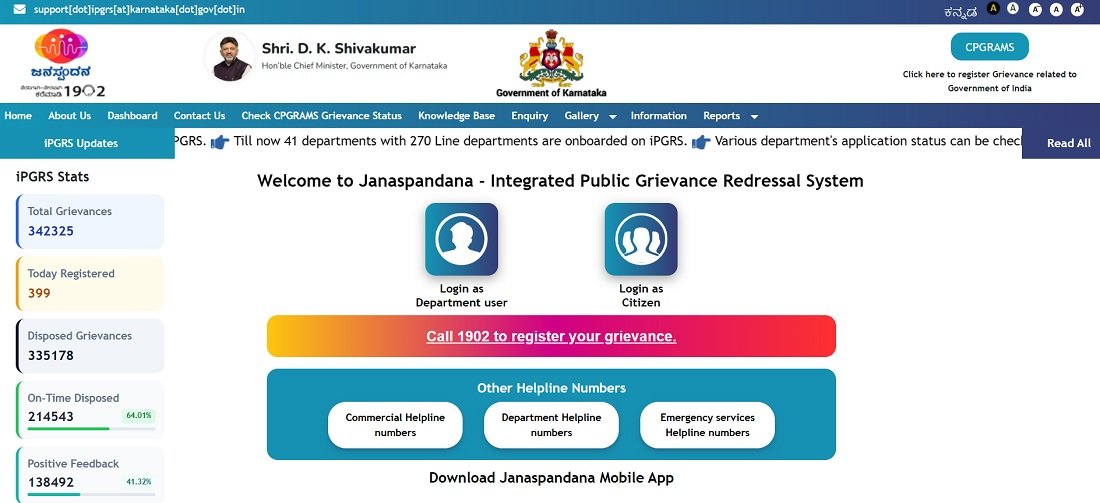
Step 2: Click “Grievance Submission” on your citizen dashboard. A disclaimer page appears asking you to confirm the authenticity of your grievance. Tick the agreement checkbox and click “Submit” to proceed.
Step 3: The grievance form opens. In the grievance search box, type keywords that describe your issue – for example, “ration card”, “pension not paid”, “road repair”, or “water supply”. The system displays a list of mapped grievance types matching your keywords. Select the most appropriate one. This keyword-based selection is critical as it routes the complaint directly to the correct Last Mile Functionary (L1) in your area.
Step 4: Select the location of the grievance – either your current registered address or a different address where the issue is occurring. This location determines which field officer receives your complaint.
Step 5: Fill in the complete grievance details in the text box. Describe what happened, since when, which officer or office is responsible, and what resolution you expect. Upload supporting documents or photographs if available.
Step 6: Tick the agreement checkbox confirming the accuracy of the information. Click “Register” to submit.
Step 7: A unique Grievance ID is generated automatically and sent by SMS to your registered mobile number. Note this ID for tracking, escalation, and all future references. You can file multiple grievances from the same login – each gets a separate Grievance ID.
Filing by Phone on 1902
Call 1902 (toll-free) to register your complaint by phone. When your call is answered:
- Provide your name, mobile number, and address with the district and taluk
- Describe the issue clearly, including the department or service involved
- Mention the location where the problem is occurring
- The call centre agent searches the keyword-mapped grievance type and registers the complaint
- A Grievance ID is provided to you during the call and sent by SMS to your mobile
For contact support queries – not grievance registration – call 080-2234-0369.
Filing via the Janaspandana App
The official Android app is Janaspandana, developed by the Centre for e-Governance, Government of Karnataka.
- Android: Download on Google Play
Step 1: Download and install the Janaspandana app from Google Play.
Step 2: Open the app and complete the one-time citizen registration if you are a new user. Enter your mobile number, verify it through OTP, and create your account.
Step 3: After registration, log in using your registered mobile number and password.
Step 4: Tap the three-dot menu in the top-right corner and select “New Grievance Registration”.
Step 5: Enter the grievance details. Search and select the appropriate grievance category using keywords, choose the location where the issue occurred, and provide a clear description of the problem.
Step 6: Upload supporting documents or photographs if available.
Step 7: Review the information and tap “Register” to submit the grievance.
Step 8: A unique Grievance ID is generated after successful submission. Save this number carefully as it is required for tracking, feedback, and future follow-up.
The app also allows citizens to track grievance status, view Action Taken Reports (ATRs), and provide feedback after resolution.
Filing at a Bapuji Seva Kendra (BSK)
Bapuji Seva Kendras are Karnataka’s gram panchayat-level citizen service centres set up across all gram panchayats in the state by the Rural Development and Panchayat Raj (RDPR) department. BSKs accept iPGRS grievances on behalf of citizens who cannot or prefer not to use the online portal or app.
Step 1: Visit your nearest Bapuji Seva Kendra. BSKs are located in Gram Panchayat offices across Karnataka.
Step 2: Tell the BSK operator about your issue. The operator logs in to the iPGRS system through the BSK interface and registers the complaint on your behalf using the same keyword-search and location selection process.
Step 3: Collect the acknowledgement with your Grievance ID. Track the complaint online at ipgrs.karnataka.gov.in or by calling 1902.
You can also visit a Jana Seva Kendra (JSK) or the Chief Minister’s Office (CMO) to file a grievance. For assisted filing through CSCs, find your nearest one at locator.csccloud.in.
Tracking Your Complaint
Via the Portal:
Step 1: Log in at ipgrs.karnataka.gov.in with your mobile OTP.
Step 2: Go to the grievance tracking section on your dashboard. All complaints filed from your account are listed with their current status.
Step 3: Click on any Grievance ID to see the detailed action trail – which L1, L2, or L3 officer it is with, what Action Taken Report (ATR) the officer submitted, and the current resolution status.
Via SMS (ATR link):
When the assigned L1 officer submits an Action Taken Report (ATR), the system automatically sends an SMS to your registered mobile number with a link to view the ATR. Click the link to see exactly what action the officer has taken on your complaint.
By Grievance ID or Mobile Number:
Go to ipgrs.karnataka.gov.in and use the public tracking option. Enter your Grievance ID or registered mobile number to check the current status without logging in.
What is an ATR and Why It Matters
ATR stands for Action Taken Report. When your grievance reaches the L1 (Last Mile Functionary) officer, they are mandatorily required to submit an ATR explaining what action they took to resolve your complaint. The ATR is sent to you as an SMS link. You can read exactly what the officer did – whether they visited the site, spoke to officials, or took corrective action. This mandatory ATR submission is what makes Janaspandana more accountable than most state grievance systems. An officer cannot simply mark a complaint as resolved without documenting their action.
Providing Feedback and Escalating if Unsatisfied
After your complaint is marked as resolved, the call centre makes an outbound call to your registered mobile number to collect feedback on the quality of resolution. Based on your response:
If satisfied: The complaint is closed.
If unsatisfied (First Escalation): The complaint is reopened and escalated to the L2 officer (the senior officer above the L1 functionary in the same department). The L2 officer reviews the case and submits a fresh ATR.
If still unsatisfied (Second Escalation): The complaint is escalated again to the L3 officer (higher authority). Karnataka allows two escalation levels before the complaint reaches the highest departmental authority.
You can also raise dissatisfaction directly through the portal or the app after receiving the ATR SMS link, without waiting for the outbound call.
Citizen Representation for Court-Related Matters
Janaspandana has a dedicated Citizen Representation module for a specific situation: when a court has issued an order requiring a government officer to take action, and the citizen wants to formally bring it to the officer’s attention. File a Citizen Representation on the portal by selecting the relevant government officer and uploading the court order. A unique Representation ID is generated. The officer must file an ATR for every representation. This module handles court compliance cases separately from general grievances.
Integration with Other Karnataka Government Systems
Janaspandana is directly integrated with multiple Karnataka government platforms, which means officials reviewing your complaint can access contextual information from related systems without you needing to submit it separately:
- Seva Sindhu: Service delivery and SAKALA applications
- SAKALA: Service delivery guarantee tracking
- Karnataka Udyoga Mitra: Employment scheme data
- Mojini: Land records system
- Suvidha: Government services portal
- Social Security Pensions: Pension disbursement data
- RGRHCL: Rajiv Gandhi Rural Housing Corporation data
- E-mapana: Map and land data
- BBMP (Building Plan Approval, Property Tax): Bengaluru urban services
- RERA: Real estate project details
CPGRAMS Integration
Janaspandana-iPGRS is integrated with the central government’s CPGRAMS portal. Citizens can visit pgportal.gov.in, select Karnataka State, and file complaints directly into the iPGRS system. Central grievances related to Karnataka state departments are also routed from CPGRAMS to iPGRS for resolution. For complaints against central government departments – Railways, Income Tax, Passport, EPFO – file directly on CPGRAMS.
Live Dashboard and Review Committees
The performance of the entire iPGRS system is publicly visible at ipgrs.karnataka.gov.in/Home/Statistics. This dashboard shows district-wise and department-wise grievance counts, resolution rates, and pending timelines. The quality of grievance resolution is reviewed periodically by two committees: the State Level Review Committee, headed by the Chief Secretary and the District Level Review Committee, headed by the District Commissioner of each district.
Quick Reference
- iPGRS Portal: ipgrs.karnataka.gov.in
- About Us and Contact: ipgrs.karnataka.gov.in/Home/About
- Live Dashboard: ipgrs.karnataka.gov.in/Home/Statistics
- Janaspandana Android App: Download on Google Play
- Seva Sindhu (SAKALA services): sevasindhu.karnataka.gov.in
- CPGRAMS (for central complaints, select Karnataka): pgportal.gov.in
- Helpline: 1902
- Contact Support: 080-2234-0369
- Programme Director email: pdpgrs@karnataka.gov.in
- CM email: cm@karnataka.gov.in
- Office: Centre for e-Governance, “Shantigruha”, No. 39, Palace Road, Next to Maharani’s Science College, Bengaluru 560001
- CSC Locator: locator.csccloud.in
Frequently Asked Questions
Q. What is Janaspandana iPGRS and when was it launched?
Ans. Janaspandana is the Integrated Public Grievance Redressal System (iPGRS) of the Government of Karnataka. It was launched on 1 November 2021 – Kannada Rajyotsava Day – by the Centre for e-Governance under DPAR (e-Governance). It is a paperless, data-driven, multi-model platform covering 40+ departments and 3,000+ grievance types. It operates at ipgrs.karnataka.gov.in and through helpline 1902, the Janaspandana Android app, and Bapuji Seva Kendras across Karnataka.
Q. What is keyword-based grievance search and why should I use it correctly?
Ans. When filing a complaint on Janaspandana, you type keywords describing your issue – such as “ration card” or “pension not paid” – and the system shows mapped grievance types. Selecting the correct type routes your complaint directly to the Last Mile Functionary (L1), the field officer closest to your location who handles that specific issue. If you select the wrong grievance type, the complaint goes to the wrong officer and gets delayed. Take a moment to select the most accurate keyword match before proceeding.
Q. What is an ATR and what should I do when I receive the SMS link?
Ans. ATR stands for Action Taken Report. After the L1 officer resolves your grievance, they must mandatorily submit an ATR explaining what action they took. The system sends you an SMS with a link to view this ATR. Open the link and read the ATR carefully. If the action described is insufficient or factually incorrect, respond with dissatisfaction during the outbound feedback call or through the portal to trigger the first escalation.
Q. Do I need to register every time I file a complaint?
Ans. No. Janaspandana uses one-time OTP-based registration. Register once with your mobile number and basic details. After that, log in each time with OTP and file as many grievances as needed across different departments. All complaints are accessible from your dashboard under a single login.
Q. Can I file a complaint against the Bengaluru police or traffic police?
Ans. Yes. Janaspandana covers the Karnataka State Police, which includes city police, traffic police, and district police. Select Police from the department dropdown and use keywords specific to your complaint. For emergency situations, call 100 directly.
Q. What is the Bapuji Seva Kendra and how do I find my nearest one?
Ans. Bapuji Seva Kendra (BSK) is Karnataka’s gram panchayat-level citizen service centre, launched by the RDPR department on 1 July 2016. BSKs are present across all gram panchayats in Karnataka and accept iPGRS complaints on behalf of citizens. Visit your nearest gram panchayat office and ask for BSK services. The BSK operator files the complaint in the iPGRS system on your behalf and provides you a Grievance ID.
Q. How many times can I escalate if my complaint is not resolved?
Ans. Karnataka’s iPGRS allows two levels of escalation beyond the initial L1 officer. If unsatisfied with the L1 resolution, the complaint escalates to L2. If still unsatisfied, it escalates to L3. Each level has a defined timeline. The quality of resolution at all levels is reviewed by the District Level Committee, headed by the District Commissioner and the State Level Committee, headed by the Chief Secretary.
Q. What is the Citizen Representation module?
Ans. Citizen Representation is a dedicated module for cases where a court has issued an order requiring a specific government officer to take action but the action has not been taken. File a representation on ipgrs.karnataka.gov.in by selecting the relevant officer and uploading the court order. A Representation ID is generated and the officer must file an ATR. This is separate from general grievances and specifically handles court order compliance.
Q. Can I use CPGRAMS to file a complaint that reaches Karnataka iPGRS?
Ans. Yes. Janaspandana is integrated with CPGRAMS. If you file a complaint on pgportal.gov.in and select Karnataka state, it is routed directly into the iPGRS system. The resolution information is also sent back to CPGRAMS. Use this route if you want central oversight on your Karnataka state grievance.
Q. Where can I see the overall performance of Janaspandana?
Ans. The live public dashboard at ipgrs.karnataka.gov.in/Home/Statistics shows real-time grievance counts, resolution rates, and pending cases by department and district. This transparency lets you see whether your department or district has a strong resolution record before you file.
Q. What is the contact for the iPGRS Programme Director?
Ans. The Programme Director of iPGRS, SSP is Smt. G. Rashmi, KAS. Email: pdpgrs@karnataka.gov.in. The office is at the Centre for e-Governance, “Shantigruha”, No. 39, Palace Road, Next to Maharani’s Science College, Bengaluru 560001. For contact support (not complaint registration), call 080-2234-0369.

Tabassum is a government document researcher and writer with over 5 years of experience exclusively dedicated to tracking and simplifying Central and State Government document processes across India. She has researched and published detailed guides on 100+ government documents and certificates – including Aadhaar Card, PAN Card, Ration Card, Domicile Certificate, and Birth Certificate – covering all states and the Central Government, helping lakhs of Indian citizens successfully complete their paperwork in simple, easy-to-understand language.