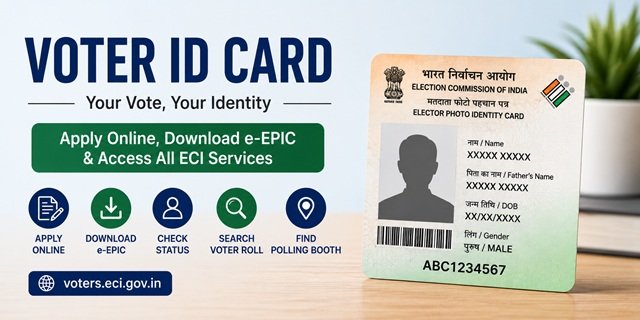
The Voter ID card, officially called the Elector’s Photo Identity Card (EPIC), is issued by the Election Commission of India to every registered voter. It serves as proof of voter registration and is also widely accepted as photo identity proof across government and private institutions. All voter registration and EPIC-related services are available at the National Voters’ Service Portal at voters.eci.gov.in.
Who Can Register as a Voter
Every Indian citizen who has completed 18 years of age on the qualifying date, which is the first day of January of the year in which the electoral roll is revised, can register as a voter. The applicant must be ordinarily resident at the address where they wish to register. A person can be registered in the electoral roll of only one constituency at a time.
Overseas Indian citizens who hold an Indian passport and have not acquired citizenship of another country can register as overseas electors. However, overseas electors are not issued an EPIC. They vote in person at the polling station in their last registered constituency in India by showing their original passport.
Forms You Need to Know
The Election Commission uses specific forms for every type of voter service. Form 6 is the application for a new voter to get their name included in the electoral roll. Form 6A is for overseas Indian electors to register from abroad. Form 6B is used to voluntarily submit your Aadhaar Card number for electoral roll authentication. Form 8 covers corrections to existing voter details including name spelling, photo, age, address within the same constituency, and shift of address to a new constituency.
All these forms are available online at voters.eci.gov.in and can be submitted digitally without visiting any office.
New Voter Registration
First-time applicants use Form 6 to register. You can submit it online through the Voters’ Service Portal, through the Voter Helpline mobile app, or offline by submitting the physical form to your Booth Level Officer (BLO) or Electoral Registration Officer (ERO). You need to attach a photograph, proof of age, and proof of ordinary residence at the address where you are registering.
After submission, the BLO may visit your address for field verification before your name is included in the electoral roll. Once included, the EPIC is dispatched to your registered address by speed post, free of charge.
Voter Registration for Overseas Indians
Indian citizens living abroad who have not acquired citizenship of any other country can register as overseas electors using Form 6A. This form requires details from your Indian passport and your address in the constituency in India where you last resided. Overseas electors do not receive an EPIC and must appear in person at the designated polling station in India to vote, carrying their original passport as identification.
Linking Aadhaar with Your Voter ID
The Election Commission allows voters to voluntarily link their Aadhaar number with their voter registration using Form 6B. This helps the Commission clean up duplicate entries in the electoral roll and ensure accuracy. Submission of Aadhaar for this purpose is voluntary, and no voter registration is denied or cancelled for not submitting Form 6B. Submit it online through voters.eci.gov.in or offline at your nearest electoral office.
Correction and Address Change in Voter ID
If any detail in your EPIC or voter registration is incorrect, or if you have moved to a new address, use Form 8. This single form handles name corrections, photo corrections, age corrections, address updates within the same constituency, and transposition requests when you shift to a different constituency. Submit it online at voters.eci.gov.in or at your ERO’s office with supporting documents.
How to Track Your Application Status
After submitting any form online, use the reference number generated at the time of submission to track your application. Visit voters.eci.gov.in and go to the Track Application Status section. Enter your reference number to see the current stage of processing, whether it is pending field verification, approved, or dispatched.
How to Download e-EPIC
e-EPIC is the digital version of your Voter ID card in PDF format. It carries the same validity as the physical EPIC. You can download it from voters.eci.gov.in by navigating to the Download e-EPIC option. Verification is done via OTP sent to your registered mobile number. New registrations become eligible for e-EPIC download after the application is processed and the EPIC is generated.
Search Your Name in the Electoral Roll
Checking whether your name appears in the voter list before an election is essential. Visit electoralsearch.eci.gov.in to search by your EPIC number, by name along with your state and district, or by the barcode on your voter ID card. The search result shows your name, EPIC number, serial number in the roll, your polling station, and your constituency details.
Find Your Polling Station
Every registered voter is assigned to a specific polling station based on their address. To find your polling station, visit electoralsearch.eci.gov.in and search your name. Your polling station details, including its name and address, appear alongside your voter information. On election day, you must vote at your assigned polling station only.
Voter Helpline and Grievance Redressal
The national voter helpline number is 1950, available toll-free across all states. Call it for queries about voter registration, EPIC status, electoral roll corrections, or polling day assistance. The helpline also accepts complaints and forwards them to the concerned electoral officer.
For formal complaints and grievances, use the National Grievance Services Portal at ngsp.eci.gov.in. You can file complaints about electoral roll errors, non-receipt of EPIC, or election-related issues. Track the status of your complaint on the same portal using your complaint number. Grievances can also be submitted through voters.eci.gov.in under the Grievance section.
Quick Reference Links
- Voters’ Service Portal (All Forms and Services): voters.eci.gov.in
- Electoral Roll Search: electoralsearch.eci.gov.in
- National Grievance Services Portal: ngsp.eci.gov.in
- Election Commission of India: eci.gov.in
Frequently Asked Questions
What is the minimum age to apply for a Voter ID card?
You must be 18 years of age on the qualifying date, which is the 1st of January of the year the electoral roll is being revised. If you turn 18 after that date but before the next revision, you must wait for the next enrollment cycle. Apply through Form 6 at voters.eci.gov.in.
Can I apply for a Voter ID online without visiting any office?
Yes. Form 6 for new registration, Form 6B for Aadhaar linking, and Form 8 for corrections can all be submitted online at voters.eci.gov.in. After online submission, the Booth Level Officer may visit your address for field verification. You do not need to personally visit the electoral office in most cases.
How long does it take to get a Voter ID card after registration?
Processing time varies by state and the period of enrollment. After your name is included in the electoral roll following field verification and approval, the EPIC is dispatched by speed post to your registered address. You can also download the e-EPIC immediately once your EPIC is generated, without waiting for the physical card.
What documents do I need to register as a new voter?
You need a recent passport-size photograph, proof of age (birth certificate, class 10 marksheet, passport, or any other accepted age proof), and proof of ordinary residence at the address where you are registering (utility bill, bank passbook, ration card, or similar document). The complete list of accepted documents is available on the voters.eci.gov.in portal.
My name is misspelt in my Voter ID. How do I correct it?
Submit Form 8 online at voters.eci.gov.in with supporting documents showing the correct spelling, such as your Aadhaar Card, PAN Card, or school certificate. The ERO processes the correction after verification. After approval, a fresh EPIC with the corrected name is issued and dispatched to your address.
I have moved to a new city. Do I need a new Voter ID card?
Your existing EPIC number remains valid, but you must update your address in the electoral roll. If you have shifted within the same constituency, use Form 8 for an address update. If you have moved to a different constituency, submit Form 8 at the ERO of your new constituency for transposition of your registration. A new EPIC reflecting the updated details is issued after processing.
Can I download my Voter ID card on my phone?
Yes. The e-EPIC is a digitally signed PDF that you can download to your phone from voters.eci.gov.in. Log in or verify with your registered mobile OTP, and download it from the e-EPIC Download section. The digital version is valid for voting and as identity proof.
What is the difference between the electoral roll and the Voter ID card?
The electoral roll is the official list of all registered voters in a constituency, maintained by the Election Commission. It includes your name, address, voter registration number, and part number. The Voter ID card (EPIC) is the physical or digital card issued to you as proof of your entry in that roll. Being in the electoral roll is what gives you the right to vote, not merely possessing the EPIC card.
How do I check if my Voter ID is still valid and active?
Search your name on the electoral roll at electoralsearch.eci.gov.in using your EPIC number or name and address. If your entry appears in the search results, your voter registration is active. If your name is not found, you may need to re-register by submitting a fresh Form 6.
Can an NRI or overseas Indian get a Voter ID card?
Indian citizens living abroad who have not acquired citizenship of any other country can register as overseas electors using Form 6A. However, they are not issued an EPIC. Overseas electors must vote in person at the polling station in their registered Indian constituency by showing their original Indian passport on election day.
What is Voter Helpline 1950 and what services does it offer?
1950 is the toll-free national voter helpline number operated by the Election Commission of India. You can call it for information on voter registration, application status, electoral roll queries, EPIC delivery issues, and to register complaints. The helpline is available in multiple regional languages and operates across all states and Union Territories.
How do I link my Aadhaar number with my Voter ID?
Submit Form 6B online at voters.eci.gov.in or offline at your nearest electoral office. This is voluntary and does not affect your voter registration in any way. Linking helps the Election Commission remove duplicate entries from the electoral roll and ensure the list is accurate. No voter faces any disadvantage for not submitting Form 6B.

Tabassum is a government document researcher and writer with over 5 years of experience exclusively dedicated to tracking and simplifying Central and State Government document processes across India. She has researched and published detailed guides on 100+ government documents and certificates – including Aadhaar Card, PAN Card, Ration Card, Domicile Certificate, and Birth Certificate – covering all states and the Central Government, helping lakhs of Indian citizens successfully complete their paperwork in simple, easy-to-understand language.