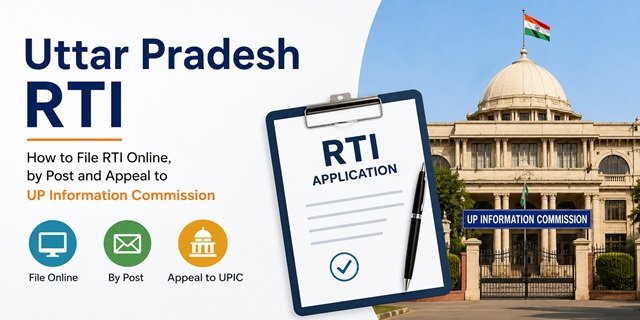
Uttar Pradesh has an official state RTI portal at rtionline.up.gov.in that allows any citizen of India to file RTI applications and First Appeals online against all departments and public authorities of the Government of Uttar Pradesh. The portal supports online payment through Net Banking, Debit Card, Credit Card, and UPI. Hindi is the preferred language for UP RTI filings, though English is also accepted. The governing rules are the Uttar Pradesh Right to Information Rules, 2015, as amended in 2019, available on the UP Information Commission website at upic.gov.in.
RTI applications in Uttar Pradesh must be drafted in Form No. 2 as prescribed in the UP RTI Rules, 2015 and must not exceed 500 words (excluding personal details). For postal applications, send only by Speed Post or Registered Post – courier services are not accepted as valid modes of delivery under the UP RTI framework.
Second appeals and complaints go to the Uttar Pradesh Information Commission (UPIC) at upic.gov.in, RTI Bhawan, Vibhuti Khand, Gomti Nagar, Lucknow 226010. The current Chief State Information Commissioner is Rajkumar Vishwakarma. The Commission was established on 2 March 2006.
For the national RTI guide covering all states and the central government process, read our RTI Online India Guide.
Central vs UP State RTI: Confirm Before Filing
India’s RTI structure is split between central and state authorities. Filing the wrong application on the wrong portal results in rejection without a refund. Before writing a single word, confirm who holds the information you are seeking.
File on rtionline.up.gov.in for information from UP state departments, including:
- Revenue department – khasra, khatauni, mutation (daakhil khaaarij), nakal, bhu-lekh
- UP Police – FIR, chargesheet, action taken reports (DGP, SSP, SP level)
- UP Power Corporation Limited (UPPCL) – electricity billing, meter, new connection
- Jal Nigam, Jal Sansthan – water supply and sewage
- UP PWD, Rural Engineering Services – road construction, bridge, project expenditure
- Basic Shiksha Vibhag – primary school teacher appointments, transfers, salaries
- Secondary Education – state school results, admissions, teacher recruitment
- State pension schemes – Vridhavastha Pension, Widow Pension, Divyang Pension
- MGNREGS – job cards, wages, work orders in UP panchayats
- UP Housing and Development Board (UPHDB) – flat allotments, plot registrations
- Lucknow Development Authority (LDA), Noida Authority, Greater Noida Authority
- Nagarpalika Parishad, Nagar Panchayat – municipal services and expenditure
- State food and civil supplies – ration card, FPS, PDS grain distribution
- UP State Medical and Health Services
- District Magistrate and collectorate offices
Three bodies not covered by the UP state RTI portal:
- Uttar Pradesh Vidhan Sabha and Vidhan Parishad have their own RTI mechanism
- Allahabad High Court and Subordinate Courts have a separate RTI portal linked directly from rtionline.up.gov.in. Click “Click here to file RTI for Allahabad High Court and Subordinate Courts” on the portal homepage. Note that the Allahabad High Court has its own fee structure and RTI process distinct from the standard UP RTI process.
- Central government departments – use rtionline.gov.in
RTI applications filed on rtionline.up.gov.in for these excluded bodies will be returned without a refund of the Rs 10 fee.
RTI Fee in Uttar Pradesh
As prescribed in the Uttar Pradesh Right to Information Rules, 2015:
- Application fee: Rs 10
- Photocopies: Rs 2 per page (A4 or A3 size)
- Information on CD or Floppy: Rs 50 per disc
- Inspection of records: Free for the first hour. Additional time is charged at Rs 5 per 15 minutes (or part thereof).
- First Appeal: No fee
- Second Appeal to UPIC: No fee
BPL Exemption: Citizens with a valid Below Poverty Line (BPL) certificate pay no fee under Section 7(5) of the RTI Act, 2005. Attach a self-attested copy of the BPL certificate with every RTI application. All information, including photocopies, must be supplied free of cost to BPL certificate holders.
Payment Modes in Uttar Pradesh RTI
Online payment (rtionline.up.gov.in):
- Net Banking
- Debit Card
- Credit Card
- UPI
- SBI e-Pay
Offline payment (postal and in-person):
- Demand Draft (DD) or Pay Order – drawn in favour of the PIO of the concerned department
- Banker’s Cheque – in favour of the PIO
- Indian Postal Order (IPO) – in favour of the PIO
- Cash – paid against a proper receipt at the PIO’s office (only for in-person submissions)
Do not send cash by post. Do not send a personal cheque. Only DD, Pay Order, Banker’s Cheque, or IPO are accepted for postal applications.
UP RTI Form No. 2: Understanding the Requirement
Under the UP RTI Rules, 2015, RTI applications in Uttar Pradesh must be made in Form No. 2. This is not a rigid printed form – it is a format requirement. You can write your RTI application on plain paper following the Form 2 structure, or type it out.
Form No. 2 requires you to include:
- Name of the applicant
- Father’s or spouse’s name
- Complete residential address
- Contact number and email address
- Details of fee paid (amount, mode, instrument number if applicable)
- Whether the applicant is BPL (if yes, attach certificate)
- The specific information sought – written in numbered points, not exceeding 500 words total
- Date and signature of the applicant
- Declaration: “I am a citizen of India and am making this application in my personal capacity.”
The Form No. 2 template is available on the UPIC website at upic.gov.in. For online filing, the rtionline.up.gov.in form automatically captures all these fields.
Finding the Correct PIO in Uttar Pradesh
With over 225 districts and thousands of government offices, finding the correct Public Information Officer (PIO) in UP is critical. A misdirected RTI wastes 30 days.
Step 1: Go to rtionline.up.gov.in and click the list of public authorities. All departments and bodies registered on the portal are listed here.
Step 2: Visit the UPIC website at upic.gov.in and click “List of PIOs and FAAs” for a department-wise list of designated PIOs and First Appellate Authorities across UP government departments.
Important for district-level information: The portal specifically states that to file an RTI for a district-level office other than DM (District Magistrate) or SSP (Senior Superintendent of Police), select the Directorate or Commissioner at the office level and then select the concerned district. For the DM’s office and SSP’s office, they have their own PIO designations on the portal.
For land records in specific tehsils: Address to the PIO of the Revenue Department or the concerned tehsil – route through the Collectorate portal or select the Revenue Department Headquarters on rtionline.up.gov.in.
Filing RTI Online at rtionline.up.gov.in: Step-by-Step
Step 1: Go to rtionline.up.gov.in/. Select English or Hindi from the language option. Hindi is preferred for UP state departments and may receive faster processing.
Step 2: Click “Submit Request” from the navigation menu. The guidelines page opens. Read carefully – especially the warnings about Vidhan Sabha, Vidhan Parishad, and High Court not being covered. After reading, click to proceed.
Step 3: The RTI request form (Form No. 2 equivalent) opens. Fill in all mandatory fields:
- Select the Public Authority from the dropdown (all UP government departments listed)
- Enter your Name, Father’s/Spouse’s Name, and complete Address
- Enter your Mobile Number and Email ID
- Indicate if you are a BPL applicant (upload BPL certificate if yes)
Step 4: Write your RTI application in the text area. The portal enforces a 500-word limit (excluding personal details). Write in Hindi or English. Frame your questions in specific, numbered points. Avoid “why” and opinion-seeking questions – ask for documents, data, records, or certified copies. If 500 words are insufficient, write the key questions in the box and upload a PDF of the complete application in the supporting document field.
Step 5: For non-BPL applicants, click “Make Payment”. Pay Rs 10 through Net Banking, Debit Card, Credit Card, UPI, or SBI e-Pay. The portal processes the payment and returns a confirmation.
Step 6: After successful payment, submit the application. A unique Registration Number is generated and sent by email and SMS to your registered contacts. This number is essential for tracking, filing the First Appeal, and all follow-ups. Save it immediately.
Step 7: Track your application at any time by clicking “View Status” on rtionline.up.gov.in and entering your Registration Number.
If the public authority is not listed on the portal, Email onlinertihelpline.up@gov.in to report the missing authority. You will need to file by post in the interim.
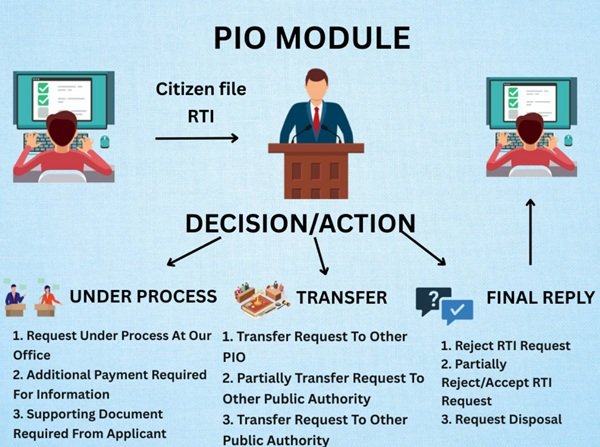
Filing RTI by Post: Step-by-Step
Step 1: Write your RTI application in Form No. 2 format on plain paper (A4). Address it to:
“To,
The Public Information Officer (PIO),
O/o [Name and designation of the department/office],
[Complete postal address],
[District], Uttar Pradesh – [PIN Code]”
Step 2: Write the opening line: “Under the Right to Information Act, 2005 (Section 6(1)), I request the following information:”
Step 3: List your questions in numbered points within 500 words. Write in Hindi or English. Be precise and document-specific. Examples of effective questions for common UP situations:
- “Please provide a certified copy of the sanctioned estimate, work order, and completion certificate for the construction of [road name] in [village/ward] under [block/tehsil], District [name], sanctioned during the financial year 2024-2025.”
Step 4: End with: “I declare that I am a citizen of India and am making this application in my personal capacity.”
Step 5: Sign the application, add the date and your town/city name.
Step 6: Attach the Rs 10 fee – DD, Pay Order, Banker’s Cheque, or IPO drawn in favour of the PIO of the concerned department. BPL applicants attach the BPL certificate copy instead.
Step 7: Keep a photocopy or scan of the complete application with the fee instrument.
Step 8: Send by Speed Post with Acknowledgement Due (AD) only. Do not use courier services – they are not accepted as valid delivery modes under the UP RTI framework. Keep the Speed Post receipt and the returned AD card. The date on the AD card is the SPIO’s receipt date – the start of the 30-day clock.
Filing RTI In Person at the PIO’s Office
Step 1: Carry the written application in Form No. 2 format in two copies, along with Rs 10 in cash and photocopies of any supporting documents you want to reference.
Step 2: Visit the PIO’s or Assistant PIO’s office during working hours. Submit the application and pay Rs 10 in cash. Request a proper receipt for the cash payment and a date-stamped acknowledgement on your copy.
Step 3: Collect the signed and stamped acknowledgement. This document confirms the date of filing and is your primary evidence if the PIO later claims they did not receive the application.
APIO Route: You can also submit the application to any Assistant Public Information Officer (APIO) of any government office in UP. The APIO must forward it to the correct PIO within 5 days. The 30-day timeline for the SPIO starts from the date they receive the forwarded application from the APIO.
Filing First Appeal Online at rtionline.up.gov.in
The UP RTI portal supports First Appeal filing online alongside RTI applications.
Step 1: Go to rtionline.up.gov.in and click “Submit First Appeal”.
Step 2: Enter the original RTI Registration Number and your email ID. The system retrieves the RTI details automatically.
Step 3: State the grounds for the appeal – that the PIO did not reply within 30 days, or that the reply was incorrect, incomplete, or unsatisfactory. Attach any supporting documents if needed. No fee is required.
Step 4: Submit. A First Appeal Registration Number is generated. Track its status under View Status on the portal.
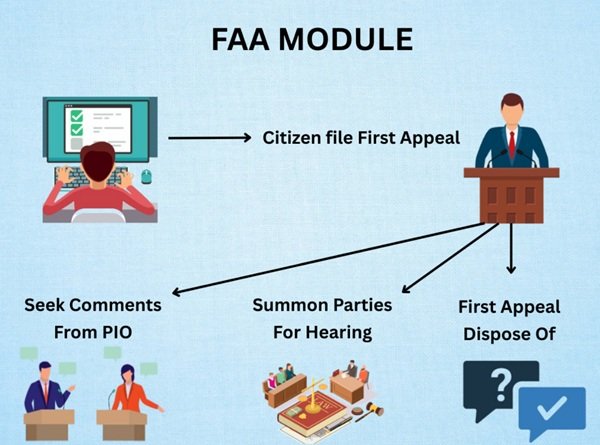
RTI Response Timeline in Uttar Pradesh
- 30 days: Standard timeline for the PIO to provide information or reject with written reasons, from the date of receipt of the application.
- 48 hours: For information that directly relates to the life or physical safety of a person, the PIO must respond within 48 hours of receipt.
- 35 days: If the PIO needs to consult a third party holding the information before providing it (under Section 11 of the RTI Act), the timeline extends to 35 days.
- Transfer in 5 days: Under Section 6(3), if the information is held by a different public authority, the PIO must transfer the application within 5 days. The 30-day clock then starts from the receiving PIO’s receipt date.
- Additional fee: If the information requires an additional fee (for copies or a CD), the PIO sends an intimation. The time between sending this intimation and receipt of additional payment is excluded from the 30 days. Online filers see this in View Status and can pay the additional fee through the portal.
DPDP Rules 2025 and Their Impact on UP RTI
The Digital Personal Data Protection Rules, 2025 (notified on 14 November 2025) amended Section 8(1)(j) of the RTI Act, 2005. Under the amended provision, the public interest override for personal information disclosure is now governed by Section 8(2) of the RTI Act rather than the earlier sub-clause. This means: if you are filing an RTI seeking personal information about a third party (such as employee records, salary details of a named individual, or personal documents of another person), the PIO now applies a stricter public interest test under Section 8(2) before disclosing that information. For UP RTI filers seeking personal information about government employees – transfers, salary, disciplinary records – you should state the specific public interest in disclosure clearly in your application to help the PIO assess your request correctly under the revised framework.
First Appeal Under Section 19(1)
File a First Appeal to the First Appellate Authority (FAA) – a senior officer in the same department as the PIO – when:
- The PIO does not reply within 30 days (or 48 hours for life/liberty matters)
- The PIO’s reply is incomplete, incorrect, misleading, or unsatisfactory
- The PIO charges an incorrect fee
- The PIO refuses to accept your application
Timeline: File within 30 days of the 30-day deadline passing or within 30 days of receiving the unsatisfactory reply. The FAA can condone a delay with sufficient cause.
FAA Response time: The FAA must decide within 30 days, extendable to 45 days, with written reasons communicated to you.
Online First Appeal: File at rtionline.up.gov.in using “Submit First Appeal” with your original Registration Number. No fee.
Offline First Appeal: Write to the FAA of the same department. Include the original application, the PIO’s reply or proof of non-reply, and specific grounds for appeal. Send by Speed Post AD. The FAA’s designation is listed on the UPIC PIO/FAA list at upic.gov.in.
Second Appeal to the Uttar Pradesh Information Commission
If the FAA does not respond within the prescribed time limit, or if you are dissatisfied with the First Appeal decision, you may file a Second Appeal before the Uttar Pradesh Information Commission (UPIC) within 90 days of the FAA’s decision or the expiry of the response period. The Commission may condone delays beyond 90 days if sufficient cause is shown.
- Step 1: Prepare your Second Appeal and clearly explain what information was denied, why the PIO or FAA decision was incorrect, and what relief you are seeking from the Commission.
- Step 2: Attach the following supporting documents:
- Copy of the original RTI application with fee payment proof (Speed Post receipt, AD card, or online payment receipt)
- Copy of the PIO’s reply, if received
- Declaration or affidavit if no reply was received from the PIO
- Copy of the First Appeal filed before the FAA with proof of submission
- Copy of the FAA’s order, if received
- Declaration or affidavit if no reply was received from the FAA
- Your name, complete address, mobile number, and email ID
- Step 3: Send the complete appeal by Speed Post with Acknowledgement Due (AD) to the Commission at the address below.
Address for Second Appeal:
The Secretary (Registry)
Uttar Pradesh Information Commission
7/7A, RTI Bhawan, Vibhuti Khand, Gomti Nagar
Lucknow, Uttar Pradesh – 226010
No fee is payable for filing a Second Appeal or complaint before the Uttar Pradesh Information Commission.
UP Information Commission (UPIC) Contact Details
| Particular | Details |
|---|---|
| Website | upic.gov.in |
| Chief State Information Commissioner | Rajkumar Vishwakarma |
| Information Commissioners | Smt. Rachna Pal, Shri Subhash Chandra Singh |
| Address | 7/7A, RTI Bhawan, Vibhuti Khand, Gomti Nagar, Lucknow – 226010 |
| UP RTI Rules | View RTI Rules |
| PIO & FAA Directory | Available on UPIC Portal |
Complaint Under Section 18
You can file a direct complaint before the UPIC (rather than a Second Appeal) in specific situations where the PIO has acted improperly:
- PIO refused to accept your RTI application
- PIO demanded a higher fee than prescribed in the UP RTI Rules, 2015
- PIO deliberately provided incorrect, incomplete, or misleading information
- PIO destroyed information before processing your application
- PIO obstructed access to information in any way not covered by Sections 8 or 9
Address the Section 18 complaint to the Secretary (Registry), UPIC, at the Lucknow address above. State specific facts, attach evidence, and request an enquiry. No fee is required.
Penalty Under Section 20
When the UPIC finds an RTI default, it can impose a penalty of Rs 250 per day of delay, subject to a maximum of Rs 25,000, on the PIO personally. The UPIC’s website upic.gov.in publishes details of penalty recovery proceedings, including its letter to the Chief Secretary of UP for the enforcement of penalties where PIOs have not complied with penalty orders.
Tips Specific to UP RTI Filings
- Hindi gives faster response in rural offices: District-level offices in Purvanchal (eastern UP), Bundelkhand, and Poorvanchal regions process Hindi applications faster than English. Use Hindi for tehsil, block, and panchayat-level RTIs.
- Do not name individuals as the information subject: For RTIs about government employees – such as a teacher’s appointment or a PIO’s assets – frame the question around the position, not the person’s name. “Please provide the appointment order and qualification certificates on record for the person appointed as Head Master of [school name] as on [date]” is better than asking in the individual’s name.
- Bhu-Lekh and revenue records: For information about khasra and khatauni records, note that much of the UP land records data is available on bhulelh.up.gov.in as a public disclosure under Section 4(1)(b). Try that first before filing an RTI – it saves 30 days.
- Avoid courier entirely: UP RTI explicitly does not accept courier-delivered applications. Use Speed Post AD or Registered Post AD only.
- Allahabad HC RTI is a separate process: If you need information from any court – Allahabad High Court at Prayagraj, Lucknow Bench, or any subordinate court – use the dedicated link on the rtionline.up.gov.in homepage (“Click here to file RTI for Allahabad High Court and Subordinate Courts”). The fee structure and response process are different from the standard UP RTI process.
Quick Reference
| UP RTI Portal | rtionline.up.gov.in |
| Submit RTI Request | Apply Online |
| Submit First Appeal | File First Appeal |
| View Status | Track Application |
| UP RTI Rules | RTI Rules 2015 & 2019 Amendment |
| PIO & FAA List | View on UPIC Website |
| Portal Helpdesk Email | onlinertihelpline.up@gov.in |
| Allahabad High Court RTI | Available via link on UP RTI Portal homepage |
| UP Information Commission | upic.gov.in |
| UPIC Address | 7/7A, RTI Bhawan, Vibhuti Khand, Gomti Nagar, Lucknow 226010 |
| RTI Fee | Rs 10 (Copies: Rs 2/page, CD: Rs 50) |
| Online Payment Modes | Net Banking, Debit Card, Credit Card, UPI, SBI e-Pay |
| Offline Payment Modes | DD, Pay Order, Banker’s Cheque, IPO, Cash (in person) |
| Application Limit | 500 Words (Form No. 2) |
| Central RTI Portal | rtionline.gov.in |
| UP Government Portal | up.gov.in |
| UP Land Records | bhulekh.up.gov.in |
Frequently Asked Questions
Q. What rules govern RTI filings in Uttar Pradesh?
The Uttar Pradesh Right to Information Rules, 2015 as amended in 2019, govern all RTI applications, fees, and procedures in UP. The rules prescribe Form No. 2 as the required application format, set the fee at Rs 10, specify accepted payment modes, and define the role of PIOs and First Appellate Authorities. Both the Rules and the 2019 Amendment are available for download on the UPIC website at upic.gov.in/StaticPages/RTI_Rules.aspx. The UP RTI Rules 2015 are a significant update over earlier rules and include clearer provisions on information inspection and copy costs.
Q. What is Form No. 2 and must I use a printed form?
Form No. 2 is the prescribed format for RTI applications under the UP RTI Rules, 2015. You do not need to use a printed copy – write or type it on plain paper following the required structure: applicant’s name, father’s or spouse’s name, complete address, contact details, whether BPL, fee details, the specific information sought in numbered points (within 500 words), date, signature, and a declaration of Indian citizenship. The Form No. 2 template is available at upic.gov.in for reference.
Q. Can I send my UP RTI application by courier?
No. UP RTI rules specifically require that postal applications be sent only by Speed Post or Registered Post. Courier services are not recognised as valid modes of delivering RTI applications in Uttar Pradesh. This matters because the receipt date on the Speed Post AD card is the date from which the SPIO’s 30-day response timeline is counted. A courier delivery has no legal standing and the PIO can refuse to accept the filing date.
Q. The public authority I want to file against is not on the portal. What do I do?
Email onlinertihelpline.up@gov.in and report the missing authority. The portal helpdesk takes note and may add the authority. In the meantime, file the same RTI by post to the PIO of that department, using the Form No. 2 format and Speed Post AD.
Q. Are Vidhan Sabha and Allahabad High Court covered by rtionline.up.gov.in?
No. The UP Vidhan Sabha, Vidhan Parishad, and Allahabad High Court are explicitly excluded from the rtionline.up.gov.in portal. RTI applications about these bodies filed on the state portal are returned without a fee refund. For Allahabad High Court and subordinate courts, use the dedicated link on the rtionline.up.gov.in homepage. For Vidhan Sabha and Vidhan Parishad, contact their respective secretariats directly for their designated PIO information.
Q. What is the 500-word limit and what do I do if I need more space?
The UP RTI Rules, 2015 cap the text of an RTI application at 500 words (excluding personal details). On the portal, the text box enforces this limit. If your questions require more than 500 words, write a summary in the text box covering the key requests and upload a detailed PDF in the supporting documents field. For postal applications, write within 500 words or risk the PIO returning the application for non-compliance with Form No. 2 requirements.
Q. How do I file a Second Appeal with the Uttar Pradesh Information Commission?
Send a Second Appeal by post to: Secretary (Registry), Uttar Pradesh Information Commission, 7/7A, RTI Bhawan, Vibhuti Khand, Gomti Nagar, Lucknow 226010. File within 90 days of the FAA’s decision or deadline. Include copies of the original RTI application, SPIO’s reply (or non-receipt declaration), First Appeal, and FAA’s order (or non-receipt declaration). State-specific grounds. No fee is required. The UPIC website at upic.gov.in publishes the weekly cause list and the monthly progress report.
Q. How does the DPDP Rules 2025 affect UP RTI for personal information?
The Digital Personal Data Protection Rules, 2025 (notified 14 November 2025) amended Section 8(1)(j) of the RTI Act. For RTIs seeking personal information about third parties, such as a named government employee’s salary, transfer order, or appointment – PIOs now apply the public interest test under Section 8(2) of the RTI Act. If your RTI seeks such information, clearly state the specific public interest reason in your application. This helps the PIO make a lawful disclosure decision and avoids reflexive rejection citing personal data protection.
Q. What is the UP Lokayukta, and when should I use it instead of RTI?
The UP Lokayukta (currently Sanjay Mishra) handles complaints of corruption and maladministration against state ministers, legislators, and Class A officers. If you have found evidence of corruption through an RTI and want to initiate an anti-corruption inquiry, approach the Lokayukta at TC-46/V-1, Vibhuti Khand, Gomti Nagar, Lucknow. The RTI process gets you information – the Lokayukta acts on complaints of misconduct based on that information.

Tabassum is a government document researcher and writer with over 5 years of experience exclusively dedicated to tracking and simplifying Central and State Government document processes across India. She has researched and published detailed guides on 100+ government documents and certificates – including Aadhaar Card, PAN Card, Ration Card, Domicile Certificate, and Birth Certificate – covering all states and the Central Government, helping lakhs of Indian citizens successfully complete their paperwork in simple, easy-to-understand language.