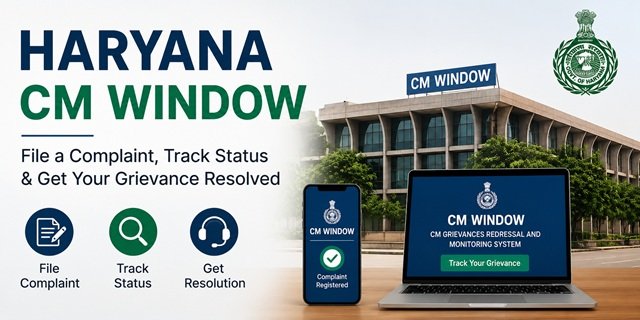
The Government of Haryana runs its public grievance system through CM Window – the CM Grievances Redressal and Monitoring System – at cmharyanacell.nic.in. Launched on 25 December 2014 as a flagship programme of the Haryana government, CM Window is implemented at all 22 districts across more than 110 CM Window counters located at Deputy Commissioner offices, Sub-Divisional Magistrate offices, and the Civil Secretariat, Chandigarh. Citizens file their grievances in person at these counters, receive an SMS with a unique Registration Number, and track the status online at any time.
By June 2026, CM Window had received over 15.59 lakh complaints with 14.89 lakh resolved – making it one of the most active state grievance systems in northern India. Grievances are required to be resolved within 45 days. The portal also integrates with the Auto Appeal System (AAS) under the Haryana Right to Service Act 2014, which automatically escalates service deficiency complaints to the designated officer of the department.
Read our CM Helpline India Page for CM Helpline portals across all states. For ration card services specific to Haryana, read our Haryana Ration Card Guide.
Where to File a Complaint: CM Window Counter Locations
As clearly stated on the cmharyanacell.nic.in homepage, CM Window complaints are registered at physical CM Window counters in the following locations:
- Deputy Commissioner Office (DC Office) – Every district has a CM Window counter at the DC Office. This is the primary filing point for residents across all 22 Haryana districts.
- Sub-Division Office (SDM Office) – Every Sub-Division Magistrate’s office in the state has a CM Window counter. More than 110 such counters are operational, bringing CM Window access close to every tehsil and block in Haryana.
- CM Residence, CM’s Office, Ministers’ Offices – For matters requiring direct CMO attention.
- Haryana Civil Secretariat, Sector-1, Chandigarh – The state secretariat also has a CM Window counter.
What You Can Complain About
CM Window accepts grievances against any department, officer, or service of the Government of Haryana. Common complaint topics include:
- Ration Card issues – new application delayed, FPS not distributing food grains, card correction, Parivar Pehchan Patra linkage problems
- Old Age Samman Allowance, widow pension, or disability pension is not credited
- MGNREGA wages not paid or job card issues
- Land records – mutation, jamabandi, nakal, registry delays
- Haryana Police complaints (for police-specific complaints, also see spca.haryana.gov.in)
- Electricity complaints against DHBVN or UHBVN
- Drinking water supply complaints
- State government hospital and medicine issues
- State school education, scholarship, or mid-day meal complaints
- Housing scheme benefits not received under state schemes
- A government officer is not responding or demanding a bribe
- Any service deficiency under the Haryana Right to Service Act 2014
What to Keep Ready Before Visiting a CM Window Counter
- Your full name, complete address, and mobile number
- Aadhaar Card or any valid government ID for identification
- Name of the department or officer your complaint relates to
- Date when the problem started and any previous reference or application number
- Written description of the issue – 2 to 3 sentences covering what happened and what resolution you need
- Photocopies of supporting documents (land papers, pension documents, scheme receipts, rejection letters)
- For NRIs: completed NRI grievance registration form (download link below)
Filing at the CM Window Counter: Step-by-Step
Step 1: Visit the nearest CM Window counter at your District’s Deputy Commissioner Office or the SDM Office of your Sub-Division. Both locations are active on all working days during office hours.
Step 2: Approach the CM Window counter and provide your name, address, mobile number, and the department your complaint relates to. The counter operator enters your details and complaint description into the CM Window system (cmharyanacell.nic.in) in real time.
Step 3: The operator assigns your complaint to the relevant department within the system. You also have the option to submit your complaint in writing – the operator helps if needed.
Step 4: After registration, you receive an SMS on your registered mobile number with a unique Registration Number. This Registration Number is your reference for all future tracking and follow-up. You can also request a Registration Slip from the counter – a printed acknowledgement of your complaint.
Step 5: The complaint is forwarded to the concerned department. The resolution time limit is 45 days. Service deficiency complaints under the Haryana Right to Service Act 2014 are also simultaneously sent to the Auto Appeal System (AAS) for tracking by the department’s nodal officer.
Tracking Your Complaint Online
Via the CM Window portal:
Step 1: Go to cmharyanacell.nic.in/citizen/view-status.php or click the “Track Grievance” tab on the cmharyanacell.nic.in homepage.
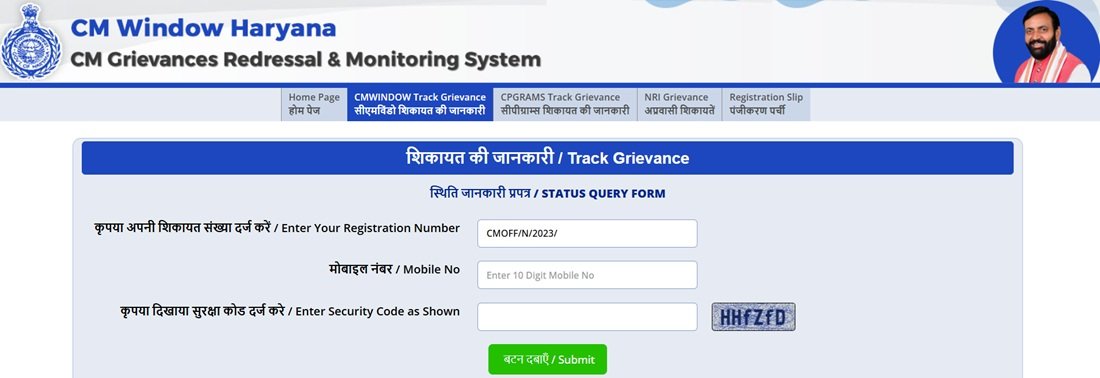
Step 2: Enter your Registration Number in the field provided.
Step 3: Enter your registered Mobile Number.
Step 4: Enter the 5-digit Captcha code shown on screen and click Submit. The current status of your complaint – including which department has it, what action has been taken, and whether it is pending or resolved – appears on screen.
Via the CPGRAMS tab on the portal:
The CM Window portal also has a “CPGRAMS Track Grievance” tab for tracking complaints that were filed through the central CPGRAMS system and relate to Haryana. Use this if your complaint was originally filed on pgportal.gov.in.
Getting a Registration Slip
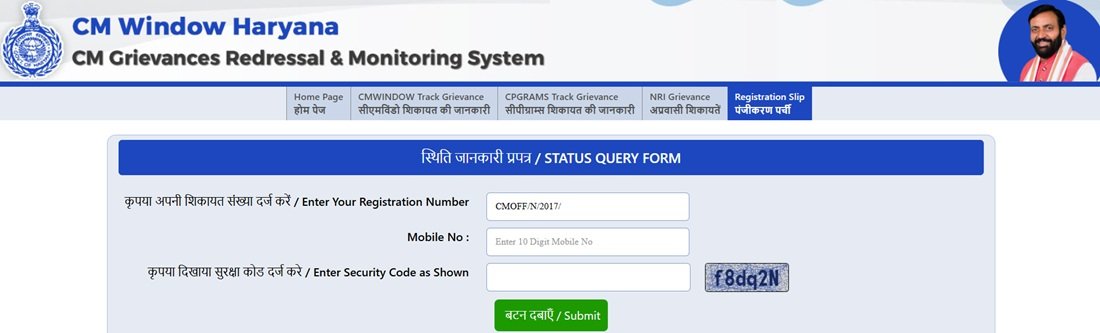
If you have already registered a complaint and need a printed copy of the registration slip, go to the “Registration Slip” tab on the cmharyanacell.nic.in homepage. Enter your Registration Number and mobile number to retrieve and print your official acknowledgement slip. This is useful for producing evidence of complaint filing during follow-up visits to government offices.
Filing via the JanSahayak App
The JanSahayak app by the Department of Electronics, IT and Communication, Government of Haryana (CRID), provides a single-platform mobile experience combining CM Window grievance filing, Saral services, RTI filing, and emergency helplines.
- Android: Search “JanSahayak” on Google Play Store (developer: Government of Haryana)
- iOS: Download on App Store
Register on the app with your name, mobile number, and OTP. Once registered, you can file a CM Window complaint, check status, avail Saral services, access emergency helplines (112, 100, 108, 101, 104, 1091, 1098), and find government jobs and tenders. The app is available in Hindi and English.
NRI Grievance: Special Process for Non-Resident Haryanvis
Non-Resident Indians (NRIs) from Haryana have a dedicated grievance registration process through the CM Window portal. This is different from the standard counter-based process and can be initiated from outside India.
Step 1: Go to cmharyanacell.nic.in/reg-form-nri.
Step 2: Download the NRI grievance registration form in one of two formats:
- Standard Word format: cmharyanacell.nic.in/CM-window-nri.docx
- Macro-enabled format (for automatic fields): cmharyanacell.nic.in/CM-window-form-NRIs.docm
Step 3: Fill in all the information in the registration form – your name, NRI address, contact details, the nature of your grievance, the department involved, and supporting details.
Step 4: Generate a single PDF file of the filled form. The maximum file size is 1 MB.
Step 5: Submit the PDF file through the NRI Grievance tab on the CM Window portal. Your complaint enters the same system as counter-filed grievances and receives a Registration Number.
The NRI grievance tab is also accessible directly on the cmharyanacell.nic.in homepage under the tabs: User Login | Track Grievance | CPGRAMS Track Grievance | NRI Grievance | Registration Slip.
Saral Haryana Grievance: Helpline 1800-180-2087
The Saral Haryana portal at saralharyana.gov.in is the state’s primary citizen service delivery platform, providing over 500 government services. For complaints about services delivered through Saral – certificate delays, service not processed, or Antyodaya Saral issues – call the dedicated helpline 1800-180-2087 (toll-free). The Saral helpline handles service-specific complaints routed to the concerned department and provides acknowledgements.
Samadhan Shivir: Daily Camp for Grievance Resolution
The Haryana government runs Samadhan Shivirs (resolution camps) through a dedicated Redressal Cell in the Office of the Chief Secretary. These camps are held at every district and sub-divisional headquarters from 9 AM to 11 AM on all working days. Citizens with complex or multi-department grievances can visit the Samadhan Shivir in their district without a prior appointment. Officials from the relevant department are present to hear and resolve complaints on the spot. Policy-level issues are sent to the State Headquarters for resolution in coordination with Administrative Secretaries.
District Public Contact and Grievance Redressal Committee
Chief Minister Nayab Singh Saini personally chairs the District Public Contact and Grievance Redressal Committee meetings at the district headquarters on a rotating basis. At these meetings, the CM hears individual complaints in person. Citizens whose complaints have not been resolved through normal channels can present their case before the committee. Complaints are taken up on the spot – at a recent session in Gurugram, the CM resolved 14 out of 18 complaints presented in a single sitting, including a 16-year-old encroachment complaint. Check haryanacmoffice.gov.in for upcoming district visit schedules.
Escalation Path
- Step 1 – CM Window counter: File at your DC or SDM office and track using the Registration Number
- Step 2 – Saral Helpline: For service-related complaints, call 1800-180-2087
- Step 3 – PPP Grievance portals: For Ration Card, pension, or scheme denial, use grievance.edisha.gov.in/grievance or meraparivar.haryana.gov.in/ReportGrievance
- Step 4 – Samadhan Shivir: Attend daily at your district/sub-division HQ from 9 to 11 AM
- Step 5 – CPGRAMS: File at pgportal.gov.in for central government departments or for state escalation
- Step 6 – Haryana Police SPCA: For complaints specifically against police officers, file at complaints-spca.haryana.gov.in
Quick Reference
- CM Window Portal: cmharyanacell.nic.in
- Track Grievance: cmharyanacell.nic.in/citizen/view-status.php
- NRI Grievance Form: cmharyanacell.nic.in/reg-form-nri
- NRI Form Download (DOCX): CM-window-nri.docx
- NRI Form Download (Macro DOCM): CM-window-form-NRIs.docm
- CM Window Haryana App: Download on Google Play
- JanSahayak App (iOS): Download on App Store
- Saral Haryana: saralharyana.gov.in
- Saral Helpline: 1800-180-2087 (toll-free)
- CM Window Helpline: 0172-3322500
- Haryana CMO: haryanacmoffice.gov.in
- CPGRAMS (Central Complaints): pgportal.gov.in
- CM Window Filing Locations: DC Office or SDM Office of your district/sub-division
Frequently Asked Questions
Q. What is CM Window Haryana and when was it launched?
Ans. CM Window is the official CM Grievances Redressal and Monitoring System of the Government of Haryana, launched on 25 December 2014 as a flagship programme. It operates through physical counters at all District Collector offices, SDM offices, and the Civil Secretariat in Chandigarh. By June 2026, it had received over 15.59 lakh complaints, resolving 14.89 lakh of them. The portal at cmharyanacell.nic.in is used for tracking and NRI filing.
Q. Can I file a CM Window complaint online from home?
Ans. Standard CM Window complaints must be registered in person at a CM Window counter at your DC or SDM office. You cannot self-file online. However, NRIs can file online by downloading the NRI registration form at cmharyanacell.nic.in/reg-form-nri, filling it, generating a PDF (max 1 MB), and submitting it through the NRI Grievance tab on the portal. You can also file PPP-related complaints online through grievance.edisha.gov.in/grievance.
Q. What is the Registration Number and how do I use it?
Ans. After your complaint is registered at the CM Window counter, you receive an SMS on your mobile with a unique Registration Number. This number is your reference for all future tracking on cmharyanacell.nic.in, for getting a printed Registration Slip from the portal, and for follow-up at the counter or through the app. Track online at cmharyanacell.nic.in/citizen/view-status.php by entering the Registration Number, mobile number, and captcha.
Q. What is the resolution time limit for CM Window complaints?
Ans. The resolution time limit is 45 days. For complaints related to service deficiencies notified under the Haryana Right to Service Act 2014, the complaint is also automatically forwarded to the Auto Appeal System (AAS), which tracks it through the department’s nodal officer. Overdue complaints are visible on the portal’s live dashboard.
Q. What is the Parivar Pehchan Patra grievance portal?
Ans. PPP (Parivar Pehchan Patra) is Haryana’s Family ID system that determines eligibility for all state welfare schemes. If you are eligible for a Ration Card, old age pension, widow pension, or disability pension but have not received the benefit, file a service denial grievance at grievance.edisha.gov.in/grievance using your Family ID. If the data in your PPP (name, address, family members) is incorrect, file a correction request at meraparivar.haryana.gov.in/ReportGrievance.
Q. What is the NRI Grievance process for Haryanvis living abroad?
Ans. NRIs can file complaints without visiting a CM Window counter. Download the NRI registration form from cmharyanacell.nic.in/reg-form-nri in Word (DOCX) or macro-enabled format (DOCM). Fill in all details, generate a single PDF file under 1 MB, and submit through the NRI Grievance tab on the cmharyanacell.nic.in homepage. The complaint enters the same system as counter-filed grievances.
Q. What is the Samadhan Shivir?
Ans. Samadhan Shivir is a daily grievance resolution camp held from 9 AM to 11 AM at every district and sub-divisional headquarters in Haryana on all working days. It is run through the Redressal Cell in the Office of the Chief Secretary. Citizens can attend without an appointment. Officials from relevant departments are present to hear and resolve complaints on the spot. Policy-level issues go to the State Headquarters level.
Q. What are the live statistics on the CM Window portal?
Ans. The cmharyanacell.nic.in homepage displays live complaint statistics, including total received, total resolved, total resolved within SLA, complaints under process with SLA, and complaints overdue. As of June 2026: 15,59,406 received, 14,89,949 resolved, 4,37,522 resolved in time, 14,904 under process within SLA, and 52,083 overdue.
Q. What is the JanSahayak app?
Ans. JanSahayak is a Government of Haryana mobile app developed by the Department of Electronics, IT and Communication (CRID). It provides a single platform for CM Window grievance filing, Saral services, RTI applications, government job and tender alerts, bill payments, and emergency helplines (112, 100, 108, 101, 104, 1091, 1098). Available for Android on Google Play and for iOS on the App Store at apps.apple.com/us/app/id1555998161.
Can I file a complaint without visiting a DC Office?
Most CM Window complaints are registered through designated CM Window counters located at DC and SDM offices. Citizens who cannot visit personally may seek assistance from family members or enquire at the nearest CM Window counter regarding available options. NRIs can use the dedicated online NRI grievance process.

Tabassum is a government document researcher and writer with over 5 years of experience exclusively dedicated to tracking and simplifying Central and State Government document processes across India. She has researched and published detailed guides on 100+ government documents and certificates – including Aadhaar Card, PAN Card, Ration Card, Domicile Certificate, and Birth Certificate – covering all states and the Central Government, helping lakhs of Indian citizens successfully complete their paperwork in simple, easy-to-understand language.