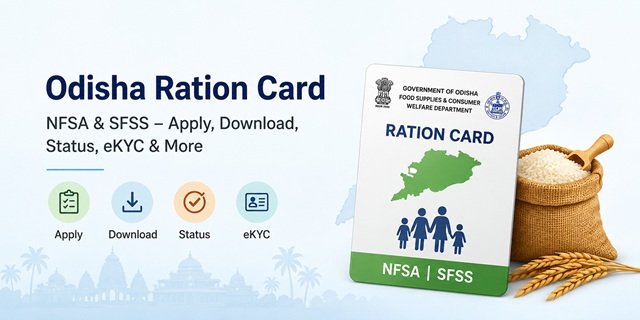
The Food Supplies and Consumer Welfare Department, Government of Odisha, manages all Ration Card services through a set of dedicated digital platforms. Unlike most states that use a single portal, Odisha splits its services across two complementary systems. The foododisha.in portal handles citizen-facing online services, including new applications, member additions, deletions, and the e-Bitaran beneficiary list. The pdsodisha.gov.in portal handles ration card downloads, SFSS card downloads, grievance status, and dealer-level PDS data.
Odisha has three features that distinguish it from every other state covered in this series. First, it runs a dedicated state-funded scheme called the State Food Security Scheme (SFSS) for families excluded from the central NFSA list, with a completely separate application track and download portal. Second, it has introduced a dry ration scheme specifically for migrant labourers from Odisha working outside the state. Third, Ration Card numbers in Odisha are 11-digit numbers in a specific format, and knowing this is essential to downloading the right card.
Eligible beneficiaries can also use their ration card under the One Nation One Ration Card (ONORC) Scheme to access food grain benefits outside their home district or state. For detailed information on ration card categories, eligibility rules, NFSA benefits, and nationwide ration card services, read our Ration Card India Guide.
Two Schemes Running Side by Side
Odisha operates two parallel food security programmes, and applicants must know which one applies to them before starting:
National Food Security Act (NFSA): The central scheme covering AAY and PHH cardholders. Managed by the central government with state-level implementation. The number of NFSA beneficiaries is capped based on the central allocation to Odisha.
State Food Security Scheme (SFSS): Odisha’s own state-funded programme launched in 2017 to cover families who are genuinely poor but could not be included in the NFSA list due to the central cap. SFSS covers an additional 34.44 lakh people using state government funds. SFSS beneficiaries receive 5 kg of rice per person per month at Rs 1 per kg, the same rate as NFSA PHH cardholders. Applications for SFSS go through the Odisha One Portal, while NFSA applications go through foododisha.in. Downloads are also separate.
Card Categories
Antyodaya Anna Yojana (AAY)
For the most economically deprived households with no stable income. This includes landless agricultural labourers without fixed work, persons with disabilities as the sole earner, widows and senior persons with no support, and tribal groups. Each AAY household receives 35 kg of rice per month at Rs 1 per kg, irrespective of family size. This is among the lowest PDS rice prices in the country.
Priority Household (PHH)
For families below the poverty line identified under NFSA 2013. Each PHH member receives 5 kg of rice per month at Rs 1 per kg. Annual household income must be below Rs 1.5 lakh to qualify.
State Food Security Scheme (SFSS)
For households that are below the poverty line but excluded from the NFSA beneficiary list due to the central government’s allocation cap for Odisha. SFSS cardholders receive the same entitlement as PHH cardholders: 5 kg of rice per person per month at Rs 1 per kg, fully funded by the Odisha state government. SFSS is not available in most other states.
Migrant Dry Ration Scheme
Odisha has a significant migrant labour population that works in construction, brick kilns, and industries outside the state. Recognising that ONORC portability may not always be accessible to all migrants, Odisha operates a separate dry ration scheme for migrant labourers from the state working outside Odisha. Eligible migrants can register for this scheme and receive dry ration kits. Details and registration are managed through the Labour Department and the Food Supplies Department. This scheme runs parallel to the ONORC portability available to NFSA cardholders.
Who Can Apply for a Ration Card in Odisha
- Must be a permanent resident of Odisha with verifiable address proof in the state.
- Annual household income must not exceed Rs 1.5 lakh.
- Must not hold an existing ration card under NFSA or SFSS anywhere in India.
- Must fall within one of the eligible beneficiary categories under NFSA or SFSS as determined by the state government.
- Must have a valid Aadhaar Card number linked to an active mobile number for OTP-based eKYC.
- Newly married individuals, persons splitting from a joint household, and households excluded from existing NFSA lists due to the central cap can apply under SFSS.
Documents Required at the Time of Application
- Aadhaar Card of all family members (mandatory for eKYC)
- Mobile number linked to Aadhaar Card for OTP verification
- Proof of Residence in Odisha (electricity bill, water connection bill, or Voter ID)
- Income certificate from a Circle Officer or Block Development Officer
- Caste certificate (for ST/SC applicants under priority categories)
- Passport-sized photographs of the head of the family
- Land possession certificate (if applicable)
- Old Ration Card or surrender certificate (if previously holding one from another address or state)
Applying for an NFSA Card Online in Odisha
Odisha residents can apply for a new NFSA ration card through either the Food Odisha portal or the Odisha One portal. Both platforms allow eligible applicants to submit their applications online and track their status digitally.
Method 1: Through the Food Odisha Portal
- Step 1: Visit foododisha.in and open the Online Services menu. Click on Citizen Services.
- Step 2: Under the NFSA section, select Apply for New Card.
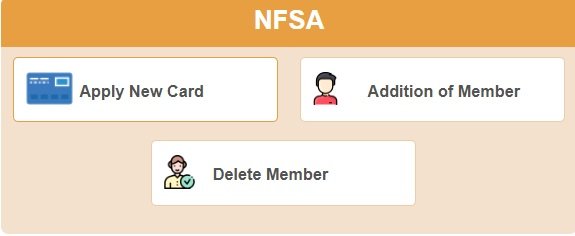
- Step 3: You will be redirected to the Odisha PDS portal at pdsodisha.gov.in.
- Step 4: Log in or complete registration if required. Enter the applicant’s details, family member information, Aadhaar details, address, and other required information.
- Step 5: Upload the required supporting documents and submit the application.
- Step 6: After successful submission, note the application reference number generated by the system. Use this number to track your application status.
Method 2: Through the Odisha One Portal
- Step 1: Visit odishaone.gov.in/citizen and log in to your account. New users must register first.
- Step 2: Open the Services section and select Food Supply & Consumer Welfare Department.
- Step 3: Choose Issuance of New Ration Card under NFSA from the list of available services.
- Step 4: Fill in the online application form with the applicant’s details and complete household information.
- Step 5: Upload the required documents, including Aadhaar card, address proof, family photograph, bank passbook, and other applicable documents.
- Step 6: Submit the application and save the application reference number generated by the portal.
- Step 7: Track the application status online using the reference number.
Eligibility: The applicant must be an Indian citizen and should not already possess another ration card.
Documents Required: Proof of date of birth, address proof, family passport-size photograph, Aadhaar Card, bank passbook, income certificate, caste certificate (where applicable), and transfer order in case of government employees transferred from another location.
Service Timeline: The service is covered under the Odisha Right to Public Services Act (ORTPSA), with a prescribed timeline of 15 working days.
Government Service Charge: Rs 17.
Applying for an Odisha SFSS Card Online
Families that are not covered under the National Food Security Act (NFSA) but qualify under Odisha’s State Food Security Scheme (SFSS) can submit a new ration card application online through the Food Odisha Portal or Odisha One Portal.
Method 1: Apply Through the Food Odisha Portal
- Step 1: Visit foododisha.in and open the Citizen Services section available under Online Services.
- Step 2: Locate the SFSS services area and select the option for a new SFSS ration card application.
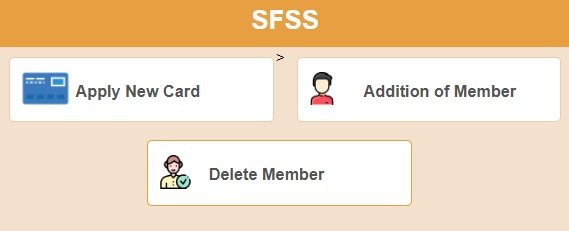
- Step 3: The portal redirects you to the Odisha PDS platform, where the application process is completed.
- Step 4: Enter the applicant’s information, residential details, income particulars, and details of all family members proposed to be included in the ration card.
- Step 5: Upload the prescribed documents and verify the information before final submission.
- Step 6: Submit the application and keep the generated reference number safe for future correspondence and status tracking.
Method 2: Apply Through the Odisha One Portal
- Step 1: Visit odishaone.gov.in/citizen and access your citizen account. New applicants must complete one-time registration first.
- Step 2: Open the list of government services and select Food Supply & Consumer Welfare Department.
- Step 3: Choose Issuance of New Ration Card under SFSS from the available services.
- Step 4: Complete the online form by providing household, income, address, and Aadhaar-related information.
- Step 5: Upload the required supporting documents and proceed to the final submission.
- Step 6: After submission, the portal generates an application reference number, which can be used to monitor application progress online.
- Step 7: Track the application status through the Odisha One Portal until the application is approved or disposed of.
Eligibility: The applicant must be an Indian citizen and must not already possess another ration card.
Documents Required: Proof of date of birth, address proof, family passport-size photograph, Aadhaar Card, bank passbook, income certificate, caste certificate (where applicable), and transfer order in case of government employees transferred from another location.
Service Timeline: The service is delivered under the Odisha Right to Public Services Act (ORTPSA), with a prescribed timeline of 15 working days.
Government Service Charge: Rs 17.
Applying Offline at the Circle Office
Step 1: Download the NFSA Ration Card application form from food.odisha.gov.in under the citizen information forms section, or collect it from your nearest Circle Office.
Step 2: Fill the form with all family member details, Aadhaar numbers, address, and income information. Attach self-attested copies of all required documents.
Step 3: Submit the completed application at your nearest Circle Office or Block Supply Officer office. Collect the receipt with your acknowledgement number.
Step 4: Field verification is conducted, and the card is issued on approval. You can also submit through any CSC centre. Find the nearest one at locator.csccloud.in.
Checking the e-Bitaran Beneficiary List
e-Bitaran is the Odisha government’s Aadhaar-enabled food grain distribution monitoring system. The beneficiary list is accessed through it:
Step 1: Go to foododisha.in and click on “e-Bitaran Odisha” on the homepage.
Step 2: Click on “Beneficiaries List of NFSA 2013”.
Step 3: Select your district from the 30 districts of Odisha.
Step 4: Select your Block, then your Gram Panchayat, then your Village, and then your Fair Price Shop.
Step 5: The complete ration card list for your FPS is displayed with card type and member count. Use Ctrl+F on your keyboard to search for your name within the displayed list.
Step 6: Click on your ration card number to view all family member details, your card category (AAY or PHH), and your 11-digit RC number. Note this number carefully as it is needed for downloading your card.
You can also view dealer-wise ration card data at portal.pdsodisha.gov.in/FPS/RationCardDetailsNew.aspx.
Your 11-Digit RC Number
Odisha ration card numbers follow an 11-digit format (example: 19130120010). The first two digits represent the district code, the next two are the block code, and the remaining digits identify the household. You must have this exact 11-digit number to download your ration card. Find it by locating your name in the e-Bitaran beneficiary list as described above, or by checking your original ration card document.
Downloading the NFSA Ration Card
Step 1: Go to pdsodisha.gov.in and click on Online Services, then Citizen Services.
Step 2: Click on “Download Ration Card (NFSA)”.
Step 3: Enter your 11-digit Ration Card Number and click Download Ration Card.
Step 4: Your ration card is generated as a PDF. Save or print it for use at the Fair Price Shop.
Downloading the SFSS Ration Card
SFSS cards have a completely separate download page from NFSA cards:
Step 1: Go to pdsodisha.gov.in/SFSS/CitizenShipDownloadRationCardSFSS.
Step 2: Enter your 11-digit RC Number or your Application Acknowledgement Number.
Step 3: Click Download. Your SFSS ration card PDF will be generated and can be saved or printed.
Ration Card Modification Services: Adding or Removing Family Member
Odisha residents can update their NFSA and SFSS ration cards online through the Food Odisha Portal and Odisha One Portal.
- NFSA Services: Addition of Member, Deletion of Member, Correction of Ration Card Details, and Surrender of Ration Card.
- SFSS Services: Addition of Member, Deletion of Member, Correction of Ration Card Details, and Surrender of Ration Card.
The Food Odisha Portal provides member addition, member deletion, and ration card surrender services, while the Odisha One Portal also offers correction services. Applicants should select the service corresponding to their existing NFSA or SFSS ration card category.
Completing eKYC
Aadhaar-based eKYC is mandatory for all family members listed on an Odisha ration card. Without it, members cannot collect their food grain entitlement at the Fair Price Shop. The pdsodisha.gov.in portal offers direct eKYC using Aadhaar number and mobile OTP. You can also complete eKYC at your nearest Fair Price Shop by providing biometric authentication on the ePoS machine, or at any CSC centre with Aadhaar cards of all members.
Raising a Complaint or Grievance
If you face issues related to ration card applications, member corrections, eKYC, food grain distribution, or Fair Price Shop (FPS) services, you can file a complaint online or through the official helpline.
- Online Complaint: Visit pdsodisha.gov.in, open the grievance section, enter your ration card details, select the complaint category, provide a description of the issue, and submit the grievance. Save the reference number for future tracking.
- NFSA Grievance Portal: If the issue remains unresolved, submit a complaint through the NFSA National Grievance Portal.
- PDS Odisha Helpline: Call 155335 (toll-free, 24×7).
- Alternate Helpline: Call 1800-345-6724 (toll-free, 24×7).
- National PDS Helpline: Call 1967.
- Offline Complaint: Visit your nearest Circle Office or Block Supply Officer (BSO) office and submit a written complaint along with supporting documents, if applicable.
Quick Reference Links
| Service | Link / Details |
|---|---|
| Online Citizen Services (Apply, Add/Delete Member) | foododisha.in/citizenservice |
| e-Bitaran Beneficiary List | foododisha.in (e-Bitaran Section) |
| NFSA Card Download | pdsodisha.gov.in (Citizen Services) |
| SFSS Card Download | Download SFSS Card |
| SFSS Application (Odisha One) | odishaone.gov.in |
| Official Food Department | food.odisha.gov.in |
| Dealer-wise Ration Card Data | View RC Data |
| NFSA Grievance Portal | Register Complaint |
| DigiLocker | digilocker.gov.in |
| Mera Ration App | Download App |
| CSC Locator | locator.csccloud.in |
| PDS Odisha Helpline | 155335 / 1800-345-6724 (24×7) |
Frequently Asked Questions
Q. What is the difference between an NFSA card and an SFSS card in Odisha?
Ans. Both give the same rice entitlement at Rs 1 per kg but they are funded differently. NFSA cards are funded by the central government under the National Food Security Act 2013. SFSS cards are funded entirely by the Odisha state government for families below the poverty line who could not be included in NFSA due to the central allocation cap. SFSS was launched in 2017 to bridge this gap and covers an additional 34.44 lakh beneficiaries.
Q. What is my 11-digit RC number and where do I find it?
Ans. Your 11-digit RC number is your unique ration card identifier in Odisha (example format: 19130120010). The first two digits indicate your district, the next two your block, and the remaining digits identify your household. Find it by searching your name in the e-Bitaran beneficiary list at foododisha.in, or on your existing physical ration card. This number is required to download either an NFSA or SFSS card.
Q. How do I apply for an SFSS card?
Ans. Apply through the Odisha One Portal at odishaone.gov.in. Search for the SFSS Ration Card in the services section, fill in the application form, upload your documents, and submit. The SFSS platform on Odisha One significantly shortens processing time and allows real-time tracking. Families excluded from NFSA due to the central cap should apply under SFSS.
Q. What is e-Bitaran in Odisha?
Ans. e-Bitaran is the Odisha government’s Aadhaar-enabled digital food grain distribution and monitoring system. It maintains the complete list of NFSA beneficiaries across all 30 districts. You can search for your name, find your 11-digit RC number, and verify your card category and family details through the e-Bitaran beneficiary list on foododisha.in.
Q. Is there a separate scheme for Odisha migrants working in other states?
Ans. Yes. Odisha runs a dry ration scheme for migrant labourers from the state working outside Odisha. This runs alongside the ONORC portability available to NFSA cardholders. NFSA beneficiaries can also collect their entitlement from any FPS across India using Aadhaar biometric authentication under ONORC.
Q. Can I add or remove a family member without visiting a government office?
Ans. Yes. Odisha allows complete online management of member additions and deletions through foododisha.in/citizenservice. Log in, select the addition or deletion service, fill in the details, upload the supporting document, and submit. No office visit is required.
Q. My eKYC is pending. How do I complete it?
Ans. Complete eKYC using Aadhaar OTP directly on the pdsodisha.gov.in portal. You can also visit your nearest Fair Price Shop for fingerprint biometric authentication, or go to any CSC with Aadhaar cards of all family members. Pending eKYC prevents members from collecting their monthly food grain entitlement.
Q. Can I use my Odisha ration card to collect ration in another state?
Ans. Yes, for NFSA cardholders. AAY and PHH cardholders from Odisha can collect their entitled food grains from any Fair Price Shop across India under the One Nation One Ration Card scheme using Aadhaar biometric authentication. SFSS cardholders are covered under the state scheme only and are not covered under the ONORC portability outside Odisha.
Q. How do I download my SFSS ration card separately?
Ans. SFSS cards have a dedicated download page at pdsodisha.gov.in/SFSS/CitizenShipDownloadRationCardSFSS. Enter your 11-digit RC number or Application Acknowledgement Number and click Download to get your SFSS card PDF. Do not use the regular NFSA download link for SFSS cards as they are separate systems.
Q. What is the 24×7 helpline for Odisha ration card issues?
Ans. Call 155335 or 1800-345-6724 for round-the-clock assistance on applications, corrections, eKYC, card downloads, and FPS complaints. Both numbers are toll-free and available 24 hours a day, 7 days a week. For national PDS issues, call 1967.
Q. What rice price do SFSS cardholders pay at the FPS?
Ans. SFSS cardholders pay Rs 1 per kg for rice, the same rate as PHH cardholders under NFSA. The cost difference is borne by the Odisha state government through its own budget. Each eligible SFSS member receives 5 kg of rice per month at this rate.

Tabassum is a government document researcher and writer with over 5 years of experience exclusively dedicated to tracking and simplifying Central and State Government document processes across India. She has researched and published detailed guides on 100+ government documents and certificates – including Aadhaar Card, PAN Card, Ration Card, Domicile Certificate, and Birth Certificate – covering all states and the Central Government, helping lakhs of Indian citizens successfully complete their paperwork in simple, easy-to-understand language.