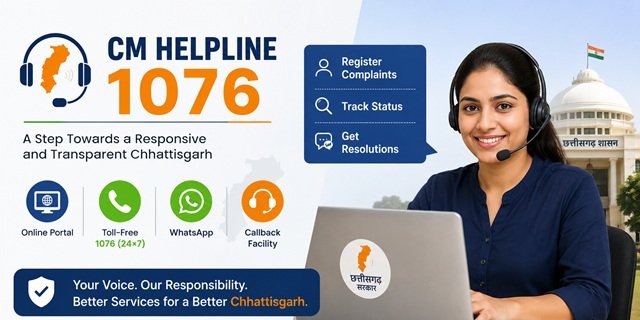
The Government of Chhattisgarh launched the CM Helpline 1076 on 9 June 2026 to provide citizens with a dedicated platform to register complaints against state government departments and public services. Introduced under the leadership of Chief Minister Shri Vishnu Deo Sai, the initiative aims to make grievance redressal faster, more transparent, and easier to access across the state.
Citizens can register complaints through the official portal at cmhelpline.cg.gov.in, call the 24×7 toll-free helpline 1076, request a callback, or use the official CG CM Helpline Citizens mobile app available for Android and iOS. The platform also allows users to track complaint status, submit reminders, and share feedback after resolution.
For certificate applications and other notified government services, the Sewa Setu Portal provides a separate ticket-based grievance system. If your issue relates to a ration card or the Public Distribution System (PDS), you should use the dedicated Khadya CG Portal. This guide explains the purpose of each platform and helps you choose the correct one for your complaint.
Looking for CM Helpline portals in other states? Read our CM Helpline India Guide. For ration card services, eligibility, and online facilities in the state, visit our Chhattisgarh Ration Card Guide.
CM Helpline 1076 vs Sewa Setu vs Khadya CG: Which Portal Should You Use?
Chhattisgarh provides different grievance platforms for different types of issues. Choosing the correct portal helps your complaint reach the concerned department quickly and reduces unnecessary delays. Use the following guide to understand which platform is right for your issue.
CM Helpline 1076: Use the CM Helpline Portal for complaints related to any state government department, public service, or government official. You can report issues such as pension not received, delayed scheme benefits, electricity or water supply problems, government officers not responding, health services, education, police, or any other state government grievance.
Sewa Setu Shikayat Portal: Use the Sewa Setu Portal only if your complaint is related to an online government service available through Sewa Setu. For example, you can report delayed certificate applications, technical errors, pending online services, or problems faced at a Lok Seva Kendra while applying for a service.
Khadya CG: Use the Khadya CG Portal to file complaints about the Public Distribution System (PDS) and Chhattisgarh Ration Card services. This includes ration card corrections, Aadhaar seeding issues, missing beneficiary names, Fair Price Shop (FPS) complaints, ePoS device problems, and non-distribution of food grains.
What Complaints Can You Register on CM Helpline 1076?
CM Helpline 1076 allows citizens to contact the Government of Chhattisgarh for different types of grievances, information requests, and public service suggestions. Before submitting your request, choose the category that best matches your issue.
- Complaint (Shikayat): Report problems related to a government department, public service, government official, or welfare scheme.
- Information Request: Seek information about a government scheme, department, eligibility criteria, or public service.
- Demand or Suggestion: Request a government benefit you are entitled to or share suggestions to improve public services.
You can register complaints on a wide range of state government services, including the following:
Food and Public Distribution
- Ration Card-related issues
- Fair Price Shop (FPS) complaints
- Missing beneficiary names
- Aadhaar Card seeding problems
- Non-distribution of food grains
Pension and Welfare Schemes
- Old age pension delays
- Widow pension issues
- Disability pension complaints
- Benefits not received under state welfare schemes
Employment, Land and Housing
- Pending MGNREGA wages and job card issues
- Land records, mutation, B1, Khasra, and Bhu Adhikar Pustika matters
- PM Awas Yojana and other housing scheme complaints
Public Services
- Electricity supply and billing issues
- Drinking water and sanitation complaints
- Government hospital services and medicine availability
- School education, scholarships, and student welfare schemes
Administration and Other Issues
- Government officials are not responding to applications
- Unnecessary delays in government services
- Alleged misconduct by government officials
- Forest rights, tribal welfare schemes, and PESA area-related grievances
How to Register a Complaint Online on the CM Helpline Portal
You can register a complaint online through the official CM Helpline Portal using your mobile number. Before you begin, keep your mobile phone ready for OTP verification and collect any documents or photographs that support your complaint.
Step 1: Visit the Online Complaint Registration page or open the CM Helpline homepage and click Register Complaint.
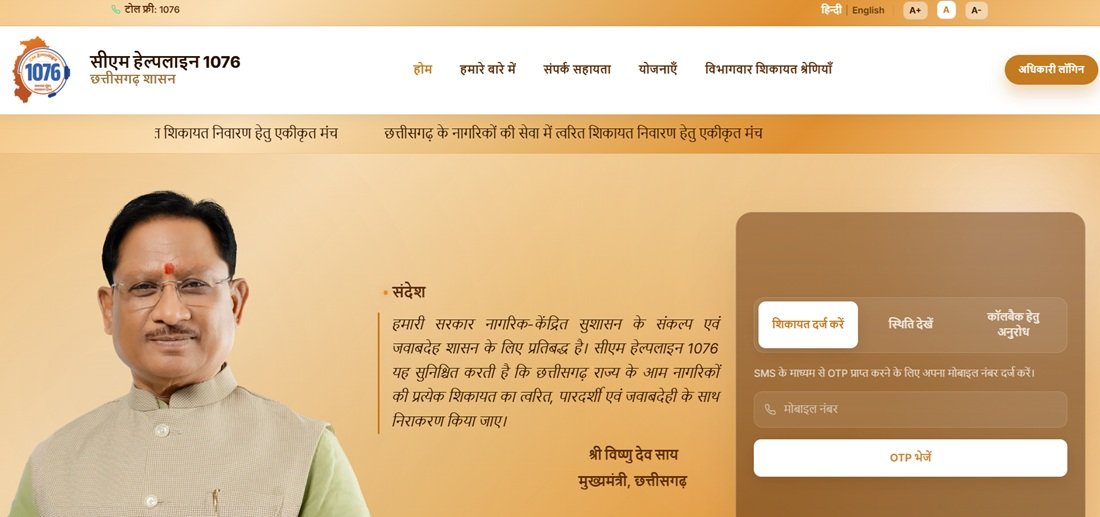
Step 2: Enter your mobile number and click Send OTP. Once you receive the OTP, enter it in the required field and click Verify OTP to continue.
Step 3: After successful verification, the complaint form will open. Select the appropriate category, such as Complaint, Information Request, or Demand/Suggestion.
Step 4: Choose the concerned department and enter complete details of your grievance. Explain the issue clearly, mention when it started, identify the office or official involved if known, and describe the action or resolution you expect. Upload supporting documents or photographs, if available.
Step 5: Read the declaration carefully, tick the confirmation checkbox, and click Submit to send your complaint.
Step 6: After successful submission, the portal generates a unique Complaint ID. You will also receive the Complaint ID on your registered mobile number through SMS. Keep this number safe, as you will need it to track your complaint status, submit reminders, or provide feedback after the complaint is resolved.
How to Register a Complaint by Calling 1076
If you do not want to use the online portal, you can register your complaint by calling the CM Helpline 1076. The toll-free helpline is available 24 hours a day, 7 days a week, and you can call it from any mobile or landline number within Chhattisgarh.
Step 1: Dial 1076 and wait for the call centre representative to answer your call.
Step 2: Share your basic details, including your name, mobile number, district, and the department related to your complaint.
Step 3: Explain your grievance clearly. Mention what happened, when the issue started, and the action or resolution you expect from the concerned department.
Step 4: Inform the representative whether you want to register a Complaint, request Information, or submit a Demand or Suggestion.
Step 5: After registering your request, the representative will provide a unique Complaint ID. You will also receive the Complaint ID through SMS on your registered mobile number.
Keep your Complaint ID safe, as you will need it to check your complaint status, submit reminders, or provide feedback after your grievance is resolved. You can also call 1076 again if you need assistance with complaint tracking or other CM Helpline services.
How to Register a Complaint through WhatsApp
If you prefer using WhatsApp instead of the web portal or helpline, you can contact the official CM Helpline WhatsApp service at +91-94255-33300. This option allows citizens to communicate with the helpline directly from their mobile phone without visiting the portal.
Step 1: Save the official CM Helpline WhatsApp number +91-94255-33300 in your contacts or open the direct link wa.me/919425533300.
Step 2: Send a message and follow the instructions provided through the official WhatsApp service to register your complaint or request information.
Step 3: Share the required details, such as your name, mobile number, district, department, and a brief description of your grievance. If needed, you can also attach relevant documents or photographs to support your complaint.
Step 4: Once your request is registered, keep your Complaint ID safe. You can use it later to track your complaint status, submit reminders, or communicate with the helpline whenever required.
The WhatsApp service is especially helpful for citizens who prefer mobile messaging over phone calls or the web portal. It provides a simple and convenient way to stay updated on your complaint directly from your smartphone.
How to Request a Callback from CM Helpline 1076
If you cannot connect to the helpline immediately or prefer receiving a call instead of waiting on the line, use the Request a Callback facility available on the official CM Helpline portal. A representative from the CM Helpline call centre will contact you and help register your complaint.
Step 1: Visit the CM Helpline Portal and click Request a Callback on the homepage.
Step 2: Enter your mobile number and complete the OTP verification process.
Step 3: Select the purpose of your request, such as a Complaint or an Information Request, and submit the callback request.
Step 4: A CM Helpline representative will call you on your registered mobile number. Explain your grievance clearly and provide the required details so your complaint can be registered successfully.
Step 5: After your complaint is registered, you will receive a unique Complaint ID. Keep this number safe, as you will need it to track your complaint status, submit reminders, and provide feedback after resolution.
How to Register a Complaint Using the CM Helpline Mobile App
If you prefer using your smartphone, install the official CG CM Helpline Citizens mobile app. The app offers the same complaint registration and tracking facilities as the web portal, making it convenient to raise and monitor grievances from anywhere.
Step 1: Download the official app from the Google Play Store or the Apple App Store.
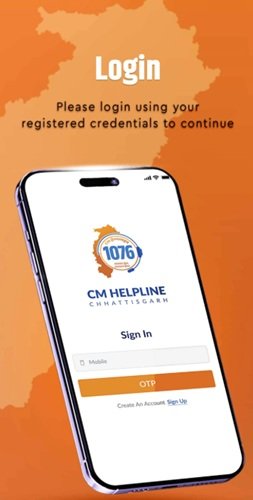
Step 2: Open the app and verify your mobile number using the OTP sent to your registered mobile number.
Step 3: Select the appropriate category, choose the concerned department, enter your complaint details, and upload supporting documents or photographs if required.
Step 4: Submit your complaint through the app. A unique Complaint ID will be generated, which you can use to track the status of your grievance.
The mobile app also lets you check complaint status, receive department updates through notifications, submit reminders, and provide feedback after your complaint is resolved. It is available in both Hindi and English.
How to Track Your CM Helpline Complaint Status
After registering your complaint, you can check its progress through multiple official channels. Keep your Complaint ID and registered mobile number ready, as you may need them while tracking your grievance.
Track Status on the Portal:
Visit the CM Helpline Complaint Status page or click Track Status on the homepage. Enter your Complaint ID and registered mobile number to view the latest updates, including the concerned department, officer handling the complaint, action taken, and the current status.
Track Status through the Mobile App:
Open the official CG CM Helpline Citizens mobile app and sign in using your registered mobile number. Go to the Track Status section to view all complaints linked to your account, along with their latest progress and updates.
Track Status by Calling 1076:
Call the toll-free helpline 1076 and provide your Complaint ID to the call centre representative. The executive will check your complaint and share its latest status over the phone.
Track Status through WhatsApp:
Send your Complaint ID to +91-94255-33300 on WhatsApp. The official CM Helpline WhatsApp service will provide the latest status of your complaint in the same chat, wherever this facility is available.
What If Your Complaint Is Not Resolved?
The official CM Helpline 1076 portal includes a built-in escalation mechanism to ensure unresolved complaints receive further review. According to the portal, if you are not satisfied with the action taken on your complaint, the system automatically forwards it to the next higher authority for examination. Senior officers monitor complaints at different administrative levels to help ensure timely resolution.
If your grievance is still not resolved, you can also contact the concerned department directly or approach the appropriate grievance mechanism available for that service.
- Ration Card and PDS: For food distribution, Fair Price Shop, or ration card-related issues, you can also use the Khadya CG Portal.
- Online Government Services: If your complaint relates to certificates or services applied through Sewa Setu, use the portal’s dedicated grievance system for faster resolution.
Keep your Complaint ID safe throughout the process, as you may need it while communicating with higher authorities or checking the latest status of your grievance.
Quick Reference Links
The table below lists the official portals, mobile apps, helpline numbers, and contact details related to Chhattisgarh CM Helpline and other connected grievance platforms.
| Service | Official Link / Contact |
|---|---|
| CM Helpline Portal | https://cmhelpline.cg.gov.in |
| Register Complaint | Register Online |
| Track Complaint Status | Track Status |
| Request a Callback | Request Callback |
| Government Schemes Information | View Schemes |
| About CM Helpline | About the Portal |
| Android App | Google Play Store |
| iPhone App | Apple App Store |
| WhatsApp Support | +91 94255 33300 |
| Email Support | helpline.ggnc@gmail.com |
| Toll-Free Helpline | 1076 (Available 24×7) |
| Sewa Setu Portal | https://sewasetu.cgstate.gov.in |
| Sewa Setu Complaint | Register Ticket |
| Sewa Setu Ticket Status | Track Ticket Status |
| Sewa Setu WhatsApp | +91 92034 06400 |
| Sewa Setu Email | sewasetu.helpline@cgchips.in |
| Khadya CG Portal | https://khadya.cg.nic.in |
Frequently Asked Questions
Q. When was the Chhattisgarh CM Helpline 1076 launched?
Ans. The Government of Chhattisgarh launched CM Helpline 1076 on 9 June 2026 under the leadership of Chief Minister Shri Vishnu Deo Sai. Citizens can register complaints through the official portal, the 24×7 toll-free helpline, WhatsApp, the Callback facility, or the official mobile app.
Q. How can I register a complaint on CM Helpline 1076?
Ans. You can register a complaint through the official CM Helpline Portal, by calling the toll-free number 1076, through the official WhatsApp service, by requesting a callback, or by using the CG CM Helpline Citizens Mobile App available for Android and iPhone.
Q. What is the Callback facility on CM Helpline?
Ans. The Callback facility allows you to request a call from the CM Helpline instead of waiting for the helpline number. After OTP verification, a call centre representative contacts you, registers your grievance, and provides a unique Complaint ID for future tracking.
Q. What is the difference between CM Helpline 1076 and Sewa Setu?
Ans. Use CM Helpline 1076 for general complaints related to state government departments, schemes, public services, and government officials. Use Sewa Setu only for issues related to services applied through the Sewa Setu Portal, such as certificate applications, pending online services, technical errors, or problems at Lok Seva Kendras.
Q. What is the official WhatsApp number of CM Helpline 1076?
Ans. The official WhatsApp number for Chhattisgarh CM Helpline is +91 94255 33300. You can use it to communicate with the CM Helpline, register complaints, and receive complaint-related updates. For Sewa Setu service-related queries, use the separate WhatsApp number +91 92034 06400.
Q. Can I complain about my ration card or Fair Price Shop through CM Helpline?
Ans. Yes. CM Helpline 1076 accepts complaints related to ration cards, Fair Price Shops (FPS), food grain distribution, and other Public Distribution System (PDS) issues. However, you can also use the dedicated Khadya CG Portal for ration card and PDS-related grievances.
Q. What happens if my complaint is not resolved?
Ans. According to the official CM Helpline portal, if you are not satisfied with the action taken on your complaint, the system automatically escalates the case to the next higher authority for further review. Senior officers monitor the grievance redressal process at different administrative levels.
Q. Can I request information or submit suggestions through CM Helpline?
Ans. Yes. Apart from complaints, CM Helpline also allows citizens to submit information requests and demand or suggestion requests. You can choose the appropriate category while registering your request through the portal, helpline, WhatsApp, or the mobile app.
Q. Which documents can I upload while filing a Sewa Setu complaint?
Ans. The Sewa Setu grievance portal supports attachments in JPG, PNG, PDF, CSV, XLS, XLSX, and DOCX formats. Upload documents such as acknowledgement receipts, screenshots, rejection letters, or other supporting evidence to help the concerned department verify your complaint.
Q. How can I find the nearest Lok Seva Kendra in Chhattisgarh?
Ans. Visit Sewa Setu Nearest Kiosk and select your district to locate the nearest Lok Seva Kendra. You can also access the same option from the Sewa Setu portal homepage.
Q. Is there any fee for filing a complaint on CM Helpline 1076?
Ans. No. Registering a complaint through the CM Helpline Portal, the toll-free number 1076, the official WhatsApp service, the Callback facility, or the official mobile app is free of cost.
Q. Will I receive a Complaint ID after submitting my grievance?
Ans. Yes. Every complaint registered through the portal, helpline, WhatsApp, Callback facility, or the official mobile app is assigned a unique Complaint ID. Keep this number safe, as it is required for tracking the complaint, submitting reminders, and checking its latest status.

Tabassum is a government document researcher and writer with over 5 years of experience exclusively dedicated to tracking and simplifying Central and State Government document processes across India. She has researched and published detailed guides on 100+ government documents and certificates – including Aadhaar Card, PAN Card, Ration Card, Domicile Certificate, and Birth Certificate – covering all states and the Central Government, helping lakhs of Indian citizens successfully complete their paperwork in simple, easy-to-understand language.