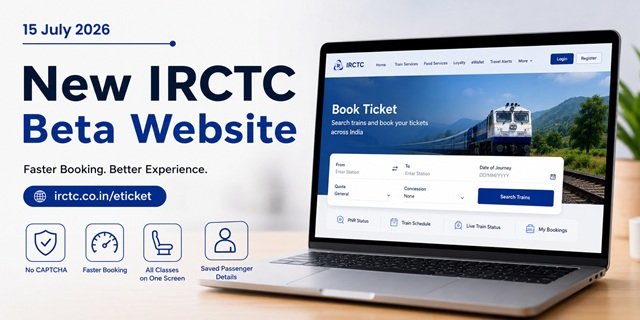
On 15 July 2026, Indian Railways launched the public beta version of its completely redesigned IRCTC ticket booking website. You can access it now at irctc.co.in/eticket. This is the first major redesign of the IRCTC booking portal since its launch in 2002. While the existing website processes around 14.5 lakh ticket bookings every day, the new platform delivers a faster, cleaner, and more user-friendly booking experience.
The Centre for Railway Information Systems (CRIS), the technology arm of Indian Railways, developed and hosts the new platform. Railway Minister Ashwini Vaishnaw reviewed feedback from regular users before approving the redesign, including suggestions from students of Malaviya National Institute of Technology (MNIT), Jaipur. One of the most common complaints was the repeated CAPTCHA verification during Tatkal booking, which often wasted valuable time. The new website addresses this issue and introduces several other improvements to make ticket booking quicker and more convenient.
This guide explains every major feature of the new IRCTC beta website, including login, ticket booking, Tatkal improvements, passenger management, and the latest changes, so you can start using the new platform with confidence.
At a Glance: New IRCTC Beta Website
| Particular | Details |
|---|---|
| Website | irctc.co.in/eticket |
| Public Beta Launch | 15 July 2026 |
| Developed by | Centre for Railway Information Systems (CRIS) |
| Managed by | Indian Railway Catering and Tourism Corporation (IRCTC) |
| Existing IRCTC Login | Works without creating a new account |
| Current Status | Public Beta (full rollout expected in the coming weeks) |
| Ticket Booking Capacity | Over 1.5 lakh tickets per minute (earlier 32,000 per minute) |
| PNR Enquiry Capacity | Over 40 lakh enquiries per minute (earlier 4 lakh per minute) |
How to Access the New IRCTC Website
Open irctc.co.in/eticket on your mobile phone, tablet, or computer to use the new IRCTC beta website. You can also visit the existing IRCTC homepage and click the link for the beta version. Both options take you to the same platform.
If you already have an IRCTC account, simply sign in with your existing username and password. Your current account, booking history, saved passengers, and other details continue to work on the new website. You do not need to register again or create a separate account.
If you are using IRCTC for the first time, click the registration option and complete the sign-up process. Enter your name, mobile number, email address, date of birth, and create a password. After verifying your mobile number through an OTP, your account becomes ready for ticket booking.
What’s New on the IRCTC Beta Website?
IRCTC has introduced several improvements in the beta version to make ticket booking faster and easier. Here are the four biggest changes that directly improve your booking experience.
1. Fewer CAPTCHA Interruptions
The earlier website frequently displayed CAPTCHA verification during the booking process, especially at critical stages of Tatkal booking. Even a short delay could reduce your chances of getting a confirmed ticket. The redesigned website removes unnecessary CAPTCHA checks, pop-ups, and distracting elements, allowing you to move from train search to payment with fewer interruptions.
2. Check Seat Availability Across All Classes Together
Instead of switching between Sleeper, AC 3 Tier, AC 2 Tier, and other classes one by one, the new website displays seat availability for all available classes on a single screen. This makes it easier to compare options and choose the most suitable class without repeating the search.
3. Faster Booking with a Simpler Checkout
IRCTC has reduced the number of steps between train selection and payment. The streamlined booking flow helps you reach the payment page more quickly, which can make a significant difference during Tatkal booking when every second matters.
4. Automatic Passenger Details for Repeat Bookings
The new website remembers passenger details from previous bookings, including names, age, and travel preferences. During future bookings, these details appear automatically, reducing manual data entry and helping families and frequent travellers complete bookings much faster.
How to Search for Trains on the New IRCTC Website
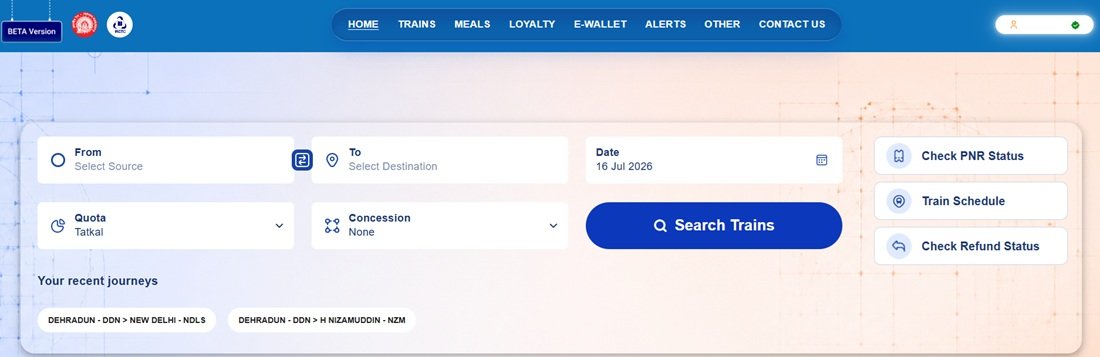
The new IRCTC homepage places the train search box at the centre of the screen, so you can start searching as soon as you log in.
Step 1: Visit irctc.co.in/eticket and sign in with your IRCTC username and password.
Step 2: Enter your boarding station in the From box and your destination in the To box. As you type, the website shows matching station names. Select the correct station from the list.
Step 3: Click the Date of Journey field and choose your travel date from the calendar.
Step 4: Select the appropriate Quota. Choose General for normal bookings, or select Tatkal or Premium Tatkal if you are booking under those quotas.
Step 5: If you are eligible for a railway concession, choose the correct option from the Concession list. Otherwise, leave this field unchanged.
Step 6: Click Search Trains. The website displays all available trains for your route along with seat availability in every class on the same screen, making it much easier to compare your options.
How to Book a Train Ticket on the New IRCTC Website
Once the search results appear, follow these steps to complete your booking.
Step 1: Find the train you want to travel on and select your preferred class, such as Sleeper, AC 3 Tier, AC 2 Tier, or Chair Car. Since all classes appear together, you can compare availability before making your choice.
Step 2: Click Book Now. The passenger details page opens.
Step 3: Enter the passenger details carefully, including name, age, gender, and any other required information. If you have travelled before, the website may automatically fill saved passenger details. Verify them before continuing.
Step 4: Choose your preferred berth if the option is available. Depending on your class, you can select preferences such as Lower Berth, Middle Berth, Upper Berth, Side Lower, or Side Upper.
Step 5: Check the fare, passenger details, boarding station, travel date, and train information once again. If everything is correct, click Proceed to Payment.
Step 6: Select your preferred payment method. The new website supports UPI, Debit Card, Credit Card, Net Banking, IRCTC eWallet, and other available payment options.
Step 7: Complete the payment. After a successful transaction, your booking confirmation appears on the screen. You also receive an SMS on your registered mobile number, and the booked ticket becomes available in the My Bookings section of your IRCTC account.
How to Book a Tatkal Ticket on the New IRCTC Website
The redesigned website offers the biggest advantage during Tatkal booking. With fewer booking steps and the removal of repeated CAPTCHA checks, you can complete the process much faster than before.
Tatkal booking starts at:
- 10:00 AM for AC classes (1A, 2A, 3A, 3E and CC)
- 11:00 AM for non-AC classes (Sleeper, Second Sitting and First Class)
Step 1: Log in to irctc.co.in/eticket at least 5 to 10 minutes before Tatkal booking opens. This helps you avoid delays during login.
Step 2: Keep your passenger details ready. If you have already saved them in your IRCTC account, simply verify the details during booking instead of typing everything again.
Step 3: Enter the From station, To station, and travel date, and select Tatkal from the Quota list.
Step 4: Click Search Trains and wait for the booking window to open.
Step 5: As soon as booking opens at 10:00 AM (AC classes) or 11:00 AM (non-AC classes), click Book Now for your preferred train and class.
Step 6: Review the automatically filled passenger details, choose your berth preference if required, and immediately continue to the payment page. Since the new website removes repeated CAPTCHA checks during booking, you can reach the payment page much faster.
Step 7: Complete the payment as quickly as possible. Once the payment succeeds, the website displays your booking confirmation and sends the ticket details to your registered mobile number.
Tip: Keep sufficient balance in your IRCTC eWallet before Tatkal booking starts. Since eWallet payments do not require bank OTP verification, they usually complete faster than most other payment methods. You can add money to your eWallet from the eWallet section after logging into your IRCTC account.
Fare Calendar: Compare Fares Before You Book
The redesigned IRCTC website introduces a Fare Calendar that helps you compare ticket fares across multiple travel dates without repeating the same search. If your travel dates are flexible, this feature makes it easier to find a cheaper ticket or better seat availability.
After searching for trains, click the Fare Calendar option available on the results page. The calendar displays fares for several dates in a weekly or monthly view. Simply select another date to instantly view trains, seat availability, and fares for that day without entering your journey details again.
This feature is especially useful if you can postpone or advance your journey by a day or two, as you may find lower fares or a higher chance of getting a confirmed ticket.
Explore All Services on the New IRCTC Website
The new IRCTC website brings almost every railway service together under a single navigation menu, making it easier to access important features without searching through multiple pages.
Train Services
The Train Services section covers everything related to railway journeys. From here, you can:
- Book train tickets
- Check connecting train options
- Track your PNR status
- Cancel e-Tickets
- View train schedules
- Track the live running status of trains
- Book a Full Tariff Rate (FTR) coach or an entire train
- Apply for pet travel (dogs and cats)
- Link your Aadhaar card with your IRCTC account
- Cancel eligible counter tickets
- Change the boarding station for eligible counter tickets
Food Services
Use the Food Services section to order meals during your journey. You can access e-Catering, book food through e-Pantry where available, and view the onboard food menu for your train.
Loyalty Programme
The Loyalty Programme section lets you manage your IRCTC reward benefits. You can check your loyalty points, compare IRCTC co-branded credit cards offered by SBI, Bank of Baroda, HDFC Bank, and RBL Bank, and link an eligible loyalty account to your profile.
IRCTC eWallet
The eWallet section explains how to activate and use the IRCTC digital wallet. Keeping your eWallet funded before Tatkal booking helps you complete payments faster because you do not need to switch to your bank’s payment page.
Travel Alerts
The Travel Alerts section displays official announcements from Indian Railways. Before travelling, check this section for important updates such as train rescheduling, cancellations, diversions, or platform changes.
Other Travel Services
Besides train booking, the new website also provides quick access to several travel-related services, including IRCTC iPAY, bus booking, flight booking, hotel reservations, holiday packages, e-Wheelchair booking, and other official offers.
Check PNR Status and Train Schedule Without Logging In
You do not need to sign in to use the PNR Status or Train Schedule tools. Both shortcuts appear directly on the homepage of the new IRCTC website.
To check your booking status, enter your 10-digit PNR number and click Check. The website displays your booking status, coach number, berth details, chart status, and other journey information.
To view a train’s timetable, enter the train number or train name in the Train Schedule search box. The website shows all scheduled stations along with arrival time, departure time, halt duration, and the days on which the train operates.
Ask Disha: IRCTC’s Virtual Assistant
If you need help while using the website, click the Ask Disha chatbot available on the screen. The virtual assistant answers common questions related to ticket booking, cancellations, refunds, PNR status, train information, account login, and other IRCTC services.
Ask Disha supports multiple Indian languages, making it easier for passengers to find answers without contacting customer support.
Book Tickets with Eligible Railway Concessions
The new IRCTC website lets eligible passengers book tickets under approved railway concession categories during the normal booking process. If you qualify for a concession, simply select the appropriate category before searching for trains. The system applies the eligible concession automatically while calculating the fare.
Concession categories available on Indian Railways include eligible Divyangjan (persons with disabilities), students, patients, and other notified passenger categories, subject to the applicable Railway rules and conditions.
Use the Website in Your Preferred Language
The redesigned IRCTC website supports multiple Indian languages. Use the language selector available on the homepage to switch the interface to your preferred language. This makes train booking easier for passengers who are more comfortable using their regional language.
RailOne App: Get the Same Features on Your Phone
If you prefer booking tickets on your mobile, you can use the official RailOne app. Developed by the Centre for Railway Information Systems (CRIS) under the Ministry of Railways, RailOne brings together almost every major Indian Railways service in a single application.
The app supports the same IRCTC booking system as the new website, so you can book tickets, check train information, and manage your journeys from your smartphone.
Download RailOne:
- Android: Google Play Store (Package ID: org.cris.aikyam)
- iPhone: Apple App Store
Before installing the app, verify that the developer is Centre for Railway Information Systems (CRIS). The app is free to download. At the time of writing, the latest available version is 2.1.61, released on 13 July 2026.
Sign in using your existing IRCTC username and password. You do not need to create a separate RailOne account.
What You Can Do with RailOne
- Book reserved and unreserved train tickets
- Track trains with real-time running status
- Check PNR status
- Order food to your seat through e-Catering
- Submit and track complaints through Rail Madad
- Request refunds for eligible cancelled tickets
- Find coach positions before your train arrives
- Pay through R-Wallet and get the applicable discount on unreserved tickets
- Use fingerprint or Face ID login on supported devices
- Switch between multiple Indian languages
When Will the New IRCTC Website Exit Beta?
The beta version is already live and fully functional. Indian Railways has opened it to the public so passengers can explore the redesigned interface and share feedback before the nationwide rollout.
At the same time, the Ministry of Railways is upgrading the Passenger Reservation System (PRS), which powers ticket reservations across IRCTC and other railway reservation channels. Once this backend upgrade is complete, the redesigned website will replace the existing portal for all users.
According to the Ministry of Railways, the full rollout is expected within a few weeks of the beta launch, although no official launch date has been announced yet.
You can already use irctc.co.in/eticket to book genuine railway tickets. The beta website is the official IRCTC booking platform—not a demo or testing website—and every successful booking made through it is a valid railway reservation.
How to Share Feedback on the New IRCTC Website
Indian Railways has released the new IRCTC website in public beta to collect feedback from passengers before the final rollout. If you notice a technical issue, experience any problem while booking, or have suggestions to improve the website, click the Feedback option available on the beta portal and submit your comments directly to IRCTC.
The Ministry of Railways and CRIS will review user feedback received during the beta phase before releasing the final version of the website.
IRCTC Customer Care and Support
If you need help with ticket booking, cancellations, refunds, loyalty services, or co-branded credit cards, use the official IRCTC contact details below.
Train Ticket Booking Support
- eQuery Portal: equery.irctc.co.in
- Email (e-Ticket Cancellation & TDR): etickets@irctc.co.in
- Railway Helpline (India): 14646
- International Support: +91-8044647999 / +91-8035734999
- Languages Supported: Hindi, English, Tamil, Telugu, Kannada, Malayalam, Marathi, Gujarati, Bengali, Assamese, Odia and Punjabi.
IRCTC Loyalty Programme
- Email: loyaltyprogram@irctc.co.in
IRCTC Registered Office
4th Floor, Tower-D, World Trade Centre, Nauroji Nagar, New Delhi – 110029
Co-branded Credit Card Support
- IRCTC SBI Card: 0124-39021212 / 18001801295 | Email: customercare@sbicard.com
- IRCTC Bank of Baroda Card: 1800225100 / 18001031006 | Email: crm@bobfinancial.com
- IRCTC HDFC Bank Card: 18002026161 / 18602676161 | HDFC Bank Contact Page
- IRCTC RBL Bank Card: 02262327777 / 02271190900 | Email: cardservices@rblbank.com
Quick Reference
| Particular | Details |
|---|---|
| New IRCTC Website | irctc.co.in/eticket |
| Beta Launch | 15 July 2026 |
| Ticket Booking Capacity | Over 1.5 lakh tickets per minute |
| CAPTCHA | Unnecessary CAPTCHA checks removed during booking |
| Existing IRCTC Login | Works on the new website |
| eQuery Portal | equery.irctc.co.in |
| Railway Helpline | 14646 |
| RailOne (Android) | Google Play Store |
| RailOne (iPhone) | Apple App Store |
| Aadhaar Guide | Aadhaar Card Guide |
| PAN Card Guide | PAN Card Guide |
| Voter ID Guide | Voter ID Guide |
Frequently Asked Questions
Q. Can I use my existing IRCTC username and password on the new website?
Ans. Yes. Your existing IRCTC account works on the new website at irctc.co.in/eticket. Simply sign in with your current username and password. You do not need to create a new account. Your booking history and saved passenger details remain available on the new platform.
Q. Can I book real train tickets through the new IRCTC beta website?
Ans. Yes. The beta website is the official IRCTC booking platform, not a demo. Every ticket booked through irctc.co.in/eticket is a valid railway reservation. The website uses the same payment gateway, generates valid booking confirmations, and sends ticket details by SMS just like the existing IRCTC portal.
Q. How does the new website make Tatkal booking faster?
Ans. The redesigned website removes repeated CAPTCHA interruptions during the booking process, reducing unnecessary delays. It also offers a simplified booking flow and automatically fills saved passenger details. In addition, the upgraded booking system can process more than 1.5 lakh ticket bookings per minute, compared to about 32,000 per minute earlier, helping improve performance during peak Tatkal booking hours.
Q. What is the Fare Calendar on the new IRCTC website?
Ans. The Fare Calendar lets you compare ticket fares across multiple travel dates on a single screen. Instead of searching the same route repeatedly, you can switch between different dates and instantly check fares, seat availability, and train options. It is especially useful if your travel dates are flexible.
Q. What is RailOne and how is it different from the old IRCTC Rail Connect app?
Ans. RailOne is the official all-in-one railway app developed by CRIS for the Ministry of Railways. It combines several railway services into a single application, including reserved and unreserved ticket booking, live train tracking, PNR enquiry, Rail Madad, e-Catering, refund services, and R-Wallet. You can sign in with your existing IRCTC username and password without creating a separate account.
Q. Does the new IRCTC website work on mobile phones?
Ans. Yes. The redesigned website works on smartphones, tablets, laptops, and desktop computers. The interface automatically adjusts to different screen sizes. If you prefer using a mobile app, install the official RailOne app for a more app-like booking experience.
Q. Which documents can I link or use with my IRCTC account?
Ans. You can link your Aadhaar card with your IRCTC account through the Train Services section. Depending on the applicable IRCTC rules, PAN details may also be required for higher booking limits or other specified services. During your journey, you can use a valid Voter ID or any other railway-approved identity document for ticket verification.
Q. When will the final version of the new IRCTC website launch?
Ans. Indian Railways has announced that the redesigned website will be rolled out fully after completing the Passenger Reservation System (PRS) upgrade. Although the Railways expects the rollout within a few weeks of the beta launch, no official launch date has been announced. Until then, passengers can continue booking tickets through the beta website.
Q. How can I send feedback about the new IRCTC website?
Ans. Open irctc.co.in/eticket and use the Feedback option available on the beta website. Describe the issue or suggestion and submit it. Indian Railways is collecting passenger feedback during the beta phase to improve the website before the final rollout.

Tabassum is a government document researcher and writer with over 5 years of experience exclusively dedicated to tracking and simplifying Central and State Government document processes across India. She has researched and published detailed guides on 100+ government documents and certificates – including Aadhaar Card, PAN Card, Ration Card, Domicile Certificate, and Birth Certificate – covering all states and the Central Government, helping lakhs of Indian citizens successfully complete their paperwork in simple, easy-to-understand language.