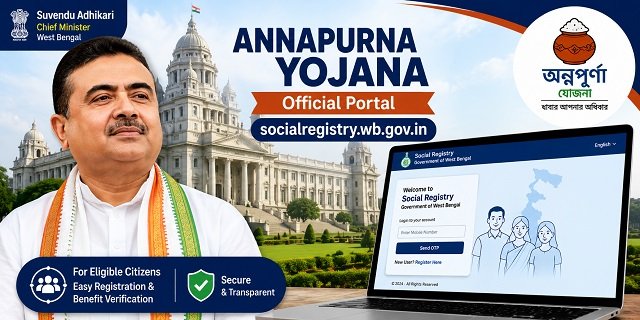
If you are looking for socialregistry.wb.gov.in, this is the official portal for the West Bengal Annapurna Yojana. The complete URL is https://socialregistry.wb.gov.in. This portal is developed by the National Informatics Centre (NIC) and is fully owned and operated by the Government of West Bengal. The portal is currently live and accessible for login using your mobile number and OTP. This guide covers everything you need to know about this portal.
Is socialregistry.wb.gov.in the Official Portal?
Yes. socialregistry.wb.gov.in is the genuine and verified government portal for Annapurna Yojana. Three clear indicators confirm its authenticity:
- The domain uses .wb.gov.in – the exclusive official domain of the Government of West Bengal. Genuine government portals never use .com, .org, or .in extensions.
- The portal footer confirms that the site is built by NIC and all content, data, and operations are owned by the Government of West Bengal.
- The portal title clearly displays “Government of West Bengal – Annapurna Yojana” with full official government branding.
The portal also has five active policy pages – Legal Disclaimer, Privacy Policy, Copyright Policy, Hyperlink Policy, and Terms and Conditions – all of which are live and accessible, confirming it is a fully deployed official government website.
Latest Update: West Bengal Social Registry Portal Brings Back Citizen Login with Enhanced Applicant Services
In a significant development for beneficiaries, the Government of West Bengal has restored the Citizen / Family Login facility on the official Social Registry Portal (socialregistry.wb.gov.in). Citizens can now log in again using their registered mobile number to access various beneficiary-related services online.
The restored portal now includes additional applicant-friendly features aimed at making the verification and grievance process more transparent and accessible.
One of the newly added services is the Track Status option. Through this feature, applicants can monitor the progress of their application in real time. The system displays whether the application is under process, approved, or rejected. If an application is rejected, the portal also provides the exact reason for rejection, enabling applicants to understand the issue and take appropriate corrective action.
Another important addition is the Objection & Claim module. This facility allows applicants to raise objections or submit claims if they believe that their application was rejected incorrectly or if there is any discrepancy in the verification process. Beneficiaries can submit their request online for review by the concerned authorities without the need for repeated visits to government offices.
With these updates, the Social Registry Portal has become more transparent and user-friendly. Beneficiaries can now check their application status, view rejection remarks, and request reconsideration of disputed cases directly through the portal, making the overall application and verification process more efficient.
How to Log in on socialregistry.wb.gov.in
The login process on this portal is simple and requires only your registered mobile number. Follow these steps:
- Open socialregistry.wb.gov.in on your mobile or computer browser.
- Enter your registered mobile number in the login field.
- Click on Send OTP. A one-time password will be delivered to your mobile number.
- Enter the OTP received on your phone and click Submit. You will be logged in successfully.
- If you have forgotten your password, use the Forgot Password option available at socialregistry.wb.gov.in/forget-password.
How to Submit Annapurna Yojana Application on socialregistry.wb.gov.in
Eligible applicants can complete their registration of Annapurna Yojana through the Family Level Data Collection Portal on socialregistry.wb.gov.in. Here is the complete step-by-step process:
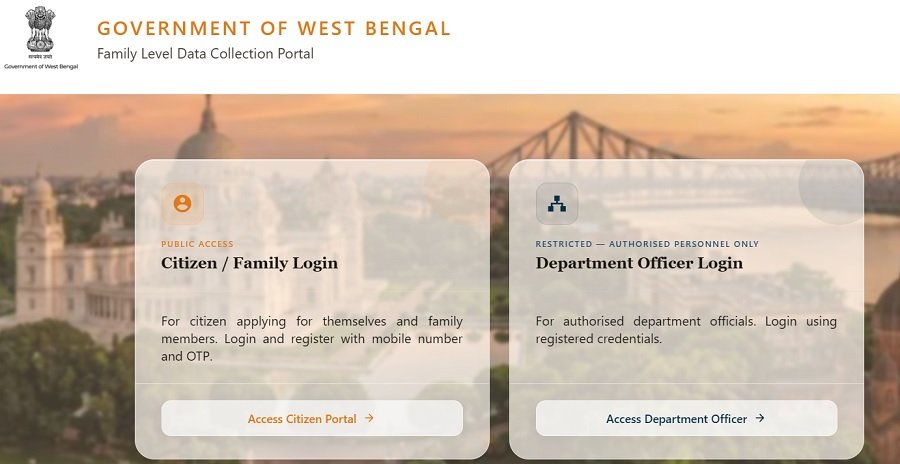
- Visit socialregistry.wb.gov.in and click on Citizen / Family Login.
- Select your district from the dropdown menu provided.
- Enter your mobile number and click Request OTP. Complete OTP verification to log in.
- Fill the Basic Information section – name, date of birth, gender, category, Aadhaar Card number, voter card details, and bank account information.
- Complete the Ration Card / Food Subsidy section with accurate details.
- Provide information under Assets, Income / Profession, and Identity Documents sections.
- Enter details of all existing government scheme benefits currently received by your family.
- Add all family members under the Family Identity section.
- Complete the declaration and consent section carefully.
- Review all entered information thoroughly and click Submit to complete your application.
Important: Use the mobile number linked to your Aadhaar card or your existing Lakshmir Bhandar account for login. Ensure this number is active and can receive SMS messages.
Annapurna Yojana Online Registration Status
The Government of West Bengal has activated the Family Level Data Collection Portal on socialregistry.wb.gov.in for Annapurna Yojana enrollments. Key updates as of June 2026:
- Existing Lakshmir Bhandar beneficiaries are being automatically migrated to Annapurna Yojana – no separate registration is required.
- New applicants can access and submit their details through the Family Level Data Collection Portal on socialregistry.wb.gov.in.
- Mobile OTP verification is mandatory for all logins and submissions.
- All mandatory sections must be completed before the final submission of the application.
How to Track Your Application on the Family Data Collection Portal
The Family Level Data Collection Portal enables applicants to monitor the progress of the information submitted during registration. After completing the family data collection process, applicants can log in to the portal using their registered mobile number and OTP to view the latest updates related to verification and approval.
To check your application status, follow these steps:
- Visit the official portal at socialregistry.wb.gov.in.
- Click on the Citizen / Family Login option.
- Select your district and enter the mobile number used during registration.
- Request an OTP and complete the login process.
- Once logged in, open your dashboard to check the current status of your application.
The dashboard may show different stages such as submitted, under verification, approved, or rejected. Applicants should check the portal regularly for the latest updates and any instructions issued by the concerned authorities.
If you are unable to access your account, use the password recovery option available on the portal or visit Forgot Password to regain access.
How to Correct Mistakes in the Submitted Annapurna Yojana Application Form
Applicants should verify all details carefully before final submission of the Annapurna Yojana Application on socialregistry.wb.gov.in. However, if any incorrect information has already been submitted, corrective action should be taken as soon as possible to avoid delays during verification.
Some commonly reported issues include:
- Spelling mistakes in the name or personal details.
- Incorrect family member information.
- Address mismatch between documents.
- Wrong identity document details.
- Incorrect family head information.
If any of these issues are found after submission, applicants should approach the concerned verification authority i.e. BDO or SDO, along with supporting documents. After verification, eligible corrections may be updated in the system as per the applicable procedure.
Applicants should ensure that details entered on the portal match their Aadhaar Card, ration card, bank account records, and other supporting documents. Consistent information helps avoid verification objections and unnecessary delays.
Applicants are advised to complete any required corrections well before the closure of the registration period.
How Verification and Benefit Processing Work
After successful submission on the Family Data Collection Portal, the information provided by the applicant undergoes verification by the concerned authorities. During this process, officials review the submitted details and supporting records to determine eligibility.
The processing cycle generally includes the following stages:
- Submission of family-level information through the portal.
- Verification of applicant and family records.
- Assessment of eligibility based on available data.
- Preparation of the approved beneficiary database.
- Release of benefits through the applicable payment system.
Applicants can log in periodically to track whether their application is under review, approved, or requires further action. Any status updates are generally reflected on the applicant dashboard.
To avoid delays in receiving benefits, applicants should ensure that their Aadhaar details, bank account information, and other mandatory records remain accurate and up to date throughout the verification process.
Annapurna Yojana Beneficiary Verification
To verify your Annapurna Yojana beneficiary status online, follow these steps:
- Go to socialregistry.wb.gov.in.
- Log in using your registered mobile number and OTP.
- Your beneficiary status and application details will be visible on your dashboard.
To verify the Rs. 3,000 monthly payment being credited to Lakshmir Bhandar-migrated beneficiaries, visit socialsecurity.wb.gov.in.
What Information is Collected on the Portal?
The Family Level Data Collection Portal creates a verified social registry of eligible households across West Bengal. During registration, you will need to provide the following details:
- Personal Details: Name, date of birth, gender, and category.
- Identity Documents: Aadhaar Card number and voter card information.
- Financial Details: Bank account number, income, and profession.
- Ration Card: Ration card number and food subsidy details.
- Assets: Household asset and property information.
- Family Details: Names and details of all family members.
- Scheme Benefits: Existing government scheme benefits already received.
Where to Apply Offline?
If the online registration module is not yet fully open in your area, you can submit your application offline at the following locations. The 90-day application window closes on approximately 29 August 2026 – do not wait until the last moment.
- Block Development Officer (BDO) Office – for rural areas
- Sub-Divisional Officer (SDO) Office
- Municipality Office – for urban areas
- Special Registration Camps organised at the gram panchayat, ward, and block levels
- Bangla Sahayata Kendra (BSK) – bsk.wb.gov.in
Official Portal Links
- Annapurna Yojana Main Portal – socialregistry.wb.gov.in
- Forgot Password – socialregistry.wb.gov.in/forget-password
- Payment Status Portal – socialsecurity.wb.gov.in
- Bangla Sahayata Kendra – bsk.wb.gov.in
- Privacy Policy – socialregistry.wb.gov.in
- Legal Disclaimer – socialregistry.wb.gov.in
Frequently Asked Questions
Q. What is socialregistry.wb.gov.in?
socialregistry.wb.gov.in is the official online portal for the West Bengal Annapurna Yojana, built by the National Informatics Centre (NIC). It allows eligible applicants to register, submit family-level information, and verify their beneficiary status using mobile OTP-based login.
Q. How do I log in to socialregistry.wb.gov.in?
Visit socialregistry.wb.gov.in, enter your registered mobile number, click Send OTP, and enter the OTP you receive. To reset your password, use the Forgot Password link at socialregistry.wb.gov.in/forget-password.
Q. I am an existing Lakshmir Bhandar beneficiary. Do I need to register again?
No. Existing active Lakshmir Bhandar beneficiaries are automatically migrated to Annapurna Yojana. Your Rs. 3,000 monthly payment started from 1 June 2026. You only need to use socialregistry.wb.gov.in if you are a completely new applicant. Check your payment status at socialsecurity.wb.gov.in.
Q. Has the Annapurna Yojana online registration started?
The portal is live, and login is functional. The government set 3 June 2026 as the target date for opening online registration. New applicants should try the portal and also apply offline at the BDO or SDO offices to avoid missing the deadline.
Q. What is the difference between Annapurna Bhandar and socialregistry.wb.gov.in?
Annapurna Bhandar (also called Annapurna Yojana) is the welfare scheme name that replaced Lakshmir Bhandar. socialregistry.wb.gov.in is the official online portal through which this scheme is being managed, and applications are being accepted.
Q. What documents do I need for registration on socialregistry.wb.gov.in?
You will need your Aadhaar card, voter card, ration card, bank account details, income information, and details of all family members. Keep all documents ready before starting the online application to avoid interruptions.
Q. How do I verify my Annapurna Yojana beneficiary status?
Login to socialregistry.wb.gov.in using your mobile OTP. Your beneficiary status and application details will appear on your dashboard. For payment verification of the Rs. 3,000 monthly amount, visit socialsecurity.wb.gov.in.
Q. What is the citizen portal link on socialregistry.wb.gov.in?
After logging in at socialregistry.wb.gov.in with your mobile OTP, you will be directed to your citizen dashboard. Always start from the homepage socialregistry.wb.gov.in and navigate after login, as the URL path may change once the full registration module is activated.

Tabassum is a government document researcher and writer with over 5 years of experience exclusively dedicated to tracking and simplifying Central and State Government document processes across India. She has researched and published detailed guides on 100+ government documents and certificates – including Aadhaar Card, PAN Card, Ration Card, Domicile Certificate, and Birth Certificate – covering all states and the Central Government, helping lakhs of Indian citizens successfully complete their paperwork in simple, easy-to-understand language.