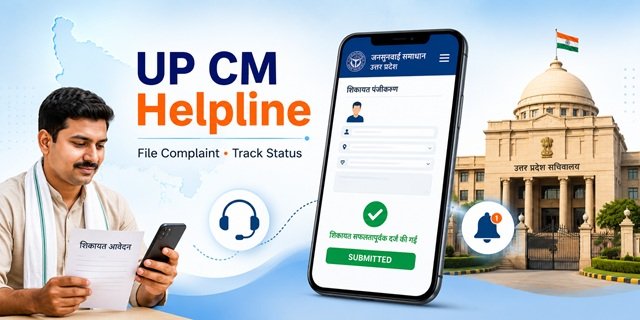
The Uttar Pradesh government runs one of the largest public grievance systems in India through the Jansunwai Samadhan portal at jansunwai.up.nic.in. Launched on 25 January 2016 at the district level and expanded to all levels on 20 February 2016, it is managed by the Lok Shikayat Vibhag under the Chief Minister’s Office, Lucknow. The system is built and hosted by the National Informatics Centre (NIC), Uttar Pradesh.
Through Jansunwai, any citizen of Uttar Pradesh can register a complaint against any state government department or officer, track its progress using a unique 14-digit reference number called the Sandarbh Sankhya, send a reminder if no action is taken, and give feedback on the resolution received. All complaint types, including CM Darbars, Tehsil Diwas, CSC submissions, and online filings converge on this single platform.
What You Can Complain About on UP CM Helpline
Jansunwai accepts complaints related to any state government department or service in Uttar Pradesh. Common categories include:
- Ration Card issues (application stuck, name not in list, FPS not giving ration, card correction)
- Revenue and land records (mutation, registry, khasra, khatauni)
- Pension non-payment (old age, widow, disability)
- Electricity and water supply complaints
- Roads, bridges, and public construction in your area
- Police complaints (state police matters, including FIR non-registration)
- Education department issues (school admissions, scholarships, Mid-Day Meal)
- Health department issues (state hospitals, medicines, ASHA workers)
- Housing schemes (PM Awas, state housing schemes)
- Welfare scheme benefits not received (old age pension, farmer benefits, SC/ST schemes)
- The government officer is not responding or taking action
- Corruption by a state government officer
What Jansunwai Does NOT Accept
The portal clearly states five categories that are not treated as Jan Shikayat (public grievances):
- Matters related to the Right to Information (RTI) – file these separately with the concerned Public Information Officer
- Cases already sub-judice or pending before a court of law
- Suggestions (not complaints)
- Demands for financial assistance or employment
- Service-related matters of government employees, such as transfers, unless they have already exhausted available departmental options
Before submitting, you must tick a box on the portal confirming that your complaint does not fall into any of these five categories.
What to Keep Ready Before Filing
- Mobile number (used for OTP verification during registration – keep it active)
- Name, address, district, and pin code
- Name of the department or officer your complaint is against
- Any previous application number or reference related to your issue
- Date when the problem started
- Scanned document or photograph as evidence (JPG or PDF, under 500 KB)
- A clear 2 to 3-sentence description of the issue, what happened, and what you want done
Filing a Complaint Online on the Jansunwai Portal
Step 1: Go to jansunwai.up.nic.in. On the homepage, click on “शिकायत पंजीकरण” (Complaint Registration) or go directly to jansunwai.up.nic.in/onlineComplaint.
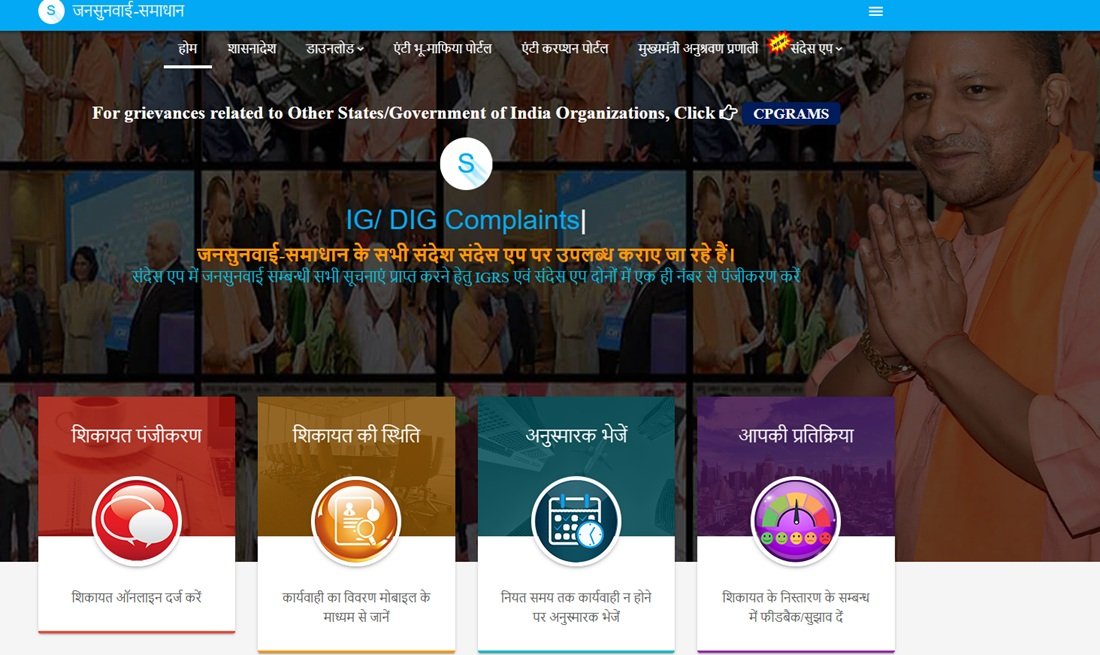
Step 2: A pop-up appears listing the five categories not accepted as Jan Shikayat. Read them carefully. If your complaint does not fall in any of these categories, tick the checkbox saying “मैं सहमत हूँ” (I Agree) and click “सबमिट करें” (Submit).
Step 3: The complaint registration form opens. Enter your mobile number in the field provided and click “Send OTP”. An OTP is sent to your mobile. Enter it to verify your number. This OTP-verified mobile number becomes the identity linked to your complaint.
Step 4: Fill in the complaint form with the following details:
- Your full name
- Your complete address, including district, tehsil, and pin code
- Select the department your complaint is related to from the dropdown
- Write the complaint description clearly in the text box
- Upload supporting documents if available (JPG or PDF, under 500 KB)
Step 5: Enter the captcha code shown on screen and click “Submit” to register the complaint.
Step 6: A unique 14-digit Sandarbh Sankhya (reference number) is generated immediately after submission. This number is also sent by SMS to your registered mobile number. Save this number carefully. You need it to track status, send reminders, and give feedback.
Understanding Your 14-Digit Sandarbh Sankhya
Every complaint registered on Jansunwai gets a unique 14-digit Sandarbh Sankhya. The first digit of this number tells you how the complaint was received:
- 1 – CM Sandarbh (submitted at CM Darbar)
- 2 – DM Sandarbh (submitted at District Magistrate level)
- 3 – Tehsil Diwas Sandarbh (submitted at Tehsil Diwas)
- 4 – Online Sandarbh (submitted through jansunwai.up.nic.in or the app)
- 5 – CSC or Lokvani Sandarbh (submitted through a Common Service Centre)
- 6 – PG Portal Sandarbh (forwarded from the central CPGRAMS portal)
For example, a number starting with 4 like 40018316000393, is an online complaint. A number starting with 1 like 11166160021769, is a CM Darbar complaint.
Tracking Your Complaint Status
Step 1: Go to jansunwai.up.nic.in/ComplaintTracker.
Step 2: Enter your 14-digit Sandarbh Sankhya in the first field and your registered mobile number in the second field.
Step 3: Enter the captcha code and click “सबमिट करें”.
Step 4: An OTP is sent to your registered mobile number. Enter it and click “सत्यापित ओ.टी.पी.” (Verify OTP).
Step 5: The current status of your complaint is displayed along with the complete action trail – which department it was sent to, what response was received, and whether it is pending, in process, or closed.
The portal retains details of resolved complaints for up to 3 months. If your complaint was resolved more than 3 months ago, the status may no longer be visible online.
You can also retrieve all complaints registered from your mobile number by clicking “मोबाइल नंबर से पंजीकृत शिकायतें प्राप्त करें” on the tracker page. You can also check at samadhan.gov.in, the alternate URL for the same portal.
Sending a Reminder if No Action is Taken
If your complaint has been registered but no action is taken within the expected timeframe, you can send a formal reminder through the portal.
Step 1: Go to jansunwai.up.nic.in/SendReminderNew.
Step 2: Enter your 14-digit Sandarbh Sankhya and registered mobile number.
Step 3: Complete the captcha and OTP verification.
Step 4: Your complaint details will appear. Confirm and submit the reminder. The reminder is officially recorded in the system and escalates the complaint to the officer responsible for resolution.
Giving Feedback After Resolution
After your complaint is marked as resolved, you can rate the quality of the resolution through the feedback section. This feedback is reviewed by senior officers and can trigger the reopening of the complaint if the resolution was unsatisfactory.
Step 1: Go to jansunwai.up.nic.in/onlineFeedbackEntry.
Step 2: Enter your Sandarbh Sankhya and registered mobile number, complete OTP verification.
Step 3: Rate the resolution and add your feedback or suggestions. Submit the form.
If you rate the resolution as unsatisfactory, your complaint can be reopened by the reviewing officer for further action.
Filing by Phone: Helpline 1076
Call 1076 or 18001801076 from any mobile or landline. The helpline runs 24 hours a day, 7 days a week. When connected:
- Select your preferred language (Hindi or English) when prompted
- Tell the representative your name, address, district, the department your complaint relates to, and a brief description of the issue
- The representative registers your complaint in the same Jansunwai system and gives you a Sandarbh Sankhya by phone
- Note this number immediately, as it is used for all future tracking on the portal
Phone complaints receive the same tracking, reminders, and feedback mechanism as online complaints. They appear in the system with a prefix depending on the source.
Filing Through the Jansunwai Mobile App
The Jansunwai Android app for citizens is available on the Google Play Store.
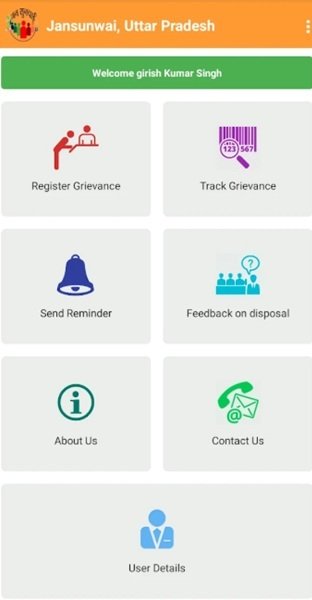
Using the app, you can:
- Register a new complaint from your phone
- Track the status of any complaint using your Sandarbh Sankhya
- Send reminders for unresolved complaints
- Give feedback on resolved complaints
- Receive notifications about your complaint through the Sandes App
The complaint registration process on the app mirrors the portal exactly. OTP verification is required. The Sandarbh Sankhya generated on the app is the same format as the portal.
Filing Through a CSC or Lokvani Kendra
If you are not comfortable using the internet or the app, visit your nearest Common Service Centre (CSC) or Lokvani Kendra. The operator will file your complaint in the Jansunwai system on your behalf. Complaints filed this way receive a Sandarbh Sankhya starting with the digit 5. Find your nearest CSC at locator.csccloud.in.
Notifications Through the Sandes App
The Jansunwai portal now delivers all complaint updates and status messages through the Sandes App, developed by NIC. To receive notifications, register on both Jansunwai and the Sandes app using the same mobile number. Once linked, every status change on your complaint appears as a Sandes notification without needing to check the portal manually. The Sandes iOS app is available at the Apple App Store.
Complaints Against Corruption and Land Mafia
Jansunwai also links to two dedicated portals for serious offences:
Anti-Corruption Portal: For complaints specifically involving bribery or corruption by a state government officer, use acp-cm.up.gov.in. This portal is connected to the CM’s office and handles corruption-specific complaints through a dedicated track.
Anti-Bhu-Mafia Portal: For complaints involving illegal encroachment of land by land mafias, use abmp.up.gov.in. This portal is dedicated to encroachment-related complaints and tracks the removal of illegal occupation of government and private land.
Escalation If Jansunwai Does Not Help
If your complaint is repeatedly closed without resolution on Jansunwai, follow this escalation path:
- Send a Reminder: Use jansunwai.up.nic.in/SendReminderNew to formally escalate within the portal
- Rate Feedback as Unsatisfactory: Use jansunwai.up.nic.in/onlineFeedbackEntry – unsatisfactory ratings are reviewed by senior officers
- CPGRAMS: File at pgportal.gov.in if the issue involves a central government department or if state-level escalation has failed. Central complaints are forwarded to the state for resolution
- UP Lokayukta: For complaints involving misconduct or corruption by state officials, approach the UP Lokayukta at lokayukta.up.gov.in
- Allahabad High Court: For matters involving fundamental rights violations, a writ petition can be filed at the Allahabad High Court as a last resort
Why Was My Jansunwai Complaint Closed Without Action?
Many citizens find that their Jansunwai CM Helpline Complaint is marked as resolved even though the issue remains unresolved. This can happen when the complaint is forwarded to the wrong department, supporting documents are insufficient, the complaint falls outside the scope of Jansunwai, or the department submits a response without fully addressing the issue.
- Complaint forwarded to the wrong department
- Insufficient supporting documents or evidence
- The issue falls outside the jurisdiction of the selected department
- Duplicate complaint already exists in the system
- Matter relates to RTI, court cases, or employee service issues
- The department provided a reply, but did not resolve the actual problem
If your complaint is closed without satisfactory action, use the Feedback option on the Jansunwai portal and rate the resolution as unsatisfactory. You can also submit a reminder through the portal for further review.
Quick Reference
- Register a Complaint: jansunwai.up.nic.in/onlineComplaint
- Track Complaint Status: jansunwai.up.nic.in/ComplaintTracker
- Send Reminder: jansunwai.up.nic.in/SendReminderNew
- Give Feedback: jansunwai.up.nic.in/onlineFeedbackEntry
- Jansunwai Citizen App: Download on Google Play
- Sandes App (for notifications): Download on Google Play
- Anti-Corruption Portal: acp-cm.up.gov.in
- Anti-Bhu-Mafia Portal: abmp.up.gov.in
- UP Lokayukta: lokayukta.up.gov.in
- CPGRAMS (Central): pgportal.gov.in
- Helpline: 1076 and 18001801076
- Email: jansunwai-up@gov.in
- CSC Locator: locator.csccloud.in
Frequently Asked Questions
Q. What is the Jansunwai portal and who manages it?
Ans. Jansunwai Samadhan is the official public grievance portal of the Government of Uttar Pradesh. It is managed by the Lok Shikayat Vibhag under the Chief Minister’s Office, Lucknow, and is built and hosted by the National Informatics Centre (NIC), Uttar Pradesh. It was launched on 25 January 2016 at the district level and expanded statewide on 20 February 2016.
Q. What is a Sandarbh Sankhya?
Ans. Sandarbh Sankhya is the unique 14-digit reference number generated by the Jansunwai system after your complaint is successfully registered. It is sent by SMS to your registered mobile number. The first digit of this number tells you the source of the complaint: 4 means it was filed online, 5 means it came from a CSC or Lokvani Kendra, and 1 means it is a CM Darbar complaint. You need this number to track status, send reminders, and give feedback.
Q. Can I file a complaint without a mobile number?
Ans. No. OTP verification through a mobile number is mandatory for registering a complaint online. If you do not have a smartphone, call 1076 and the helpline representative will register the complaint and provide a Sandarbh Sankhya verbally. You can also visit a CSC or Lokvani Kendra where the operator files on your behalf.
Q. My complaint was closed but the problem is not solved. What do I do?
Ans. Go to jansunwai.up.nic.in/onlineFeedbackEntry, enter your Sandarbh Sankhya and mobile number, complete OTP verification, and rate the resolution as unsatisfactory with a description of what remains unresolved. Senior officers review unsatisfactory feedback and can reopen the complaint. If this also fails, send a reminder through jansunwai.up.nic.in/SendReminderNew.
Q. Can I complain about an RTI matter on Jansunwai?
Ans. No. RTI-related matters are explicitly excluded from Jansunwai. For RTI applications, file directly with the Public Information Officer (PIO) of the relevant department. Jansunwai also does not accept court-pending matters, suggestions, demands for financial assistance, or government employee service matters.
Q. How do I know my complaint has been forwarded to the right department?
Ans. Check the status at jansunwai.up.nic.in/ComplaintTracker using your Sandarbh Sankhya. The status page shows the complete action trail, including which department or officer the complaint was forwarded to and when. If it was forwarded to the wrong department, mention this in the feedback section or send a reminder with a note specifying the correct department.
Q. What is the Anti-Corruption Portal and when should I use it?
Ans. The Anti-Corruption Portal at acp-cm.up.gov.in is a separate dedicated platform for complaints specifically involving bribery or corrupt practices by state government officers. Use this for corruption-specific complaints. For general grievances about officer inaction or service delays, use Jansunwai directly.
Q. What is the Anti-Bhu-Mafia Portal?
Ans. The Anti-Bhu-Mafia Portal at abmp.up.gov.in handles complaints related to illegal encroachment of government or private land by land mafias in Uttar Pradesh. This is a dedicated portal linked to the CM’s office for encroachment removal and is separate from Jansunwai.
Q. How do I get notifications without checking the portal every time?
Ans. Download the Sandes App (developed by NIC) on Android or iOS and register with the same mobile number you used on Jansunwai. Once both are linked to the same number, every update on your complaint appears as a Sandes notification on your phone automatically.
Q. Can I file a complaint in English on the Jansunwai portal?
Ans. The Jansunwai portal supports both Hindi and English. Use the language selector in the top menu of jansunwai.up.nic.in to switch between Hindi and English. However, official responses from departments are typically in Hindi.
Q. Is there a time limit for how quickly my complaint will be resolved?
Ans. The Jansunwai system does not publish a fixed statutory deadline publicly, but the portal’s reminder mechanism is designed to escalate automatically when complaints remain unresolved beyond the expected timeframe. Online complaints filed through Jansunwai are monitored by the CM Monitoring System at cmis.up.gov.in, which tracks unresolved cases at every administrative level.
Q. How is filing on Jansunwai different from filing on CPGRAMS?
Ans. Jansunwai handles complaints against state government departments and officers of Uttar Pradesh. CPGRAMS at pgportal.gov.in handles complaints against central government ministries and departments. If your complaint involves a state subject like ration cards, pensions, electricity, or police, use Jansunwai. If it involves a central department like Income Tax, Railway, Passport, or EPFO, use CPGRAMS. When both are involved, file on both separately.

Tabassum is a government document researcher and writer with over 5 years of experience exclusively dedicated to tracking and simplifying Central and State Government document processes across India. She has researched and published detailed guides on 100+ government documents and certificates – including Aadhaar Card, PAN Card, Ration Card, Domicile Certificate, and Birth Certificate – covering all states and the Central Government, helping lakhs of Indian citizens successfully complete their paperwork in simple, easy-to-understand language.