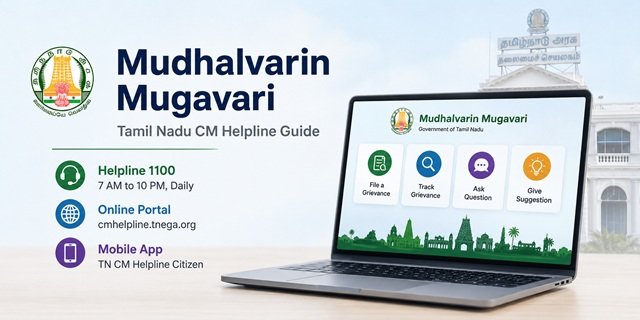
Mudhalvarin Mugavari (முதல்வரின் முகவரி), meaning “The Chief Minister’s Address”, is the official public grievance redressal system of the Government of Tamil Nadu. Citizens can use it to submit complaints, ask questions about government services, and share suggestions for improving public administration.
The service is available through the official portal cmhelpline.tnega.org and the toll-free helpline 1100, which operates from 7:00 AM to 10:00 PM every day, including Sundays and government holidays.
The platform is developed and managed by the Tamil Nadu e-Governance Agency (TNeGA). Officially, it is known as the Integrated and Inclusive Public Grievance CM Helpline Management System (IIPGCMS).
You can access the service through multiple official channels, including the web portal, helpline, mobile app, email and other communication methods supported by the Government of Tamil Nadu.
If you are looking for grievance portals in other states, read our CM Helpline India guide. For issues related to Smart Ration Cards, visit our Tamil Nadu Ration Card guide.
What Can You Submit on Mudhalvarin Mugavari?
You can use the portal for different types of public grievances and service-related requests, including:
- Grievances: Complaints about delays, deficiencies or problems in receiving government schemes and public services.
- Civic Issues: Local civic problems such as damaged public property, overflowing garbage, broken street lights, open manholes, waterlogging and similar public infrastructure issues.
- Other Public Issues: Matters affecting the public that do not fall under the available grievance categories.
- Questions: Queries about government schemes, departments, public services or eligibility.
- Suggestions: Recommendations to improve government services, policies or public welfare programmes.
Common Issues You Can Report
You can use Mudhalvarin Mugavari to report a wide range of problems related to Tamil Nadu Government departments and public services. Some of the most common grievance categories include:
- Smart Ration Card issues such as application delays, TNPDS eKYC problems, FPS not distributing food grains, or correction of card details.
- Land-related services, including patta records, land records and revenue department matters.
- Delay in receiving state pension benefits such as old-age, widow or disability pension.
- Electricity supply, drinking water and other public utility-related complaints.
- Government hospital services, availability of medicines and other public health issues.
- Municipal and local body problems, including damaged roads, broken street lights, blocked drains, garbage clearance and waterlogging.
- School education, scholarships, mid-day meal and other education-related issues.
- Delay or non-receipt of benefits under Tamil Nadu Government welfare and housing schemes.
- Complaints regarding delay, negligence or unsatisfactory service by government offices or officials.
Important: The official Mudhalvarin Mugavari portal clearly states that patta-related applications and certificate services (such as income, community and nativity certificates) are processed only through the e-Sevai system. Submit these applications through your nearest e-Sevai Centre or online at tnesevai.tn.gov.in instead of filing them on the CM Helpline.
What to Keep Ready Before Filing a Grievance
Keeping the required information ready beforehand will help you submit your grievance quickly and avoid delays.
- Your registered mobile number for OTP login or your registered email ID and password.
- The name of the concerned government department, if known.
- Your complete address, including district details.
- The date or period when the issue occurred.
- Any application number, acknowledgement number or previous reference number related to the matter.
- Supporting documents, photographs or videos, if available (maximum file size: 20 MB per file).
- A clear and concise description of the issue in Tamil or English.
How to File a Complaint Online on the Mudhalvarin Mugavari Portal
You can submit your grievance online through the official Mudhalvarin Mugavari portal from your mobile phone or computer. The process takes only a few minutes if you keep the required details and supporting documents ready.
Step 1: Open the Official Portal
Visit cmhelpline.tnega.org. The portal opens in Tamil by default. If you prefer English, click the language option available at the top of the page.
Step 2: Create an Account or Sign In
If you are using the portal for the first time, click Sign Up. You can register using either your mobile number or your email address.
- Mobile Number: Log in using an OTP sent to your registered mobile number.
- Email ID: Create a password during registration and use it for future logins.
If you already have an account, simply click Sign In and log in.
Step 3: Select “File a Grievance”
After logging in, open your dashboard and click File a Grievance to start a new complaint.
Step 4: Fill in the Grievance Form
Complete the application carefully by providing the following information:
- Select the concerned government department. If you are unsure, choose Other Petitions. The grievance will be routed to the appropriate department after review.
- Describe your problem clearly in Tamil or English. Mention when the issue started, where it occurred and the action you expect from the department.
- Enter your personal details and communication address.
- Upload supporting documents, photographs or videos, if available. The maximum file size allowed is 20 MB per file.
Step 5: Review and Submit
Check all the information carefully before submitting the grievance. Once you are satisfied that everything is correct, click Submit.
Step 6: Save Your Grievance ID
After successful submission, the portal generates a unique Grievance ID. An acknowledgement is also sent to your registered mobile number. Keep this Grievance ID safe because you will need it to track the status of your complaint or contact the helpline in the future.
How to File a Complaint by Calling 1100
If you are unable to use the online portal, you can register your grievance by calling the toll-free helpline 1100. The helpline operates daily from 7:00 AM to 10:00 PM, including Sundays and government holidays.
When you speak with the helpline executive, keep the following information ready:
- Your name, mobile number and complete address.
- The district and department related to your grievance, if known.
- A clear explanation of your complaint and the assistance you require.
Once your complaint is registered, you will receive a Grievance ID. Note this number carefully, as it will be required whenever you want to check the status of your complaint or contact the helpline again.
If you submitted your grievance through email, post or social media, you can also call 1100 and provide your Grievance ID or registered mobile number to enquire about its latest status.
How to File a Complaint Using the TN CM Helpline App
If you prefer using your smartphone, you can submit and track grievances through the official TN CM Helpline Citizen app developed by TNeGA.
- Android: Download from Google Play
- iPhone (iOS): Search for “TN CM Helpline Citizen” on the Apple App Store.
After installing the app, sign in using your registered mobile number (OTP) or your email ID and password. The login process is the same as the official web portal.
Once logged in, you can:
- File a new grievance.
- Track the status of your existing grievances.
- Receive notifications about updates to your complaint.
If you use the same login credentials on both the website and the mobile app, your grievances are available from a single account.
How to File a Complaint by Email
You can also submit your grievance by email to cmcell@tn.gov.in.
Include the following details in your email:
- Your full name and mobile number.
- Your complete postal address and district.
- The concerned department, if known.
- A clear description of your grievance.
- Supporting documents or photographs, if applicable.
If you need an update on your grievance, contact the CM Helpline on 1100 and provide your mobile number or any reference details available with you.
How to File a Complaint by Post
If you wish to submit your grievance offline, send a written application to:
Special Officer
Mudhalvarin Mugavari Department
Secretariat, Chennai – 600009
Your application should include:
- Your full name and contact details.
- Your complete address.
- The department related to the grievance.
- A detailed description of the issue.
- Photocopies of supporting documents, if available.
To enquire about the status of your postal grievance, contact the CM Helpline by dialling 1100.
Can You File a Complaint Through Social Media?
The Government of Tamil Nadu also maintains an official presence on social media platforms. If required, you may contact the official accounts with your grievance or seek guidance on the appropriate grievance redressal process.
For official complaint registration and status tracking, the Mudhalvarin Mugavari portal, mobile app and helpline remain the recommended channels.
Can You Visit the Office in Person?
Yes. Citizens may also visit the Mudhalvarin Mugavari Department at the Secretariat, Chennai – 600009 for grievance-related assistance, wherever applicable.
How to Track Your Grievance Status
You can check the latest status of grievances submitted through the Mudhalvarin Mugavari portal or the TN CM Helpline Citizen app by logging into your account.
Step 1: Log In
Visit cmhelpline.tnega.org and sign in using your registered mobile number (OTP) or your email ID and password.
Step 2: Open My Dashboard
After logging in, click My Dashboard from the main menu.
Step 3: View Your Grievances
Your dashboard displays all grievances submitted using the same account. For each grievance, you can view details such as the Grievance ID, submission date, concerned department and the latest available status.
Step 4: Check the Latest Update
Select any grievance to view its complete details and the latest action or remarks available on the portal.
Note: Keep your Grievance ID safe. You may need it while contacting the helpline or seeking further assistance.
Important: Grievances submitted through the online portal or the official mobile app can be viewed in My Dashboard. If you submitted your grievance through the helpline, email or post and need a status update, contact the toll-free helpline 1100 with your Grievance ID or registered mobile number.
What If You Change Your Mobile Number?
If you change the mobile number used for your Mudhalvarin Mugavari account, log in using the account linked with your grievance whenever possible. If you are unable to access your earlier account or need information about an existing grievance, contact the CM Helpline on 1100 and provide your Grievance ID or previously registered mobile number for assistance.
Not Receiving the OTP?
If you do not receive the OTP, first ensure that your mobile number has network coverage and is able to receive SMS messages. You can request another OTP from the login page.
If the problem continues, contact cmcell@tn.gov.in or call the toll-free helpline 1100 for assistance.
What If Your Grievance Is Closed but the Problem Still Exists?
If your grievance has been marked as resolved but the issue remains unresolved, you can take one of the following steps:
- Use the Appeal Option: If an appeal option is available for your grievance on the portal, submit your appeal with complete details.
- Contact the CM Helpline: Call 1100, provide your Grievance ID and explain why you are not satisfied with the resolution.
- Submit a Fresh Grievance: If necessary, file a new grievance and mention your earlier Grievance ID so that the department can refer to your previous complaint.
How to Escalate an Unresolved Grievance
If your grievance is still not resolved, you may consider the following options:
- Contact the CM Helpline (1100): Request further assistance by quoting your Grievance ID.
- Use the Appeal Facility: If available, submit an appeal through the Mudhalvarin Mugavari portal.
- For Central Government Departments: If your complaint relates to a Central Government organisation such as Railways, EPFO, Passport or Income Tax, submit it through CPGRAMS (pgportal.gov.in).
- Share Your Feedback: You can also submit your experience through the official Mudhalvarin Mugavari Feedback Form.
Quick Reference
| Particular | Details |
|---|---|
| Official Portal (English) | cmhelpline.tnega.org/portal/en/home |
| Official Portal (Tamil) | cmhelpline.tnega.org/portal/ta/home |
| Sign Up | Create an Account |
| Sign In | Login to Your Account |
| Official FAQ | Mudhalvarin Mugavari FAQ |
| Android App | TN CM Helpline Citizen |
| Helpline | 1100 (7:00 AM – 10:00 PM, daily including government holidays) |
| cmcell@tn.gov.in | |
| Postal Address | Special Officer, Mudhalvarin Mugavari Department, Secretariat, Chennai – 600009 |
| e-Sevai Portal | tnesevai.tn.gov.in (Patta and Certificate Services) |
| Central Government Complaints | CPGRAMS (pgportal.gov.in) |
Frequently Asked Questions (FAQs)
Q. What is Mudhalvarin Mugavari?
Ans. Mudhalvarin Mugavari, meaning “The Chief Minister’s Address”, is the official public grievance redressal system of the Government of Tamil Nadu. It is managed through the Mudhalvarin Mugavari Department and supported by the Tamil Nadu e-Governance Agency (TNeGA). Citizens can submit grievances, questions and suggestions through the official portal and other notified channels.
Q. How can I file a complaint under Mudhalvarin Mugavari?
Ans. You can submit your grievance through the official web portal, the TN CM Helpline Citizen mobile app, the toll-free helpline 1100, email, or by post. Choose the option that is most convenient for you.
Q. What is a Grievance ID?
Ans. A Grievance ID is the unique reference number generated after your complaint is successfully registered. Keep this number safely, as it is required for tracking your grievance or contacting the helpline.
Q. Is the 1100 helpline available on Sundays and government holidays?
Ans. Yes. The toll-free helpline 1100 operates daily from 7:00 AM to 10:00 PM, including Sundays and government holidays.
Q. Can I submit my grievance in Tamil?
Ans. Yes. Both the Mudhalvarin Mugavari portal and the mobile application support Tamil and English. You can choose your preferred language before filing the grievance.
Q. What should I do if I do not know the concerned department?
Ans. Select Other Petitions while filing the grievance and describe your issue clearly. The grievance will be reviewed and forwarded to the appropriate department, wherever applicable.
Q. Can I track complaints submitted by phone, email or post online?
Ans. If online tracking is not available for your complaint, contact the CM Helpline on 1100 and provide your Grievance ID or registered mobile number to obtain the latest status.
Q. What is the maximum file size allowed for uploads?
Ans. You can upload supporting documents, photographs or videos up to 20 MB per file. Upload only documents that are directly related to your grievance.
Q. What can I do if my grievance is closed but the issue is still not resolved?
Ans. If an appeal option is available on the portal, you may submit an appeal. You can also contact the CM Helpline on 1100 or file a fresh grievance with reference to your earlier Grievance ID.
Q. Can I apply for patta transfer or certificates through Mudhalvarin Mugavari?
Ans. No. Applications for patta-related services and certificates such as income, community and nativity certificates are processed through the e-Sevai portal or authorised e-Sevai Centres.
Q. How long does it take to resolve a grievance?
Ans. The time required depends on the concerned department and the nature of the grievance. You can check the latest status through your account on the portal or by contacting the CM Helpline.
Q. Can I use Mudhalvarin Mugavari for Central Government complaints?
Ans. No. Mudhalvarin Mugavari is meant for grievances relating to Tamil Nadu Government departments and services. Complaints against Central Government departments should be submitted through CPGRAMS.

Tabassum is a government document researcher and writer with over 5 years of experience exclusively dedicated to tracking and simplifying Central and State Government document processes across India. She has researched and published detailed guides on 100+ government documents and certificates – including Aadhaar Card, PAN Card, Ration Card, Domicile Certificate, and Birth Certificate – covering all states and the Central Government, helping lakhs of Indian citizens successfully complete their paperwork in simple, easy-to-understand language.