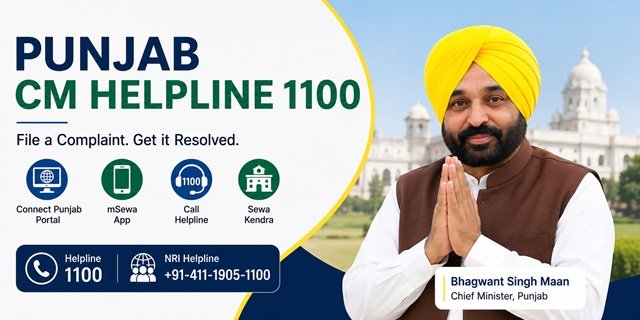
The Government of Punjab runs its public grievance system through Connect Punjab, the integrated citizen service and grievance portal at connect.punjab.gov.in. It is also accessible at esewa.punjab.gov.in. The system is managed by the Department of Governance Reforms and Public Grievances (DGR&PG), Government of Punjab, under the Policy on Public Grievance Redressal 2020, which brought all state departments onto a single unified platform. The toll-free helpline is 1100. NRIs can reach the same system at +91-411-1905-1100.
Connect Punjab offers four channels for filing a complaint: the web portal, the mSewa mobile app (available on Android and iOS), the call centre at 1100, and in person at any Sewa Kendra across Punjab. Every filed complaint generates a unique Grievance ID that can be used to track progress, submit appeals, and escalate if needed. The system has a formal three-level escalation structure – from the Designated Officer at the department, to the First Appellate Officer (Public Grievance Officer), to the Second Appellate Officer (Head of Department) – with the Chief Minister’s Office as the final escalation point.
For CM Helpline portals across all states, read our CM Helpline India Guide. For ration card services specific to Punjab, read our Punjab Ration Card Guide.
What You Can Complain About
Connect Punjab’s grievance system covers all state government departments, officers, and services. Common categories include:
- Ration Card issues – new application delayed, FPS not distributing food grains, SMART Ration Card correction, ePoS machine not working
- Revenue department issues – mutation, jamabandi, fard, property registration
- State pension schemes not credited
- Electricity complaints against PSPCL or PEDA
- Water supply complaints against PWSSB or local bodies
- Punjab Police complaints (select department DGP and category Punjab Police)
- Cyber crime complaints (select subcategory Cyber Crime under Punjab Police)
- Municipal corporation, Nagar Panchayat, or Gram Panchayat service failures
- State government hospital, medicine, and health scheme complaints
- Education department issues – school admissions, scholarships, mid-day meal
- Housing scheme benefits not received
- A government officer is not responding or demanding a bribe
- Any service delay or non-delivery under a state department
Registering on the Portal for the First Time
Connect Punjab requires a one-time registration with Aadhaar verification before you can file a grievance. After this, log in anytime with password, OTP, or DigiLocker.
Step 1: Go to connect.punjab.gov.in. Click “Sign-Up” on the homepage.
Step 2: Fill in the registration form with your Name, Father’s Name, Email ID, Mobile Number, District, and Tehsil. Set a password and click Submit.
Step 3: Aadhaar verification is required. Select “OTP-based Aadhaar Verification” and click Submit. Enter the OTP received on your Aadhaar-linked mobile number to complete verification.
Step 4: Your account is created. For all future sessions, click “Login” on the homepage and enter your credentials. Login options available: Username + Password, Mobile OTP, or DigiLocker login.
Filing a Complaint Online on Connect Punjab
Step 1: Log in at connect.punjab.gov.in using your registered credentials.
Step 2: On your dashboard, click “Apply Grievance” from the Citizen Corner menu or the grievance section.
Step 3: Select the Department your complaint relates to from the dropdown. Each department has multiple categories and subcategories. Select the most specific subcategory that matches your complaint – for example, for a Punjab Police cyber crime complaint, select Department: Director General of Police → Category: Punjab Police → Subcategory: Cyber Crime.
Step 4: Select the District where the grievance is occurring.
Step 5: Write a clear Title for your complaint in the title field – 5 to 10 words summarising the issue.
Step 6: Write the detailed Description in the description box. The portal allows up to 4,000 characters. Include what happened, since when, which officer or office is responsible, what you have already done, and what specific resolution you expect.
Step 7: Answer the question “Have you submitted this complaint before?” If yes, select Yes and enter the previous complaint reference number. If this is a fresh complaint, select No.
Step 8: Upload Attachments – copies of supporting documents, photographs, or rejection letters. These strengthen the complaint.
Step 9: Review all entries and click Submit. A unique Grievance ID is generated immediately and sent by SMS to your registered mobile number. Note this ID – you need it for all tracking, reminders, and appeal filings.
Filing by Phone: Call Centre 1100
Call 1100 (toll-free, unified state helpline) from any mobile or landline. A call centre representative registers your complaint in the PGRS system and provides a Grievance ID on the call. Describe your issue clearly, including the department, the specific problem, the location, and what resolution you need. The SMS confirmation with the Grievance ID arrives on your registered mobile number after the call.
For NRIs (Non-Resident Indians from Punjab): Call +91-411-1905-1100. This is the dedicated NRI grievance helpline, confirmed by the NRI Affairs Department of the Government of Punjab. The same Grievance ID system applies, and tracking is done through the same Connect Punjab portal.
Filing via the mSewa App
The official mobile app is Punjab mSewa, developed by the Department of Governance Reforms and Public Grievances, Government of Punjab:
- Android: Download on Google Play
- iOS: Download on App Store
The app is available in English and Punjabi. It supports the same registration and grievance filing process as the web portal. Additional features include:
- Track the status of existing grievances using your Grievance ID
- Locate the nearest Sewa Kendra, government school, hospital, and police station using GPS
- Access government services from seven state departments directly on the app
- Receive status updates and notifications about your grievance
Log in with the same credentials you created during portal registration. The Grievance IDs generated on the app are identical to those generated on the portal.
Filing at a Sewa Kendra
Sewa Kendras are Punjab’s district and tehsil-level citizen service centres open Monday to Saturday from 9 AM to 5 PM. They handle both service applications and grievance filing.
Step 1: Book a slot in advance at esewa.punjab.gov.in/CenterSlotBooking. Enter your name, mobile number, district, and preferred date. At some Sewa Kendras, WhatsApp-based token booking is also available – check the WhatsApp QR code displayed at your nearest Kendra.
Step 2: Visit the Sewa Kendra on your booked date. Bring your Aadhaar card, mobile number, and relevant supporting documents.
Step 3: Tell the Kendra operator your complaint – which department, what happened, and what resolution you need. The operator files the grievance in the PGRS system on your behalf.
Step 4: Collect the receipt with your Grievance ID. Use this to track the status online at connect.punjab.gov.in or on the mSewa app.
Sewa Kendras also handle over 400 government services, including birth and death certificates, caste certificates, marriage registration, pension applications, fard, and driving licence services. Find your nearest Sewa Kendra by entering your district on the Connect Punjab portal or using the mSewa app’s locator feature.
Tracking Your Grievance
Via the portal:
Log in at connect.punjab.gov.in. Click “Track Grievance” from the Citizen Corner menu. Your dashboard shows all grievances filed under your account with their current status, the officer assigned, and any action taken.
Via Grievance ID (without login):
Go to connect.punjab.gov.in, find the Track Grievance or Check Status option on the homepage, enter your Grievance ID, and view current status without logging in.
Via the mSewa app:
Open the Punjab mSewa app, log in, and go to the grievance tracking section. Your complaint history and status are visible under your account.
Via phone:
Call 1100 and provide your Grievance ID to the call centre representative for a verbal status update.
The Three-Level Escalation System
If your complaint is not resolved or you are not satisfied with the resolution, Punjab Connect provides a formal three-level appeal structure:
Level 1 – Designated Officer: Your initial complaint is assigned to the Designated Officer of the concerned government department or office. They review the complaint and are responsible for resolving it within the defined timeline.
Level 2 – First Appeal (Public Grievance Officer): If the Designated Officer does not resolve your complaint or the resolution is unsatisfactory, you can file a First Appeal. Go to your Grievance ID on the portal, select the First Appeal option, and submit your appeal with reasons for dissatisfaction. The Public Grievance Officer at the department level reviews the case impartially.
Level 3 – Second Appeal (Head of Department): If the First Appeal is also unsatisfactory, file a Second Appeal through the portal. The Head of Department reviews the case and is the final departmental authority. Both the First and Second Appellate Authorities are responsible for ensuring impartial review and fair decision-making.
CMO Escalation: If all three appeal levels fail to produce a satisfactory resolution, you can escalate to the Chief Minister’s Office, Government of Punjab. Bring the complete complaint trail – Grievance ID, all responses received, appeal IDs, and dates – when escalating to the CMO.
Filing an RTI Application
If you need information from a government department to support your grievance, you can file a Right to Information (RTI) application online through the same Connect Punjab portal. Go to connect.punjab.gov.in and find the RTI filing option. RTI applications are processed separately from grievances, but use the same registration credentials.
Quick Reference
- Connect Punjab Portal: connect.punjab.gov.in
- E-Sewa Punjab Portal: esewa.punjab.gov.in
- Citizen Services: connect.punjab.gov.in/service/citizenservice
- Sewa Kendra Slot Booking: esewa.punjab.gov.in/CenterSlotBooking
- mSewa Android App: Download on Google Play
- mSewa iOS App: Download on App Store
- NRI Grievance Info: nri.punjab.gov.in
- CM Helpline: 1100
- NRI Helpline: +91-411-1905-1100
- Office Address: Department of Governance Reforms and Public Grievances, Plot No. D-241, Industrial Area, Phase-8B, Sector-74, Mohali – 160071
- CPGRAMS (Central Complaints): pgportal.gov.in
Frequently Asked Questions
Q. What is Connect Punjab and who manages it?
Ans. Connect Punjab is the integrated public service and grievance portal of the Government of Punjab, available at connect.punjab.gov.in and esewa.punjab.gov.in. It is managed by the Department of Governance Reforms and Public Grievances (DGR&PG) under the Policy on Public Grievance Redressal 2020. The system brings all state departments onto a single platform and accepts grievances through the web portal, the MSewa app, call centre 1100, and Sewa Kendras.
Q. Why does Connect Punjab require Aadhaar verification during registration?
Ans. Aadhaar verification is required to ensure that each grievance is linked to a genuine citizen identity. The one-time OTP-based Aadhaar verification during registration prevents duplicate or false complaints. After registration, you can log in using your password, OTP, or DigiLocker without needing Aadhaar again.
Q. What is a Grievance ID?
Ans. A Grievance ID is the unique reference number generated by the PGRS system when your complaint is successfully filed through any channel – portal, app, phone, or Sewa Kendra. It is sent by SMS to your registered mobile number. Use this ID to track the status online, follow up by calling 1100, and file First or Second Appeals through the portal.
Q. What is the maximum description length for a complaint?
Ans. The complaint description box on connect.punjab.gov.in accepts up to 4,000 characters. Use this space to clearly explain what happened, when, which officer or office is responsible, what you have already tried, and what specific resolution you are seeking. Attach supporting documents to supplement the description.
Q. What are the three levels of escalation on Connect Punjab?
Ans. Level 1 is the Designated Officer of the concerned department. Level 2 (First Appeal) is the Public Grievance Officer at the department. Level 3 (Second Appeal) is the Head of Department. After all three levels, the final escalation is to the Chief Minister’s Office. All appeal options are accessible through the portal using your Grievance ID.
Q. What is a Sewa Kendra and when is it open?
Ans. Sewa Kendras are Punjab’s district and tehsil-level citizen service centres that handle both government service applications and grievance filing. They are open Monday to Saturday from 9 AM to 5 PM. Book a slot in advance at esewa.punjab.gov.in/CenterSlotBooking. They handle over 400 services, including birth and death certificates, caste certificates, ration card services, pension applications, and more.
Q. Can NRIs from Punjab file grievances through this system?
Ans. Yes. NRIs can file grievances online at connect.punjab.gov.in from anywhere in the world. For phone-based filing, NRIs can call +91-411-1905-1100 – the dedicated NRI helpline confirmed by the NRI Affairs Department of the Government of Punjab. The same Grievance ID and three-level appeal system apply.
Q. Is the mSewa app available in Punjabi?
Ans. Yes. The Punjab mSewa app is available in both English and Punjabi. It can be downloaded on Android from Google Play and on iOS from the App Store. Apart from grievance filing and tracking, it locates the nearest Sewa Kendra, government school, hospital, and police station using GPS.
Q. Can I file a cybercrime complaint through Connect Punjab?
Ans. Yes. On the grievance form, select Department: Director General of Police → Category: Punjab Police → Subcategory: Cyber Crime. Fill in your complaint description and submit. This routes your complaint to the cybercrime wing of the Punjab Police. For immediate cybercrime incidents requiring urgent response, also report at the national cybercrime portal cybercrime.gov.in or call 1930.
Q. How do I file a complaint against a central government department?
Ans. Central government departments – Railways, Income Tax, Passport, EPFO, and UIDAI – are not handled by Connect Punjab. File these at CPGRAMS at pgportal.gov.in. The Connect Punjab FAQ also specifically states this: for central government complaints, use CPGRAMS.
Q. Can I use the same account for both services and grievances on Connect Punjab?
Ans. Yes. One Connect Punjab account handles both government service applications (certificates, licences, ration card, etc.) and grievance filing. The same login works for the web portal at connect.punjab.gov.in, the mSewa app, and the e-Sewa portal at esewa.punjab.gov.in.

Tabassum is a government document researcher and writer with over 5 years of experience exclusively dedicated to tracking and simplifying Central and State Government document processes across India. She has researched and published detailed guides on 100+ government documents and certificates – including Aadhaar Card, PAN Card, Ration Card, Domicile Certificate, and Birth Certificate – covering all states and the Central Government, helping lakhs of Indian citizens successfully complete their paperwork in simple, easy-to-understand language.