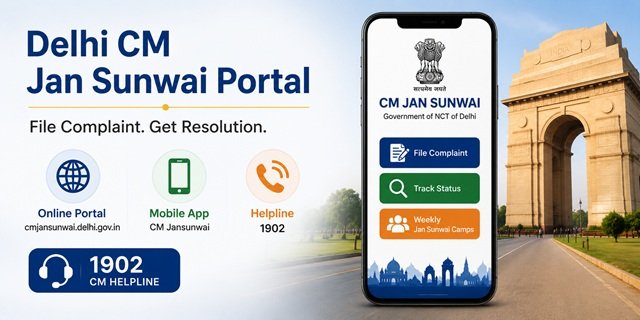
The Government of NCT of Delhi launched the CM Jan Sunwai Portal on 22 February 2026 under Chief Minister Rekha Gupta. The official portal is at cmjansunwai.delhi.gov.in. The CM Helpline number is 1902. The portal is developed, maintained, and hosted by the National Informatics Centre (NIC), Delhi and serves as an integrated, centralised grievance redressal system for all citizens of Delhi.
CM Jan Sunwai brings together complaints against multiple authorities under one platform: Delhi government departments, Municipal Corporation of Delhi (MCD), Delhi Development Authority (DDA), Delhi Police, Delhi Jal Board, New Delhi Municipal Council (NDMC), and the Delhi Cantonment Board. Citizens can file and track complaints online at any time through the portal, through the Android app, or by calling 1902.
Alongside the digital system, the Delhi government also runs weekly Jansunwai camps every Saturday across all revenue districts where CM Rekha Gupta, Cabinet ministers, MLAs, and senior officials from 18 departments hear citizen grievances in person. This combination of a digital portal, a 24×7 app, and physical camps on every Saturday makes Delhi’s grievance system one of the most multi-channel among all state CM helplines.
For complete details about CM Helpline portals across all states, read our CM Helpline India Article. For ration card services specific to Delhi, read our Delhi Ration Card Article Page.
What CM Jan Sunwai Covers
The portal is a single window for complaints against all of the following authorities in Delhi:
- Delhi Government departments – all departments of the Government of NCT of Delhi, including Revenue, Social Welfare, Education, Health, Food and Civil Supplies, PWD, and Transport
- Municipal Corporation of Delhi (MCD) – sanitation, road maintenance, street lighting, parks, property tax issues
- Delhi Jal Board (DJB) – water supply, sewage, connection complaints
- Delhi Development Authority (DDA) – housing scheme, allotment, flat maintenance
- Delhi Police – complaints against police officers and stations
- New Delhi Municipal Council (NDMC) – Lutyens Delhi municipal services
- Delhi Cantonment Board – complaints in cantonment areas
Common Complaint Categories
- Ration Card issues – e-Ration card correction, FPS not distributing food, beneficiary list errors
- Water supply and sewage issues – Delhi Jal Board connection, billing, leakage
- Electricity complaints – BSES Rajdhani, BSES Yamuna, Tata Power Delhi billing and supply issues
- Road maintenance, pothole, and drain issues – PWD and MCD jurisdiction
- Sanitation and waste management
- State pension schemes not credited
- Delhi Police complaints
- DDA housing and flat allotment issues
- State school education, scholarships, and welfare scheme benefits
- Hospital and health service complaints
- A government officer is not responding or demanding a bribe
What CM Jan Sunwai Does NOT Accept
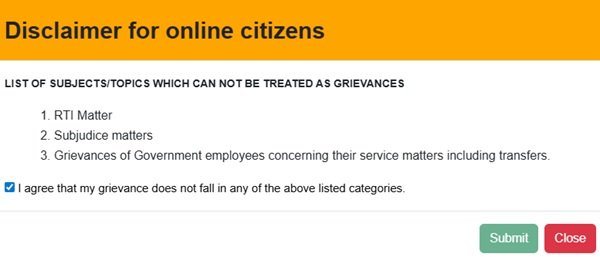
The portal’s disclaimer lists three categories explicitly excluded. You must confirm your complaint does not fall in any of these categories by ticking the agreement checkbox:
- RTI (Right to Information) matters – file these with the Public Information Officer of the concerned department
- Sub-judice matters – cases already pending before any court
- Grievances of government employees concerning their service matters, including transfers, have separate departmental channels
What to Keep Ready Before Filing
- Mobile number for OTP verification (this becomes your registered number for tracking and notifications)
- Name, Father’s Name, Gender, and complete address
- Email ID (for email notifications at each stage)
- Name of the department or authority your complaint relates to
- Locality or area where the issue is occurring
- A clear description of the issue – what happened, since when, what resolution you need
- Supporting documents or photographs for upload
Filing a Complaint Online on the CM Jan Sunwai Portal
Step 1: Go to cmjansunwai.delhi.gov.in. On the homepage, click “Complaint Registration” (Step 01 on the homepage).
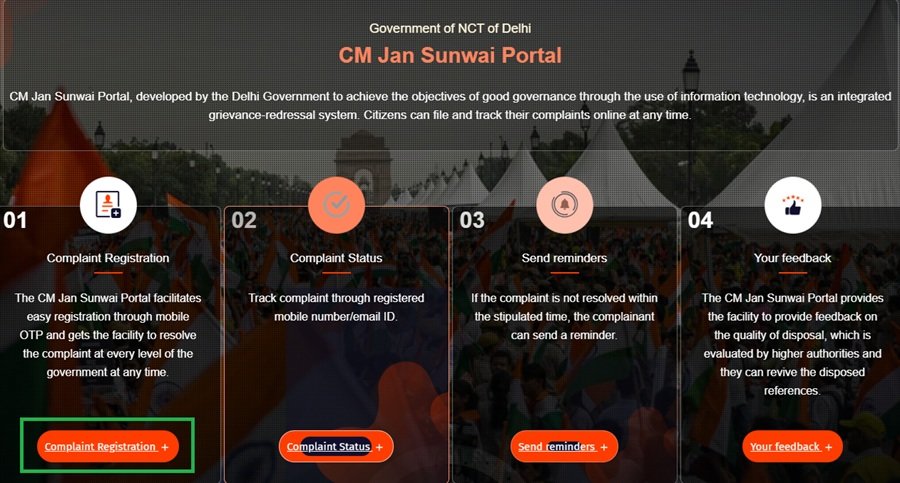
Step 2: A Disclaimer for online citizens appears. Read the three excluded categories carefully. If your complaint does not fall in RTI, sub-judice, or government employee service matters, tick the agreement checkbox and click “Submit” to proceed to the registration form.
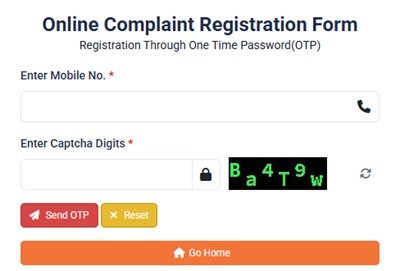
Step 3: Enter your mobile number in the field provided. Click to send OTP. An OTP arrives on your mobile. Enter it to verify your identity and proceed.
Step 4: The complaint registration form opens. Fill in your personal details:
- Name
- Father’s Name
- Gender
- Mobile Number (pre-filled from OTP step)
- Email ID
- Address
Step 5: Select the Department Name your complaint relates to from the dropdown. Choose the specific department or authority – for example, Delhi Jal Board for water issues, MCD for municipal complaints, or Delhi Police for police matters.
Step 6: Enter the Grievance Details – describe the issue clearly in the text field. Mention what happened, since when, which officer or office is responsible, and what specific resolution you expect. Also, fill in any department-related information fields that appear based on the department selected.
Step 7: Upload any supporting documents if available – photographs, bills, rejection letters, or related documents.
Step 8: Review all details and click Submit. A unique Grievance Registration Number is generated immediately and sent by SMS to your registered mobile and by email if provided. Save this number – it is your reference for all tracking, reminders, and follow-ups.
Filing by Phone in 1902
Call 1902 (CM Helpline) to register your complaint by phone. A call centre representative enters your complaint in the same CM Jan Sunwai system and provides a Registration Number by phone. Keep your mobile number, department name, and complaint description ready before calling.
Filing via the CM Jansunwai Mobile App
The official Android app is CM Jansunwai, developed by the National Informatics Centre (NIC):
- Android: Download on Google Play
The app was updated on May 7, 2026. Open it, register with your mobile number via OTP, and file complaints using the same form as the web portal. The app auto-routes your complaint to the correct department based on category and jurisdiction – no manual routing needed.
Important: To receive all CM Jan Sunwai Portal notifications on the app, register with the same mobile number on both the portal and the app. If you use different numbers, portal complaints will not show notifications on the app.
The app also includes:
- Real-time complaint tracking at every stage
- Automated reminder alerts when complaints approach their resolution deadline
- Citizen feedback after resolution
- Officer view for departmental staff
For app support, email: delhi-mitra@delhi.gov.in
Tracking Your Complaint
Via the portal:
Step 1: Go to cmjansunwai.delhi.gov.in/ComplaintTracker or click “Complaint Status” (Step 02 on the homepage).
Step 2: Enter your Grievance Registration Number and registered mobile number.
Step 3: Submit to view the complete status trail – which department has the complaint, what action has been taken, the current stage, and whether it is resolved or pending. You also receive status updates by SMS and email at each stage of the complaint’s progress.
Via the app:
Log in to the CM Jansunwai app with your registered mobile number. Your complaint history and real-time status appear on your dashboard. The app sends push notifications at each status change.
Sending a Reminder for an Unresolved Complaint
If your complaint is not resolved within the stipulated time, send a formal reminder:
Step 1: Go to cmjansunwai.delhi.gov.in/SendReminder or click “Send Reminders” (Step 03 on the homepage).
Step 2: Enter your Grievance Registration Number and registered mobile number.
Step 3: Submit the reminder. The system sends automated alerts to the concerned officer that the complaint has exceeded its resolution timeline. Officers receive escalation notifications when complaints are approaching or past their due date.
Providing Feedback After Resolution
After your complaint is marked as resolved, provide feedback on the quality and timeliness of the resolution:
Step 1: Go to cmjansunwai.delhi.gov.in/onlineFeedbackEntry or click “Your Feedback” (Step 04 on the homepage).
Step 2: Enter your Grievance Registration Number and provide your feedback rating.
Step 3: Submit. All feedback is evaluated by higher authorities. If the resolution quality is poor, senior officers can revive (reopen) the disposed complaint for further action. This means your feedback directly influences whether a closed complaint gets reviewed again.
Weekly Saturday Jansunwai Camps
Every Saturday, the Delhi government holds public grievance camps across all revenue districts of Delhi. These Jansunwai camps bring the government physically to citizens – at revenue offices, schools, community centres, chaupals, and baraat ghars across the city.
At each camp:
- Cabinet ministers, MLAs, and Municipal Councillors are present
- Officials from over 18 departments attend – Delhi Jal Board, MCD, Police, power discoms (BSES, Tata Power), PWD, Health, and Food and Civil Supplies
- Grievances are heard in person, and many are resolved on the spot
- Unresolved complaints are forwarded immediately to the concerned departments for swift action
Common issues raised at camps include water supply, sanitation, road maintenance, encroachment, law and order, street lighting, and park maintenance. Over 1,000 grievances were registered in the initial rounds of camps with a high on-the-spot resolution rate.
No prior appointment or registration is needed to attend a Jansunwai camp. Bring a written description of your complaint, your Aadhaar card, and photocopies of any supporting documents. If you have an existing CM Jan Sunwai Portal Registration Number, mention it at the camp for follow-up.
Check the official Delhi government website at delhi.gov.in or the CMO Delhi announcements for the schedule of upcoming camps in your revenue district.
PGMS Delhi: The Earlier CMO Grievance System
The older Public Grievance Monitoring System at pgms.delhi.gov.in is still operational. It is the CMO Delhi grievance portal that predates the CM Jan Sunwai Portal and is vertically integrated above with CPGRAMS (Government of India) and below with districts and subordinate officers. Complaints filed on PGMS are connected to all departments of the Government of NCT of Delhi through role-based access.
Complaints sent by post to the Grievance Cell are also entered into the PGMS system. The Nodal Department of PGMS is the Administrative Reforms (AR) Department. For complaints against central government departments, PGMS redirects to CPGRAMS at pgportal.gov.in.
CPGRAMS for Central Government Complaints
For complaints against central government departments – Railways, Income Tax, Passport Office, EPFO, UIDAI, and central ministries – do not use CM Jan Sunwai or PGMS. File directly on CPGRAMS at pgportal.gov.in. Both the CM Jan Sunwai Portal and PGMS Delhi link directly to CPGRAMS for routing central complaints.
Quick Reference
- CM Jan Sunwai Portal: cmjansunwai.delhi.gov.in
- Register Complaint: cmjansunwai.delhi.gov.in → Complaint Registration (Step 01)
- Track Complaint Status: cmjansunwai.delhi.gov.in/ComplaintTracker
- Send Reminder: cmjansunwai.delhi.gov.in/SendReminder
- Submit Feedback: cmjansunwai.delhi.gov.in/onlineFeedbackEntry
- Portal Suggestion: cmjansunwai.delhi.gov.in/Support
- CM Jansunwai Android App: Download on Google Play
- PGMS Delhi (older CMO system): pgms.delhi.gov.in
- CM Helpline: 1902
- Portal/App Support Email: delhi-mitra@delhi.gov.in
- Delhi Government Portal: delhi.gov.in
- CPGRAMS (Central Complaints): pgportal.gov.in
- Cyber Crime (national): cybercrime.gov.in or call 1930
Frequently Asked Questions
Q. What is the CM Jan Sunwai Portal and when was it launched?
Ans. CM Jan Sunwai Portal is the official integrated grievance redressal system of the Government of NCT of Delhi at cmjansunwai.delhi.gov.in. It was launched on 22 February 2026 by Chief Minister Rekha Gupta. Developed by the National Informatics Centre (NIC), Delhi, it covers complaints against Delhi government departments, MCD, DDA, Delhi Police, Delhi Jal Board, NDMC, and the Delhi Cantonment Board. The CM Helpline number is 1902.
Q. What are the three types of complaints NOT accepted on CM Jan Sunwai?
Ans. Three categories are excluded: RTI-related matters (file with the department’s Public Information Officer), sub-judice matters pending before any court, and service grievances of government employees, including transfer matters. You must tick an agreement checkbox confirming your complaint is outside these categories before the registration form opens.
Q. What is the Grievance Registration Number?
Ans. After your complaint is submitted through the portal, app, or call centre, a unique Grievance Registration Number is generated and sent to your registered mobile number by SMS and to your email. Use this number to track status at cmjansunwai.delhi.gov.in/ComplaintTracker, send reminders at cmjansunwai.delhi.gov.in/SendReminder, and submit feedback after resolution.
Q. Why should I use the same mobile number on both the portal and the app?
Ans. The CM Jan Sunwai Portal and the CM Jansunwai app are linked – all portal notifications are made available on the app. However, this link works only when both are registered with the same mobile number. If you use different numbers, complaints filed on the portal will not appear in the app and you will miss push notifications for status updates, reminders, and resolution alerts.
Q. What is the difference between CM Jan Sunwai Portal and PGMS Delhi?
Ans. CM Jan Sunwai Portal (cmjansunwai.delhi.gov.in) is the new portal launched in February 2026. PGMS Delhi (pgms.delhi.gov.in) is the older CMO grievance system that was in operation before CM Jan Sunwai was launched. PGMS is vertically integrated above with CPGRAMS and below with district-level officers. Postal complaints to the Grievance Cell are still entered into PGMS. Both portals handle Delhi government complaints, but the CM Jan Sunwai Portal is the current recommended channel.
Q. What is the Saturday Jansunwai camp and how do I attend?
Ans. Every Saturday, the Delhi government holds public grievance camps across all revenue districts. CM Rekha Gupta, Cabinet ministers, MLAs, and senior officials from 18 departments – including DJB, MCD, police, power discoms, PWD, Health, and Food and Civil Supplies – attend these camps. Venues include revenue offices, schools, community centres, chaupals, and baraat ghars. No appointment is needed. Bring a written complaint, Aadhaar card, and photocopies of documents. Many complaints are resolved on the spot. Check delhi.gov.in for upcoming camp schedules in your district.
Q. Can I file a complaint against Delhi Police on CM Jan Sunwai?
Ans. Yes. Delhi Police is one of the covered authorities on the CM Jan Sunwai Portal. Select Delhi Police as the department when registering your complaint. For immediate emergency assistance, call 100. For cybercrime complaints, file at cybercrime.gov.in or call 1930.
Q. What happens if my complaint is resolved but I am not satisfied?
Ans. Go to cmjansunwai.delhi.gov.in/onlineFeedbackEntry and submit your feedback rating. All feedback is evaluated by higher authorities. If the rating is poor, senior officers can revive (reopen) the disposed complaint for further action. This means a complaint closed by a department can be reopened based on poor citizen feedback – a key accountability feature of the CM Jan Sunwai system.
Q. How do I file a complaint against a central government department in Delhi?
Ans. Central departments – Railways, Income Tax, Passport, EPFO, UIDAI – are not covered by CM Jan Sunwai or PGMS Delhi. File directly on CPGRAMS at pgportal.gov.in. Both CM Jan Sunwai and PGMS Delhi provide direct links to CPGRAMS on their homepages for routing central complaints correctly.
Q. Is the CM Jansunwai app available for iOS?
Ans. Currently, the official CM Jansunwai app is available for Android only on the Google Play Store. The portal at cmjansunwai.delhi.gov.in is accessible on all browsers on iOS devices. iPhone users can file and track complaints through the web portal on any mobile browser.

Tabassum is a government document researcher and writer with over 5 years of experience exclusively dedicated to tracking and simplifying Central and State Government document processes across India. She has researched and published detailed guides on 100+ government documents and certificates – including Aadhaar Card, PAN Card, Ration Card, Domicile Certificate, and Birth Certificate – covering all states and the Central Government, helping lakhs of Indian citizens successfully complete their paperwork in simple, easy-to-understand language.