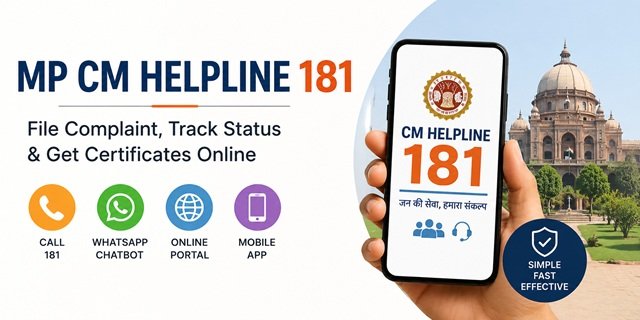
The Madhya Pradesh government runs one of the most feature-rich public grievance systems in India through CM Helpline 181. Launched on 31 July 2014 by the Lok Seva Prabandhan Vibhag (Public Service Management Department), it gives citizens of Madhya Pradesh six distinct ways to reach the government: by phone on 181, through the online portal, via the CM Helpline mobile app on Android or iOS, through a WhatsApp chatbot, through a Missed Call campaign number, and through the Call Me Back service. All six channels feed into the same centralised system and route complaints to the concerned department officer for resolution.
By June 2026, CM Helpline 181 has recorded over 3.68 crore total complaints with a resolution rate of over 98 per cent. The system also goes beyond grievance redressal: by calling 181, citizens of Madhya Pradesh can get an income certificate or domicile certificate delivered to their mobile via WhatsApp on the same day – completely free of cost – without visiting any government office. This CM Jan Seva feature makes 181 a document delivery service as well as a complaint hotline.
What You Can Complain, Demand, or Suggest
CM Helpline 181 accepts four types of contacts, not just complaints:
- Complaints (Shikayat): Against any state government service, scheme, or officer that has failed to deliver or has acted improperly
- Demands (Maang): Requesting a service or benefit you are entitled to under a state scheme but have not received
- Suggestions (Sujhav): Improvement ideas for government services or schemes
- Corruption-related calls (Bhrashtachar): Reports of bribery or corrupt practices by state government officers
Additionally, 181 handles calls related to Women Helpline, Child Helpline 1098, Divyang (Disability) Helpline, and government scheme information queries. If you call 181 with a disability-related complaint, the call is automatically transferred to the dedicated Divyang Helpline advisor.
What Common Issues Citizens Complain About
- Ration Card (Patra Parchi) issues – Samagra ID problems, FPS not distributing food grains, name missing from beneficiary list
- PM Awas Yojana or the state housing scheme benefit was not received
- Jal Jeevan Mission – water connection not provided
- MNREGA wages pending or job card issues
- State pension schemes not paid (old age, widow, disability)
- Bijli (electricity) connection or billing disputes with the state utility
- Land records – Khasra, Khatauni (B-1), mutation, and rights records
- Ladli Laxmi Yojana, CM Kanya Vivah Yojana, or Janani Suraksha Yojana benefits have not been received
- State government hospital and medicine issues
- Government officer not taking action or demanding a bribe
What CM Helpline 181 Does NOT Accept
The portal and call centre explicitly exclude four categories before complaint registration:
- RTI (Right to Information) related matters – file these separately with the concerned department’s Public Information Officer
- Matters already sub-judice (pending before any court)
- Demands for financial assistance or employment
- False complaints – by accepting the disclaimer, you confirm that the complaint is true and you take full responsibility for it
Filing a Complaint Online on the CM Helpline Portal
Step 1: Go to cmhelpline.mp.gov.in/Public/VerifyOTPBeforeOnlineComplaint.aspx. A disclaimer page opens listing the four categories not accepted. Read them carefully.
Step 2: Select whether you are filing a Complaint, a Demand, or a Suggestion from the three tabs shown (Shikayat, Maang, Sujhav). Tick the agreement checkbox confirming your complaint does not fall in the excluded categories.
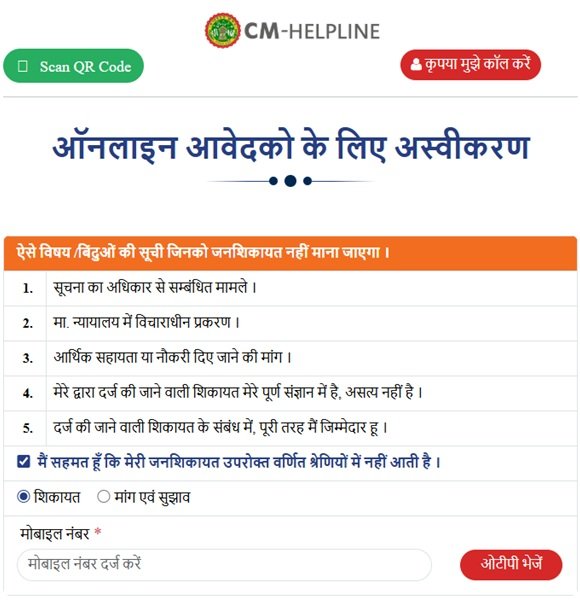
Step 3: Enter your mobile number and click “Get OTP”. Enter the OTP received on your mobile to verify your identity. This OTP-verified mobile number becomes the identity linked to all your complaints.
Step 4: The complaint form opens. Fill in your name, address, district, select the concerned department, and describe the issue clearly. Mention dates, officer names if known, and what specific resolution you expect.
Step 5: Upload supporting documents or photographs if available. Submit the form.
Step 6: A unique Complaint Reference Number (Sandarbh Krama) is generated and sent by SMS to your registered mobile. Save this number for all future tracking, reminders, and follow-ups.
Filing by Phone on 181
Call 181 from any mobile or landline, using any telecom network. The helpline runs 24 hours a day, 7 days a week. When your call is answered:
- The call centre executive asks for your name, address, and mobile number
- Tell them the department or scheme your complaint is about
- State whether it is a complaint, demand, or suggestion
- Clearly describe the issue in 2 to 3 sentences
- The executive registers it in the system and gives you a Complaint Reference Number
- An SMS is sent to your mobile with the number and complaint details
181 is reachable from Jio, Airtel, BSNL, Vi, and all other telecom networks without any call charges.
Filing via WhatsApp Chatbot
The CM Helpline WhatsApp chatbot is one of the most feature-rich citizen-facing WhatsApp services offered by any Indian state government. To use it:
Step 1: Save the number +91-7552555582 in your phone contacts.
Step 2: Open WhatsApp and send “Hi” to this number. The chatbot responds immediately with a menu of options.
Step 3: Reply with the number corresponding to your need:
- 1 – Check complaint status (know where your complaint currently stands)
- 2 – File a new complaint
- 3 – Contact Women’s Helpline
- 4 – Get information about government schemes
- 5 – Receive information on WhatsApp (documents and scheme info)
- 6 – Other information or FAQ
You can also rate the resolution of your complaint (Satisfied or Dissatisfied) through WhatsApp after the complaint is closed. This feedback is reviewed by the system.
You can also reach the chatbot directly by clicking web.whatsapp.com/send?phone=917552555582 on a computer or scanning the QR code available on the CM Helpline website.
Filing via the CM Helpline Mobile App
The CM Helpline app is available for both Android and iOS:
- Android (Citizen): Download on Google Play
- iOS (Citizen): Download on App Store
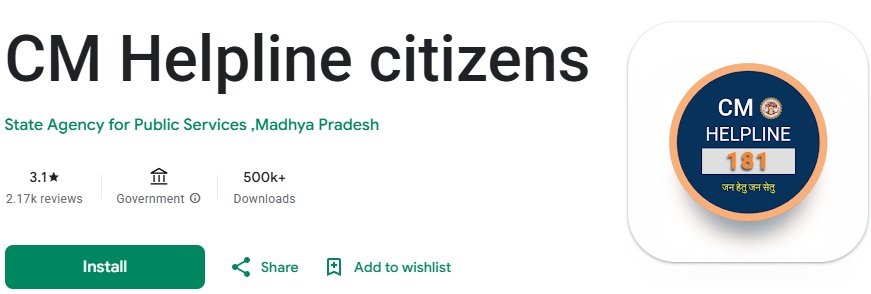
Open the app, verify your mobile number via OTP, and file a complaint directly from your phone. The app also lets you check the status of existing complaints, send reminders, and receive updates. Both the Android and iOS apps are developed for the Madhya Pradesh government and are the official citizen-facing apps for CM Helpline 181.
The Call Me Back Service
If you are in a rural area with limited connectivity, or if the 181 line is busy, you can request the CM Helpline call centre to call you back:
Step 1: Go to cmhelpline.mp.gov.in/Public/AddCallerNo.aspx.
Step 2: Enter your mobile number and submit.
Step 3: The CM Helpline call centre will call you back at a convenient time between 7 AM and 11 PM. You do not need to wait on hold or call again.
QR Code-Based Complaint Filing
The CM Helpline also supports QR code-based complaint access. If you see a CM Helpline QR code at a government office or public location in Madhya Pradesh, scan it using:
- The CM Helpline app’s built-in QR scanner
- The online QR scanner at cmhelpline.mp.gov.in/QR/QrScanner.aspx
Scanning takes you directly to the complaint registration form pre-filled with the department or service linked to that QR code.
Tracking Your Complaint Status
Via Portal:
Go to cmhelpline.mp.gov.in/grievance-status.aspx, enter your Complaint Reference Number and mobile number, and click Submit. The current status, including which department has the complaint, what action has been taken, and whether it is resolved or pending, will appear.
Via WhatsApp:
Send “Hi” to +91-7552555582 on WhatsApp and select Option 1 (Check Complaint Status). Enter your reference number when prompted. Status is returned instantly as a WhatsApp message.
Via 181:
Call 181 and mention your Complaint Reference Number. The call centre executive reads out the current status to you.
CM Jan Seva: Get Documents Delivered via 181
A unique feature of MP CM Helpline 181 is the CM Jan Seva scheme, launched on 26 December 2020. By calling 181, citizens can get these documents delivered directly to their mobile phones – without visiting any Lok Seva Kendra or government office:
Free documents via WhatsApp (same day, requires Samagra eKYC):
- Income Certificate (Aay Praman Patra) – free
- Domicile Certificate (Sthaniya Niwasi Praman Patra) – free
Documents available via SMS link (specimen copy, free):
- Current Khasra copy
- B-1 Khatauni copy
- Current Naksha (map) copy
Certified copies (Rs 10 per page):
- Certified Khasra copy
- Certified B-1 Khatauni copy
- Certified Naksha copy
- Bhu-Adhikar Pustika (Land Rights Record) – Rs 10 per page
To get an income or domicile certificate free on the same day, your Samagra Member ID must be eKYC-verified with your Aadhaar. Call 181, ask for CM Jan Seva, and the certificate arrives on WhatsApp within the day.
Sankalpse Samadhan Abhiyan
The Sankalpse Samadhan Abhiyan is a special camp-based grievance resolution drive by the MP government where officers come to specific locations across districts to hear and resolve complaints on the spot. Citizens can check upcoming camp schedules and register at the Sankalpse Samadhan citizen portal. These camps provide in-person resolution for cases that are difficult to resolve purely through the online or phone system.
Department-wise Resolution Timelines
Every department under the Madhya Pradesh government has a prescribed time limit within which it must resolve a CM Helpline complaint. You can check the department-wise resolution timelines at cmhelpline.mp.gov.in/MIS/samayseema.aspx. If your complaint has crossed the time limit shown for the concerned department, use the status tracker to check if it is still pending and follow up via 181 or WhatsApp.
CPGRAMS Integration
Since 6 November 2020, the CM Helpline 181 portal is integrated with the central government’s CPGRAMS portal. Complaints received on CPGRAMS that relate to Madhya Pradesh state departments are automatically transferred to the CM Helpline system and routed to the concerned district or department for resolution. For complaints against central government departments – Railways, Passport, Income Tax, EPFO, or central banks – file directly on CPGRAMS at pgportal.gov.in.
Complaint Closed Without Resolution? What To Do Next
If your complaint has been marked as resolved but the actual problem still exists, do not ignore the closure message. First, check the remarks entered by the concerned department through the CM Helpline portal, WhatsApp chatbot, or by calling 181.
If you are not satisfied with the action taken, contact CM Helpline 181 and explain why the issue remains unresolved. Keep your Complaint Reference Number ready while speaking to the call centre executive.
It is also advisable to keep copies of all SMS messages, complaint references, photographs, and supporting documents related to your case. These records can help the department review the matter more effectively if additional action is required.
If the issue continues despite the closure, provide complete details of the earlier complaint while seeking further assistance through the available CM Helpline channels.
Quick Reference
- Portal (Complaint, Demand, Suggestion): cmhelpline.mp.gov.in
- File Complaint Online: cmhelpline.mp.gov.in/Public/VerifyOTPBeforeOnlineComplaint.aspx
- Check Complaint Status: cmhelpline.mp.gov.in/grievance-status.aspx
- Call Me Back: cmhelpline.mp.gov.in/Public/AddCallerNo.aspx
- QR Code Scanner: cmhelpline.mp.gov.in/QR/QrScanner.aspx
- Department-wise Timelines: cmhelpline.mp.gov.in/MIS/samayseema.aspx
- Citizen Android App: Download on Google Play
- Citizen iOS App: Download on App Store
- WhatsApp Chatbot: +91-7552555582 – Send “Hi” to start
- Helpline: 181 (24×7, all telecom networks)
- CPGRAMS (Central): pgportal.gov.in
Frequently Asked Questions
Q. What is CM Helpline 181 and when was it started?
Ans. CM Helpline 181 is the official public grievance system of the Government of Madhya Pradesh, managed by the Lok Seva Prabandhan Vibhag. It was launched on 31 July 2014 and accepts complaints, demands, suggestions, and corruption reports against any state government service, scheme, or officer. By June 2026, it had processed over 3.68 crore contacts with a resolution rate exceeding 98 per cent.
Q. Can I file a complaint on WhatsApp?
Ans. Yes. Send “Hi” to +91-7552555582 on WhatsApp to open the CM Helpline chatbot. Select Option 2 to file a new complaint. You can also check complaint status (Option 1), get scheme information (Option 4), and receive documents via WhatsApp (Option 5). This is one of the most complete WhatsApp-based government services in India.
Q. What is the Call Me Back service?
Ans. If you are unable to reach 181 due to network issues or a busy line, go to cmhelpline.mp.gov.in/Public/AddCallerNo.aspx and enter your mobile number. The CM Helpline call centre will call you back between 7 AM and 11 PM at a time convenient for you.
Q. What is CM Jan Seva and how do I get a free income certificate?
Ans. CM Jan Seva is a service under CM Helpline 181 that delivers income certificates, domicile certificates, and land records to your mobile without any office visit. To get a free income or domicile certificate on the same day, call 181 and request CM Jan Seva. Your Samagra Member ID must be eKYC-verified with Aadhaar. The certificate arrives on WhatsApp within the day at no cost.
Q. Is the CM Helpline available 24 hours a day?
Ans. Yes. The 181 helpline operates 24 hours a day, 7 days a week, including Sundays and public holidays. The Call Me Back service operates from 7 AM to 11 PM. The WhatsApp chatbot and the online portal are also available around the clock.
Q. What is the Sankalpse Samadhan Abhiyan?
Ans. Sankalpse Samadhan Abhiyan is a camp-based grievance resolution drive by the MP government. Officers travel to specific locations across districts and hear and resolve complaints in person. It is especially useful for complaints that are complex or require physical verification. Citizens can check camp schedules and register at the Sankalpse Samadhan citizen portal.
Q. How do I check department-wise resolution timelines?
Ans. Every department under the MP government has a prescribed time limit for resolving CM Helpline complaints. Visit cmhelpline.mp.gov.in/MIS/samayseema.aspx to see the time limit for each department. If your complaint has exceeded this limit, follow up on 181 or via the WhatsApp chatbot.
Q. Can I also file a demand or suggestion, not just a complaint?
Ans. Yes. The CM Helpline 181 portal, app, phone, and WhatsApp all accept three types of contacts: Shikayat (Complaint), Maang (Demand), and Sujhav (Suggestion). A demand is for a benefit you are entitled to but have not received. A suggestion is an improvement idea for a government service. All three are routed to the relevant department.
Q. What happens when I scan a CM Helpline QR code at a government office?
Ans. Scanning a CM Helpline QR code using the app or the QR scanner at cmhelpline.mp.gov.in/QR/QrScanner.aspx opens the complaint form pre-linked to the department or service associated with that code. This makes it easier to file complaints at specific offices – for example, a Patwari office or a Gram Panchayat – without having to navigate through the portal manually.
Q. How is MP CM Helpline different from CPGRAMS?
Ans. CM Helpline 181 handles complaints against Madhya Pradesh state government departments, including ration card, land records, state pensions, electricity, and state hospitals. CPGRAMS handles complaints against central government departments like Railways, Income Tax, Passport, and EPFO. Since November 2020, the two systems are integrated: CPGRAMS complaints about MP state departments are automatically transferred to the CM Helpline system for resolution.
Q. Does CM Helpline handle Women Helpline or Child Helpline calls?
Ans. Yes. The Women Helpline, active since 8 March 2020, is integrated with CM Helpline 181. When you call 181 about a women-related complaint or safety issue, the call is transferred to the Women Helpline advisors. The Child Helpline 1098 is also integrated with 181. The Divyang (Disability) Helpline runs through the same system for queries and complaints related to persons with disabilities.
Q. What is my Complaint Reference Number and where do I find it?
Ans. After filing a complaint through any channel – portal, phone, app, or WhatsApp – you receive a unique Complaint Reference Number (Sandarbh Krama) by SMS on your registered mobile. This is your only identifier for checking status, sending reminders, and following up. If you lose it, call 181 with your mobile number and the call centre can retrieve your complaint history.

Tabassum is a government document researcher and writer with over 5 years of experience exclusively dedicated to tracking and simplifying Central and State Government document processes across India. She has researched and published detailed guides on 100+ government documents and certificates – including Aadhaar Card, PAN Card, Ration Card, Domicile Certificate, and Birth Certificate – covering all states and the Central Government, helping lakhs of Indian citizens successfully complete their paperwork in simple, easy-to-understand language.