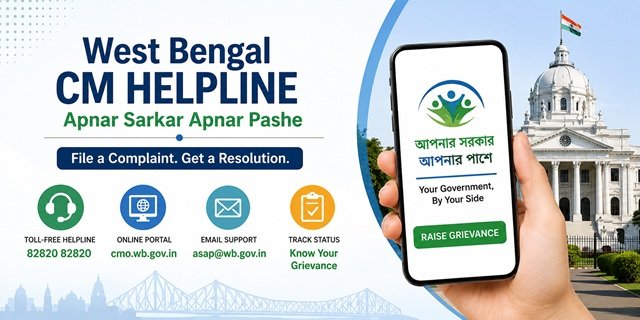
The Chief Minister’s Office, Government of West Bengal, launched a new public grievance programme called Apnar Sarkar Apnar Pashe (আপনার সরকার আপনার পাশে), meaning “Your Government, By Your Side”, on 3 June 2026. The portal is at cmo.wb.gov.in and the toll-free helpline is 82820 82820. Citizens can also write to asap@wb.gov.in for grievance support.
The programme replaced the earlier “Didi Ke Bolo” initiative of the previous government. Under Apnar Sarkar Apnar Pashe, the focus shifts from a single leader to the government as a collective institution. Chief Minister Suvendu Adhikari launched it with the guiding principle “Not me, we” – reflecting the administration’s stated commitment that the government stands ready to assist all citizens regardless of political affiliation.
The portal accepts complaints in both Bengali and English. The resolution target is 7 working days. All complaints filed online generate a reference number that can be used to track status through the same portal using your registered mobile number.
For CM Helpline portals across all states, read our CM Helpline India Guide.
What You Can Complain About
Apnar Sarkar Apnar Pashe accepts grievances related to any state government department or service in West Bengal. Common categories include:
- Ration Card issues, including new application delays, FPS not distributing food grains, name missing from the WBPDS beneficiary list, or card category corrections
- Land records, mutation, and registration-related delays
- State pension schemes not credited (old age, widow, disability)
- Electricity and water supply complaints against state utilities
- State government hospital services and medicine availability
- Housing scheme benefits not received under state programmes
- State school issues, including admissions, scholarships, and mid-day meal
- Municipal, gram panchayat, or nagar panchayat service failures
- Government officer not taking action or demanding a bribe
- Welfare scheme benefits, such as Annapurna Yojana, not received under state-run programmes
What to Keep Ready Before Filing
- Mobile number for OTP verification (this becomes your registered number for status tracking)
- Your full name and complete address, including Sub-Division, Police Station, and Assembly Constituency
- District and State details
- Social category (General, SC, ST, OBC, etc.)
- Employment status
- Email ID (optional but recommended for receiving updates)
- Alternate contact number (optional)
- Supporting documents if any – in JPG, JPEG, PNG, or PDF format, maximum 2 MB per file, up to 5 files
- A clear description of the issue within 1,000 characters
Filing a Complaint Online at cmo.wb.gov.in
Step 1: Go to cmo.wb.gov.in. The portal opens in Bengali by default. To switch to English, click the English language option in the top right corner of the homepage.
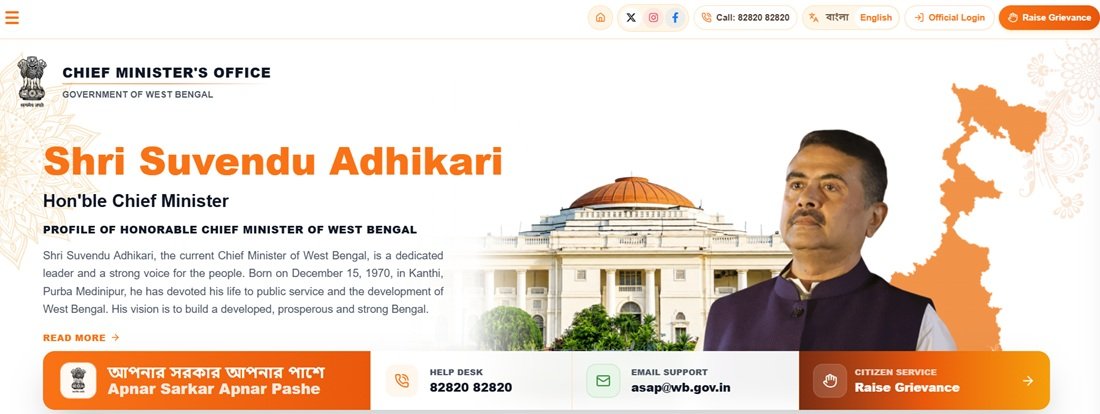
Step 2: Click on “Raise Grievance” – the orange button visible in the top right corner of the homepage.
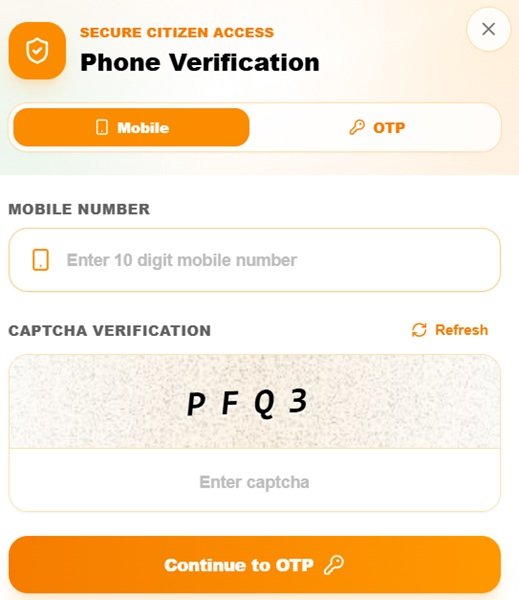
Step 3: An OTP verification page opens. Enter your mobile number in the field and complete the OTP verification. The OTP arrives on the mobile number you entered. Enter it to proceed. This number becomes your registered contact for all future tracking of this complaint.
Step 4: The grievance form opens after OTP verification. It has two sections – Personal and Communication Details, and Grievance Details.
Fill in the Personal and Communication Details section:
- Applicant Mobile No.: Pre-filled from OTP verification
- Applicant Name: Enter your full name
- Applicant Address: Enter your address (maximum 200 characters)
- State: Select West Bengal
- District: Select your district from the dropdown
- Address Type: Select Rural or Urban
- Sub-Division: Select your sub-division
- Police Station: Select your police station area
- Assembly Constituency: Select your constituency
- Post Office: Enter your post office name
- Gender: Select Male, Female, or Other
- Age: Enter your age
- Email ID: Optional but recommended
- Alternate Contact No.: Optional
- Social Category: Select your category (General, SC, ST, OBC, Minority, etc.)
- Employment Status: Select your employment status
Step 5: In the Grievance Details section, write your complaint clearly in the text box. The limit is 1,000 characters. Describe what happened, which department or officer is responsible, and what resolution you are seeking.
Step 6: In the Documents section, click Choose File to upload supporting documents. Accepted formats are JPG, JPEG, PNG, and PDF. Each file must not exceed 2 MB and you can upload up to 5 files. Upload relevant evidence such as a copy of your ration card, an electricity bill, a rejection letter, or any government document related to your complaint.
Step 7: Click Submit to file the complaint. A unique reference number is generated. This number is sent to your registered mobile number by SMS. Save it for tracking, follow-up, and any future escalation.
Filing by Phone: Helpline 82820 82820
Call 82820 82820 (toll-free) to register a complaint by phone. The helpline operates Monday to Saturday, 9 AM to 6 PM, except on public holidays. When connected:
- Provide your name, mobile number, district, and address details
- Describe the issue clearly, including the department involved and what action you expect
- The helpline representative registers your complaint in the system and provides a reference number
- Note the reference number immediately for future tracking
Filing by Email
Send your grievance to asap@wb.gov.in. Include your full name, mobile number, address with district and sub-division, the department your complaint relates to, and a clear description of the issue. Attach supporting documents as email attachments in JPG, PNG, or PDF format. Email complaints take longer to process than portal submissions because they require manual entry. Use the portal or phone for urgent issues.
Checking Your Complaint Status
Step 1: Go to cmo.wb.gov.in and click on “Know Your Grievance” on the homepage.
Step 2: Enter the mobile number you used to register the complaint.
Step 3: Click “Get OTP”. An OTP is sent to your registered mobile number.
Step 4: Enter the OTP to verify and proceed. All complaints registered from that mobile number will appear with their current status – showing whether the complaint is pending, under review, or resolved, along with the department it was forwarded to and any remarks from officials.
What Happens After You Submit
After submission, your complaint is forwarded to the concerned department based on the nature of the issue and the district selected. The government’s resolution target is 7 working days. The concerned officer or department reviews the complaint, takes action, and updates the status on the portal. You receive SMS updates on your registered mobile number at each stage. Once marked resolved, log in with your mobile OTP to check the remarks and action taken by the department.
If the resolution is not satisfactory, you can escalate through CPGRAMS at pgportal.gov.in for additional accountability, particularly if the complaint has remained unresolved for more than 15 working days despite submission.
What Happened to Didi Ke Bolo and the Old Portal
The previous West Bengal government under Chief Minister Mamata Banerjee ran a grievance programme called “Didi Ke Bolo” and later “Sorasori Mukhyomontri” (Directly with the CM), which operated through the same cmo.wb.gov.in domain with a helpline at 91370-91370. After the change of government following the 2026 West Bengal assembly elections, the BJP government of Chief Minister Suvendu Adhikari renamed the programme “Apnar Sarkar Apnar Pashe” and introduced the new helpline 82820 82820 and email asap@wb.gov.in on 3 June 2026. The old helpline 91370-91370 is no longer the active number. Use 82820 82820 for all new complaints.
Quick Reference
- CM Helpline Portal: cmo.wb.gov.in
- Raise Grievance: cmo.wb.gov.in → Raise Grievance (top right)
- Know Your Grievance (Status): cmo.wb.gov.in → Know Your Grievance
- Helpline: 82820 82820 (Monday to Saturday, 9 AM to 6 PM)
- Email: asap@wb.gov.in
- CPGRAMS (Central Complaints): pgportal.gov.in
Frequently Asked Questions
Q. What is Apnar Sarkar Apnar Pashe?
Ans. Apnar Sarkar Apnar Pashe means “Your Government, By Your Side” in Bengali. It is the public grievance programme of the Chief Minister’s Office, Government of West Bengal, launched on 3 June 2026 by Chief Minister Suvendu Adhikari. It replaced the previous government’s “Didi Ke Bolo” initiative. Citizens file grievances through the portal at cmo.wb.gov.in, by calling 82820 82820, or by emailing asap@wb.gov.in.
Q. What is the helpline number for the West Bengal CM Helpline?
Ans. The current toll-free helpline number is 82820 82820, operational Monday to Saturday from 9 AM to 6 PM. The old number 91370-91370 belongs to the previous government’s initiative and is no longer the active helpline. Use 82820 82820 for all complaints registered after June 2026.
Q. What details does the online grievance form ask for?
Ans. After verifying your mobile number via OTP, the form asks for your applicant name, address (up to 200 characters), state, district, address type, sub-division, police station, assembly constituency, post office, gender, age, social category, and employment status. An email ID and alternate contact number are optional. The grievance description allows up to 1,000 characters, and you can upload up to 5 supporting documents in JPG, JPEG, PNG, or PDF format not exceeding 2 MB each.
Q. How do I check the status of my complaint?
Ans. Go to cmo.wb.gov.in and click “Know Your Grievance” on the homepage. Enter the mobile number used during filing and verify using the OTP received. All complaints from that number appear with their current status, forwarding details, and any official remarks.
Q. Within how many days will my complaint be resolved?
Ans. The Government of West Bengal’s resolution target under Apnar Sarkar Apnar Pashe is 7 working days from the date of registration. Complex matters involving multiple departments may take longer.
Q. What is the difference between Apnar Sarkar Apnar Pashe and the old Didi Ke Bolo?
Ans. Both operated through cmo.wb.gov.in but under different governments. Didi Ke Bolo was launched by Chief Minister Mamata Banerjee and used helpline 91370-91370. After the BJP government under Suvendu Adhikari came to power in 2026, the programme was renamed Apnar Sarkar Apnar Pashe with a new helpline 82820 82820 and email asap@wb.gov.in. The guiding philosophy shifted from individual leader-centric to government-as-institution, reflected in the CM’s “Not me, we” slogan.
Q. Can I file a complaint in Bengali?
Ans. Yes. The portal at cmo.wb.gov.in supports both Bengali and English. The portal opens in Bengali by default. Click the “English” option in the top right corner to switch languages. The helpline at 82820 82820 also accepts complaints in Bengali.
Q. Is there a mobile app for the West Bengal CM Helpline?
Ans. No. Apnar Sarkar Apnar Pashe currently operates only through the web portal at cmo.wb.gov.in, the helpline 82820 82820, and email at asap@wb.gov.in. There is no dedicated mobile app at this time.
Q. Can I file a complaint against a central government department on this portal?
Ans. No. cmo.wb.gov.in handles grievances against West Bengal state government departments only. For complaints against central government departments such as Railways, Income Tax, Passport Office, EPFO, or central banks, file directly on CPGRAMS at pgportal.gov.in.
Q. How many documents can I upload with my complaint?
Ans. You can upload up to 5 files per complaint. Each file must not exceed 2 MB. Accepted formats are JPG, JPEG, PNG, and PDF. Upload only documents directly relevant to your complaint – such as proof of application, rejection letters, or identity documents – to strengthen your case.
Q. What should I do if my complaint is not resolved within 7 days?
Ans. Check the status on cmo.wb.gov.in using your registered mobile number and OTP. If the complaint is still showing as pending or the resolution is unsatisfactory, escalate to CPGRAMS at pgportal.gov.in. You can also call 82820 82820 with your reference number to follow up directly with the helpline.

Tabassum is a government document researcher and writer with over 5 years of experience exclusively dedicated to tracking and simplifying Central and State Government document processes across India. She has researched and published detailed guides on 100+ government documents and certificates – including Aadhaar Card, PAN Card, Ration Card, Domicile Certificate, and Birth Certificate – covering all states and the Central Government, helping lakhs of Indian citizens successfully complete their paperwork in simple, easy-to-understand language.