The Government of Maharashtra runs its public grievance system through the Aaple Sarkar Grievance Redressal Portal at grievances.maharashtra.gov.in. This is an initiative of the Chief Minister’s Office, Mantralaya, Mumbai, supported by the Directorate of Information Technology. The portal lets citizens of Maharashtra file complaints against any state government department or office, track status using a Token Number, send reminders, escalate to higher authorities, and give feedback on the resolution received.
Maharashtra’s grievance system has a feature that sets it apart from most other states: it is backed by the Maharashtra Right to Public Services Act 2015. This means if a government service is not delivered within the stipulated time or is rejected without a proper reason, you have a legal right to appeal, up to a Third Appeal, before the Maharashtra State Commission for Right to Service. The erring officer can be penalised up to Rs 5,000 per case. This legal accountability framework makes the Maharashtra CM Helpline one of the strongest citizen grievance mechanisms in India.
For CM Helpline portals across all states, read our CM Helpline India Guide.
District Level vs Mantralaya Level: Which One to Choose
Before filing your complaint on the Aaple Sarkar Grievance Redressal Portal, you must choose between two filing levels. Choosing the wrong level delays your complaint because it gets routed to the wrong authority.
Select District Level when: Your complaint is about the functioning of a village office, gram panchayat, taluka office, district office, or any government office at the sub-state level. Examples include ration card issues, land records, local police matters, panchayat services, talathi office, or tehsil office complaints.
Select Mantralaya Level when: Your complaint is about a policy matter, a ministry or secretariat department in Mantralaya Mumbai, or a state-level directorate. Examples include policy implementation issues, departmental decisions that affect entire districts, or appeals against orders passed by commissioners.
When in doubt, choose District Level. Most citizen complaints about everyday government services go to the District Level.
What You Can Complain About
Aaple Sarkar accepts grievances related to the functioning of any government office within the State of Maharashtra. Common complaint categories include:
- Ration Card issues (new application delayed, name not in list, FPS not issuing ration, card correction)
- Land records, property mutation, 7/12 extract, and namoona issues
- Pension non-payment (old age, widow, disability state schemes)
- Electricity and water supply complaints against state utilities
- Municipal and local body services in your area
- State government hospital and healthcare complaints
- Education department issues (state schools, admissions, scholarships)
- Welfare scheme benefits not received (housing, SC/ST schemes, Majhi Ladki Behan Scheme, farmer benefits)
- The government officer is not responding or taking action
- Service not delivered within the stipulated time under the RTS Act
- Corruption or misconduct by a state government officer
What the Aaple Sarkar Grievance Portal Does NOT Accept
The portal explicitly excludes three categories from its grievance redressal process:
- Cases already sub-judice or pending before any court of law
- Personal and family disputes that were not first raised with the proper authority at the block, district, or sub-divisional level
- RTI (Right to Information) related matters – file these separately with the Public Information Officer of the concerned department
Complaints against central government institutions such as Railways, Banks, RBI, Income Tax, EPFO, or Passport Office are also not accepted on this portal. For central complaints, use CPGRAMS at pgportal.gov.in
What to Keep Ready Before Filing
- Valid mobile number and email ID (both are mandatory for OTP verification during registration)
- Your district and taluka are required to route the complaint to the correct authority
- Name of the department or office your complaint relates to
- Any previous application or reference number related to your issue
- Date when the problem started or when you last approached the department
- Supporting document or photograph as evidence (image or PDF format)
- A clear 2 to 3-sentence description of the issue in Marathi or English
Registering on the Portal for the First Time
Step 1: Go to grievances.maharashtra.gov.in/en/citizens/verify to register as a new citizen user by clicking on Citizen Registration.
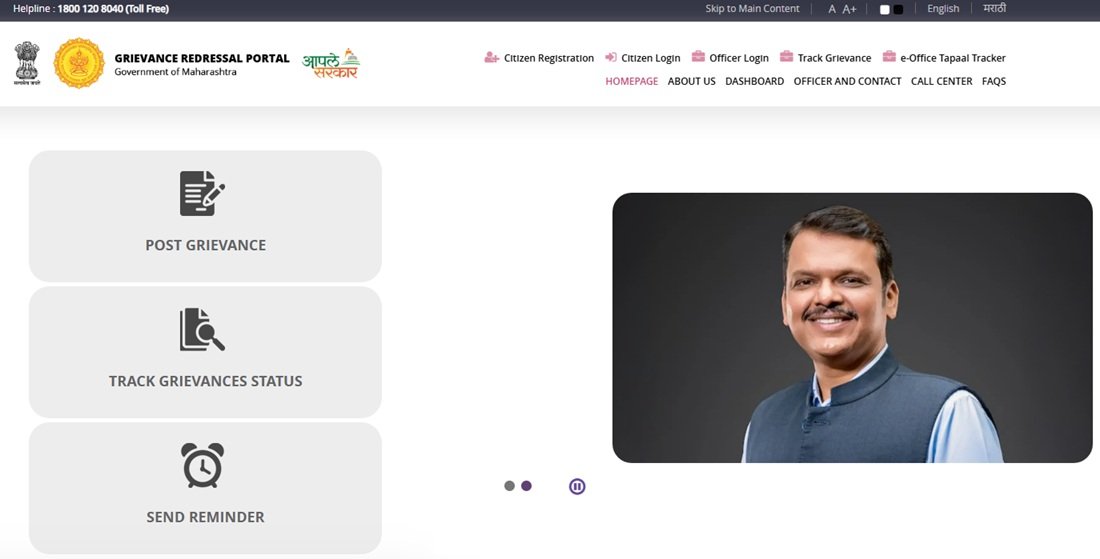
Step 2: Enter your mobile number and email ID in the fields provided. Both are mandatory. Click “Get OTP”.
Step 3: An OTP is sent to both your mobile number and email ID simultaneously. Enter the OTP in the verification field. If no OTP is received within 120 seconds, a “Resend OTP” button appears – click it to request a fresh OTP.
Step 4: After OTP verification, set a password for your account. Your email ID becomes your username. The name pre-populated in your profile is taken from the part of your email ID before the “@” symbol – you can modify this when filing a grievance.
Alternate Login: If you already have an account on MahaDBT, RTS Maharashtra, Mygov, or Mahalabarthi, you can use Single Sign-On (SSO) to log in to the grievance portal without creating a separate account. Click the SSO option on the login page and use your existing credentials.
Filing a Complaint Online
Step 1: Go to grievances.maharashtra.gov.in/en/citizens/login and log in with your registered email ID and password, or use SSO.
Step 2: On your dashboard, click “Post Grievance” or the equivalent button to start a new complaint.
Step 3: Select the filing level. Choose District Level for local government issues or Mantralaya Level for state-level policy matters as explained above.
Step 4: Select your District and Taluka from the dropdowns. These fields are critical as they route your complaint to the correct district administration.
Step 5: Select the department and then the Nature of Grievance from the dropdown. The Nature of Grievance is the subject area that your complaint relates to, compiled for each department. Selecting the correct nature routes your complaint to the correct officer within the department.
Step 6: Write the complaint description in the text box in Marathi or English. Be specific – mention what happened, when, which officer or office is responsible, and what resolution you expect.
Step 7: Click the “Choose File” button to upload supporting documents if you have them. Image and PDF formats are accepted.
Step 8: Enter the Captcha code shown on screen. If the captcha image is unclear, press the Refresh button next to it for a new one.
Step 9: Click Submit. A unique Token Number is generated immediately and an e-acknowledgement is auto-sent to your registered mobile number and email ID. Save this Token Number – it is the only identifier for all future tracking, reminders, and escalation.
Filing by Phone
Call 18001208040 (toll-free, 24×7). A call centre representative will assist you in filing the complaint or file it on your behalf. They register the complaint in the same Aaple Sarkar system and provide a Token Number during the call. Note this number for tracking. This is useful if you are not comfortable with the online portal or if you need assistance in Marathi.
Tracking Your Complaint
You receive three types of automated updates after filing:
- An e-acknowledgement immediately after submission, confirming receipt
- An “In Progress” update once the concerned department receives and opens your complaint
- A resolution notification once the department marks the complaint as resolved, asking for your feedback
To check the detailed status at any time:
Step 1: Log in at grievances.maharashtra.gov.in/en/citizens/login with your email ID and password.
Step 2: Go to the “Track Grievance Status” tab on your dashboard.
Step 3: All complaints filed from your account are listed with their current status. Click on any complaint to see the detailed action trail, including which officer it was sent to and what response was received.
You can also track without logging in at grievances.maharashtra.gov.in/mr/pg-portal-grievance/track-grievance-verification by entering your Token Number.
Sending a Reminder if 21 Days Pass Without Resolution
Aaple Sarkar’s 21 working-day deadline is backed by the Government Resolution dated 24 August 2016. If your complaint is not resolved within 21 working days, you can send a reminder:
Step 1: Log in to the portal and go to Track Grievance Status.
Step 2: Find the unresolved complaint and click the “Send Reminder” option.
Step 3: Submit the reminder. This is Reminder 1. If the complaint is still unresolved after 15 more days, you can send a second reminder (Reminder 2) following the same steps.
You can also call the concerned Nodal Officer directly after 21 days. The Nodal Officer contact details for each department are listed on the portal at grievances.maharashtra.gov.in/en under the More Details section next to the 21-day notice.
The 4-Level Escalation System
Maharashtra’s grievance system has a formal 4-level escalation structure backed by the Right to Public Services Act 2015:
Level 1 – Aaple Sarkar Portal: File your grievance. Department resolves within 21 working days.
Level 2 – First Appeal (Nodal Officer): If unresolved after 21 days or if you are dissatisfied, mark feedback as “Dissatisfied” and escalate to the Nodal Officer on the portal. The Nodal Officer is a senior official within the same department designated for grievance escalation.
Level 3 – Second Appeal (Senior Authority): If the Nodal Officer also fails to resolve satisfactorily, escalate further to the Second Appellate Authority, who is a higher officer in the department. This is done through the same portal.
Level 4 – Third Appeal (RTS Commission): If both appeals fail, file a Third Appeal before the Maharashtra State Commission for Right to Service at aaplesarkar.mahaonline.gov.in. The Commission has the power to penalise the erring officer up to Rs 5,000 per case and can issue binding orders. The Commission has six Divisional Offices at the six divisional headquarters across Maharashtra and its headquarters is at the New Administrative Building, Opposite Mantralaya, Mumbai.
Giving Feedback on Resolution
After the department marks your complaint as resolved, the portal asks for feedback. You have two options: Satisfied or Dissatisfied. You can also add written comments. The CMO team makes random verification calls to both satisfied and dissatisfied citizens to assess the quality of resolutions. If you select Dissatisfied, your complaint is immediately eligible for escalation to the Nodal Officer at Level 2. Do not mark Satisfied unless the issue is genuinely resolved, as dissatisfied feedback is the formal trigger for escalation within the system.
Complaint Marked as Resolved, but Your Problem Is Still Not Fixed?
Sometimes a department may mark a grievance as “Resolved” even though the issue has not been fully addressed on the ground. In such cases, do not select “Satisfied” while submitting your feedback on the portal.
Choose the “Dissatisfied” option and clearly explain what part of the problem remains unresolved. This allows your grievance to move to the next level of review within the grievance redressal system.
If the feedback option is no longer available or the grievance has already been closed, you may submit a fresh grievance describing the current situation. Mention the Token Number of the earlier complaint so that the concerned authority can refer to the previous case while examining your request.
Keep copies of all replies, photographs, documents, and previous grievance references. These records can be useful if the matter needs to be reviewed by higher authorities or during the appeal process.
If You Cannot Edit a Submitted Complaint
Once submitted, a grievance cannot be modified or edited on the Aaple Sarkar portal. If you have made an error – such as selecting the wrong district or uploading the wrong document – submit a fresh grievance with the correct details and mention the Token Number of the previous grievance in the description of the new complaint. The system links them for reference.
Quick Reference
- Grievance Portal: grievances.maharashtra.gov.in/en
- New Registration: grievances.maharashtra.gov.in/en/citizens/verify
- Login and File Grievance: grievances.maharashtra.gov.in/en/citizens/login
- Track Grievance (without login): grievances.maharashtra.gov.in track link
- Aaple Sarkar Main Portal: aaplesarkar.maharashtra.gov.in
- RTS Commission (Third Appeal): aaplesarkar.mahaonline.gov.in
- CM Helpline: 18001208040 (24×7, toll-free)
- CPGRAMS (Central Complaints): pgportal.gov.in
Frequently Asked Questions
Q. What is the Aaple Sarkar Grievance Redressal Portal?
Ans. Aaple Sarkar is the official public grievance portal of the Government of Maharashtra, initiated by the Chief Minister’s Office, Mantralaya, Mumbai. Citizens can file complaints against any state government department, track status using a Token Number, send reminders, escalate through multiple levels, and give feedback. The portal works in both Marathi and English and is accessible at grievances.maharashtra.gov.in/en.
Q. What is the difference between the District Level and the Mantralaya Level?
Ans. District Level is for complaints about village, taluka, or district offices – the offices you interact with for everyday services like ration cards, land records, and local police. Mantralaya Level is for policy-related grievances targeting state ministries or directorates in Mumbai. Choose the District Level for most day-to-day complaints and the Mantralaya Level only when the issue is a state policy or a department-level decision.
Q. What is a Token Number in Aaple Sarkar?
Ans. After you successfully submit a grievance, the portal generates a unique Token Number and sends it to your registered mobile and email. This is your only reference for tracking status, sending reminders, filing appeals, and giving feedback. Keep it safe. If you forget it, log in with the same email ID and find all your complaints under Track Grievance Status.
Q. Within how many days will my complaint be resolved?
Ans. Grievances are expected to be resolved within 21 working days as per the Government Resolution dated 24 August 2016. This deadline is backed by the Maharashtra Right to Public Services Act 2015. If not resolved within 21 days, you can send a reminder. After a further 15 days with no resolution, you can send a second reminder.
Q. What is the RTS Commission and when should I approach it?
Ans. The Maharashtra State Commission for Right to Service (RTS Commission) is a statutory body established under the Maharashtra Right to Public Services Act 2015. It handles Third Appeals when a citizen is not satisfied even after the First and Second Appeal levels within the department. The Commission can penalise the erring officer up to Rs 5,000 per case and issue binding orders. It has divisional offices at the six divisional headquarters of Maharashtra and its main office is at Opposite Mantralaya, Mumbai.
Q. Can I file a complaint without registering on the portal?
Ans. No. Registration with a valid mobile number and email ID is mandatory. However, if you prefer not to register, call the toll-free helpline 1800-120-8040 and the call centre representative will file the complaint on your behalf in the same system.
Q. I accidentally submitted the complaint with the wrong details. Can I edit it?
Ans. No. Once submitted, a grievance cannot be edited. Submit a fresh grievance with the correct details and mention the Token Number of the incorrect grievance in the description. The system links them for officer reference.
Q. I forgot to upload supporting documents. What now?
Ans. File a fresh grievance with all the correct information, including the supporting documents. In the description of the new complaint, mention the Token Number of the previous grievance without documents. This ensures the officer sees both filings together.
Q. Can I use my MahaDBT or RTS login for Aaple Sarkar?
Ans. Aaple Sarkar supports Single Sign-On (SSO) with MahaDBT, RTS Maharashtra, Mygov, and Mahalabarthi. If you have an account on any of these portals, click the SSO option on the grievance portal login page and use those credentials without creating a new account.
Q. My complaint was marked Resolved but the issue is still not fixed. What do I do?
Ans. Select “Dissatisfied” when providing feedback on the resolution. Add a description explaining what remains unresolved. Selecting Dissatisfied is the formal trigger for escalating to the Nodal Officer (Level 2). Do not select Satisfied if the issue is genuinely unresolved – the CMO team also makes random verification calls to both satisfied and dissatisfied citizens to audit resolution quality.
Q. How is Aaple Sarkar different from filing on CPGRAMS?
Ans. Aaple Sarkar handles complaints against Maharashtra state government departments and offices. CPGRAMS handles complaints against central government departments such as Railways, Banks, Income Tax, EPFO, and Passport Office. For ration card issues, land records, local police, and state pensions, use Aaple Sarkar. For central government issues, use CPGRAMS. If both state and central departments are involved, file separately on both portals.
Q. Is there a chatbot on the Aaple Sarkar portal?
Ans. Yes. The Aaple Sarkar grievance portal has a chatbot available on the portal page that can answer basic questions about filing a complaint and navigating the portal. Use it if you have a quick question before proceeding with registration or filing.

Tabassum is a government document researcher and writer with over 5 years of experience exclusively dedicated to tracking and simplifying Central and State Government document processes across India. She has researched and published detailed guides on 100+ government documents and certificates – including Aadhaar Card, PAN Card, Ration Card, Domicile Certificate, and Birth Certificate – covering all states and the Central Government, helping lakhs of Indian citizens successfully complete their paperwork in simple, easy-to-understand language.