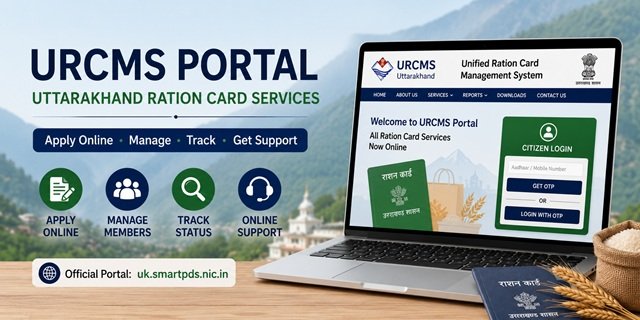
The Unified Ration Card Management System (URCMS) is the official online portal launched by the Government of Uttarakhand for all Ration Card services, accessible at uk.smartpds.nic.in. Developed and hosted by the National Informatics Centre (NIC) for the Department of Food, Civil Supplies and Consumer Affairs, Uttarakhand, URCMS replaces the earlier system where citizens had to physically visit the District Supply Office (urban) or Block Development Office (rural) for every ration card service. The portal was announced by the Dehradun District Supply Officer and brings Uttarakhand’s entire ration card management online for the first time.
Before URCMS, applying for a new Ration Card, adding a family member, removing a deceased member, or correcting a name required a physical visit with documents, a field inspection by a Supply Inspector, and multiple trips over several weeks. URCMS eliminates all of that. Citizens can now complete every service from home by uploading documents digitally and tracking applications online. Offline support at Tehsil Offices, DSO Offices, and BDO Offices is still available for those who need help with the online process.
What You Can Do on the URCMS Portal
Through uk.smartpds.nic.in, you can complete the following services entirely online from home regarding the Uttarakhand Ration Card:
- Apply for a new Ration Card
- Add a family member to an existing ration card
- Remove a family member from the ration card
- Correct details such as name, date of birth, or address
- Upload documents digitally for all services
- Track the status of any submitted application
- File a grievance online
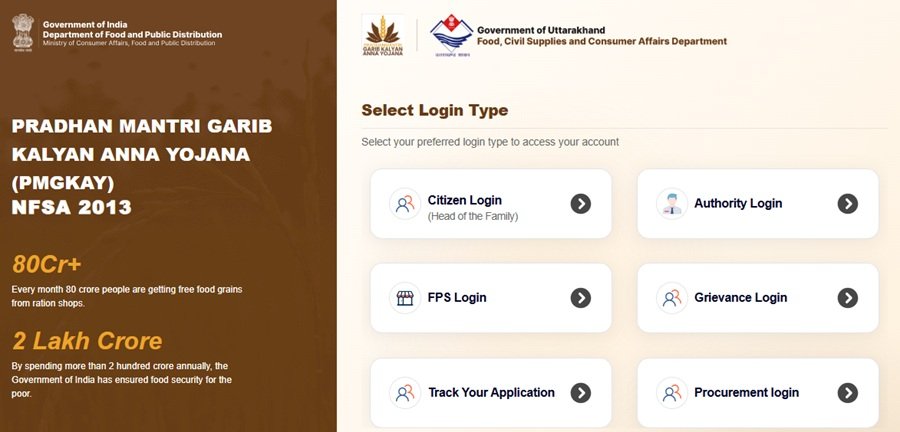
Two Login Methods: Depending on Your Situation
The URCMS portal has two separate login routes because new applicants and existing cardholders have different authentication needs:
If you are applying for a new ration card (no existing card): Click Citizen Login on the homepage of uk.smartpds.nic.in. Enter your 12-digit Aadhaar number. An OTP is sent to the mobile number registered with your Aadhaar at UIDAI. Enter the OTP to log in and access the new application dashboard.
If you already have a ration card and want to make changes, Click Citizen Login on the homepage. Enter the mobile number that is registered with your existing ration card (the mobile number of the Head of Family). An OTP is sent to this registered mobile number. Enter the OTP to log in and access your ration card dashboard.
How to Apply for a New Ration Card Online via URCMS
Step 1: To Apply new Uttarakhand Ration Card, open uk.smartpds.nic.in on your browser and click on Citizen Login on the homepage.
Step 2: Enter your 12-digit Aadhaar number in the login field. Click to receive OTP. The OTP arrives on the mobile number linked with your Aadhaar. Enter the OTP and log in.
Step 3: After logging in, your dashboard opens. Select New Ration Card Application from the available services.
Step 4: Fill in the applicant’s personal details: full name (exactly as in Aadhaar), current address, district, block, and Gram Panchayat or Ward.
Step 5: Add each family member you want included on the card. For every member, enter their Aadhaar number, full name, date of birth, and relationship with the head of the household.
Step 6: Upload scanned copies or clear photos of all required documents (see the Documents section below). All files must be uploaded digitally. No physical submission is required at this stage.
Step 7: Review all the entered details carefully. After confirming, submit the application.
Step 8: An Acknowledgement Number is generated on screen. Save or note this number. You will use it to track your application status on the RCMS portal at rcmspds.uk.gov.in and for any follow-up communication with the department.
After submission, a Supply Inspector may visit your address for field verification of residence and family details. After verification and approval, the ration card is issued and linked to the Fair Price Shop nearest to your address. The application fee is Rs 5.
How to Add a Family Member Online
Existing ration card holders can add a new member directly from home without any office visit:
Step 1: Go to uk.smartpds.nic.in and click Citizen Login. Enter the registered mobile number of the Head of Family and verify with OTP.
Step 2: Your existing ration card details appear on the dashboard. Click Add Member.
Step 3: Enter the new member’s Aadhaar number, full name as in Aadhaar, date of birth, and their relationship with the head of the household.
Step 4: Upload the required document based on the reason for addition: Birth Certificate for a newborn child; Marriage Certificate for a newly married spouse joining the household; relevant relationship proof for other additions.
Step 5: Submit and save the Acknowledgement Number generated.
How to Remove a Family Member Online
Removal of a member who has passed away, migrated, or moved out is now an online process:
Step 1: Log in at uk.smartpds.nic.in using the family head’s registered mobile number and OTP.
Step 2: On the dashboard, select Remove Member.
Step 3: From the list of members shown on your ration card, select the member to be removed.
Step 4: Select the reason for removal and upload the corresponding document: Death Certificate if the member has passed away; migration proof if the member has moved to another state; Marriage Certificate if the member has married and moved to a different household.
Step 5: Submit and note the Acknowledgement Number.
How to Correct Ration Card Details Online
Name spelling errors, address changes, date of birth corrections, and other detail corrections can all be done online:
Step 1: Log in at uk.smartpds.nic.in with the family head’s registered mobile number and OTP.
Step 2: Select Correction or Modification from the dashboard services menu.
Step 3: Choose the specific field you want to correct: name, date of birth, address, or other detail.
Step 4: Enter the corrected information and upload the supporting document for that correction. For a name correction, upload the Aadhaar card or any government ID showing the correct name. For an address change, upload the current electricity bill, water bill, or telephone bill.
Step 5: Submit and save the Acknowledgement Number.
How to Complete e-KYC for Existing Ration Card Holders
The Uttarakhand government has directed all existing NFSA ration card holders to complete e-KYC. Ration cards without completed e-KYC may face interruption in monthly grain distribution. Three ways to complete it:
At the Fair Price Shop: Visit your assigned FPS with Aadhaar cards of all family members. The FPS dealer operates an ePoS device. Each family member places their finger on the biometric sensor of the ePoS device for fingerprint authentication. Once biometrics are recorded for a member, their e-KYC is complete for that ration card entry.
Via IMPDS eKYC System: Go to epos.uk.gov.in/IMPDS_eKYC.jsp. Log in with your ration card credentials and complete Aadhaar-based biometric or OTP verification for each member.
Via the AePDS Portal: The Uttarakhand AePDS portal is accessible at epos.uk.gov.in. This portal also shows your FPS transaction history and authentication records so you can verify whether your e-KYC has been recorded.
How to Check Ration Card Application Status
After submitting any application through uk.smartpds.nic.in, track its status at rcmspds.uk.gov.in. The RCMS dashboard on this portal shows the processing stage of your application: pending at the department, pending additional documents from the applicant, approved, or rejected. The RCMS Service Dashboard also shows aggregate data on total applications received and approved across the state, with a notified timeline of 30 days for new ration card issuance.
To check your existing ration card beneficiary details on the national NFSA system, use nfsa.gov.in with your Aadhaar number or ration card number.
Offline Help: Still Available for Those Who Need It
URCMS was built to make everything doable from home, but not everyone is comfortable with online portals. For those who need assistance, the offline route remains available:
Tehsil Offices: Staff at Tehsil Offices will help you complete the URCMS application online. Carry your Aadhaar cards and required documents and they will assist with the digital submission.
District Supply Office (DSO): For urban area residents who need in-person help, visit the DSO. The DSO staff can guide you through the online application process.
Block Development Office (BDO): For rural area residents, visit the BDO. The BDO staff can assist with online application submission for village and gram panchayat residents.
The offline procedure documented on fcs.uk.gov.in describes the physical process step by step for those going directly to offices: form collection, document submission, clerk verification, SI home visit, master register entry, and card delivery. The fee is Rs 5 for both online and offline routes.
Documents Required for Each Service
| Service | Documents Required |
|---|---|
| New Ration Card | Aadhaar Cards of all family members; Electricity/ Water/ Telephone bill as address proof; Rent receipt (if living on rent); Passport-size photo of head of household |
| Add Newborn Child | Birth certificate of the child; Existing ration card number |
| Add Newly Married Spouse | Marriage certificate; Aadhaar Card of spouse |
| Remove Deceased Member | Death certificate of the member |
| Remove Migrated Member | Migration proof or transfer order |
| Name Correction | Aadhaar Card or government ID showing correct name; School certificate (if applicable) or Voter ID |
| Address Change | Current electricity bill, water bill, or telephone bill at the new address |
| Transfer from another GP/Town | Surrender Certificate from the previous FPS area; the previous ration card |
Official Step-by-Step PDF Guides Published on the URCMS Portal
The NIC has published six official citizen manuals directly on the URCMS portal at uk.smartpds.nic.in. Each PDF covers a specific service with detailed screenshots and instructions in the format used on the actual portal. Download whichever guide matches your need and follow the steps alongside the portal:
- Uttarakhand New Ration Card Application Guide through uk.smartpds.nic.in
- Add Member to existing Ration Card Guide
- Delete Member from Ration Card Guide
- Modification (correction) Guide
- Surrender of Ration Card Guide
- Transfer of Ration Card Guide
These are the only official citizen guides published for the URCMS portal. If any service step on the portal is unclear, download the corresponding PDF; it has screen-by-screen instructions exactly as the portal looks.
All Official Portals for Uttarakhand Ration Card Services
- URCMS Portal (Apply online, add/ remove/ correct): uk.smartpds.nic.in
- RCMS Status Check: rcmspds.uk.gov.in
- AePDS Portal (FPS transactions, e-KYC): epos.uk.gov.in
- IMPDS e-KYC: epos.uk.gov.in/IMPDS_eKYC.jsp
- Department of FCS&CA Uttarakhand: fcs.uk.gov.in
- New Ration Card Offline Procedure: fcs.uk.gov.in
- NFSA My RC Details: nfsa.gov.in
- NFSA Grievance: nfsa.gov.in grievance
Department Contact
Commissioner, Food and Civil Supplies: 0135-2780765 | comm-fcs-uk@nic.in. PDS Toll-Free: 1967. Additional helplines: 18001802000 and 18001804188 (listed on nfsa.gov.in/State/UK).
Frequently Asked Questions
Q. What is URCMS and why was it launched?
Ans. URCMS stands for Unified Ration Card Management System. It is the online portal launched by the Government of Uttarakhand at uk.smartpds.nic.in to digitise all Ration Card services. Before URCMS, every service required a physical visit to the DSO or BDO office, waiting for a Supply Inspector’s home visit, and collecting the card after multiple trips. URCMS lets citizens do everything from home by uploading documents digitally and tracking applications online. Announced by the Dehradun DSO, the portal is developed and hosted by the National Informatics Centre.
Q. What is the difference between the two login methods on URCMS?
Ans. New applicants who have no existing ration card log in using their Aadhaar number and an OTP sent to the Aadhaar-linked mobile number at UIDAI. Existing ration card holders who want to modify, add members, delete members, or correct details log in using the mobile number registered with their ration card (the Head of Family’s registered number) and an OTP sent to that number. Both logins lead to different dashboards suited to each need.
Q. Do I still need a Supply Inspector to visit my home after applying online?
Ans. Yes, for new ration card applications, a Supply Inspector may still visit your address for field verification after your online submission. This is to verify that the residence and family composition match the submitted details. However, you do not need to visit any office; the verification comes to you. For member additions, deletions, and corrections, field verification may or may not be required depending on the nature of the change.
Q. How do I track my URCMS application status?
Ans. After submitting any application on uk.smartpds.nic.in, you receive an Acknowledgement Number. Take this number to rcmspds.uk.gov.in (the RCMS portal) and check your application’s processing stage. The RCMS dashboard shows whether the application is pending with the department, waiting for document resubmission, approved, or rejected. The notified processing timeline is 30 days for a new ration card.
Q. What is the e-KYC requirement and how do I complete it?
Ans. The Uttarakhand government has directed all existing NFSA ration card holders to complete e-KYC, which is biometric authentication that links each family member on the ration card to their Aadhaar record. Ration cards without completed e-KYC may face disruption in monthly grain distribution. Complete it at your nearest FPS using the ePoS device’s biometric scanner, or online at epos.uk.gov.in/IMPDS_eKYC.jsp. All family members must authenticate individually.
Q. I am not comfortable with online processes. What should I do?
Ans. Go to your nearest Tehsil Office. Staff there will help you complete the URCMS online application on your behalf. Carry Aadhaar cards of all family members and the supporting documents for your service. For urban residents, the District Supply Office (DSO) provides the same help. For rural residents, visit the Block Development Office (BDO). The online and offline routes cost the same Rs 5 fee.
Q. What is the fee for URCMS services?
Ans. The fee for all ration card services in Uttarakhand, whether submitted online through uk.smartpds.nic.in or offline at the DSO or BDO, is Rs 5. This applies to new card applications, renewals, duplicate cards, modifications, and member additions or deletions. The application form is available free of cost on fcs.uk.gov.in.
Q. My Aadhaar mobile number has changed. Can I still log in as a new applicant?
Ans. The new applicant login on URCMS requires an OTP sent to the mobile number currently registered with your Aadhaar at UIDAI. If your Aadhaar mobile number has changed and you have not updated it, the OTP will go to the old number. First update your mobile number on Aadhaar by visiting a UIDAI Aadhaar Enrolment Centre (locatable at uidai.gov.in/bhuvan). Once updated, you can log in using the new Aadhaar-linked mobile number.
Q. What is rcmspds.uk.gov.in and how is it different from uk.smartpds.nic.in?
Ans. uk.smartpds.nic.in (URCMS) is where you submit applications and manage your ration card online. rcmspds.uk.gov.in is the RCMS (Ration Card Management System) status and reporting portal where you track the progress of submitted applications, check departmental processing timelines, and view aggregate data. Citizens use URCMS for actions and rcmspds.uk.gov.in for tracking those actions after submission.
Q. What is epos.uk.gov.in used for?
Ans. epos.uk.gov.in is Uttarakhand’s AePDS (Aadhaar-enabled Public Distribution System) portal. It records all ration distribution transactions at fair price shops across the state. When you collect grain at your FPS each month, the ePoS device transaction is recorded here. You can check your FPS transaction history, verify whether your monthly distribution was recorded, and complete IMPDS e-KYC for Aadhaar biometric seeding at epos.uk.gov.in/IMPDS_eKYC.jsp.
Q. How does the URCMS portal help with surrender and transfer when relocating?
Ans. If you are relocating from one Gram Panchayat or Town to another within Uttarakhand, or moving to another state, you must surrender your ration card first. Log in at uk.smartpds.nic.in using the family head’s registered mobile and OTP. Apply for a Surrender Certificate through the portal. Once generated, download it immediately, as the system issues it only once. Use this certificate when applying for a new ration card at your new address, along with the old ration card.
Q. What schemes does URCMS cover: NFSA and SFY both?
Ans. Yes. The URCMS portal manages ration cards under both the National Food Security Act 2013 (covering AAY and PHH categories: 1,84,104 AAY and 12,14,430 PHH cards in Uttarakhand from nfsa.gov.in data) and the State Food Yojana (SFY), which is Uttarakhand’s state-funded scheme for households above the NFSA threshold who still need subsidised grain access. Legacy APL and BPL card management also runs through the same system.

Tabassum is a government document researcher and writer with over 5 years of experience exclusively dedicated to tracking and simplifying Central and State Government document processes across India. She has researched and published detailed guides on 100+ government documents and certificates – including Aadhaar Card, PAN Card, Ration Card, Domicile Certificate, and Birth Certificate – covering all states and the Central Government, helping lakhs of Indian citizens successfully complete their paperwork in simple, easy-to-understand language.